
How to self-host GitLab
Self-hosting GitLab gives you control over where GitLab runs, how it is configured, and where your source code and development data are stored.
With Northflank, you can deploy a self-hosted GitLab instance using a one-click template without manually configuring the underlying application infrastructure.
There are two templates available:
- GitLab Community Edition: Deploy the open-source Community Edition.
- GitLab Enterprise Edition: Deploy GitLab Enterprise Edition for organizations that need its additional enterprise capabilities.
You can deploy GitLab on Northflank's managed cloud or use Northflank BYOC to deploy it into your own cloud environment. This guide uses Northflank Cloud for the deployment.
What is Northflank? Northflank is a cloud platform for deploying and managing applications, databases, GPUs, and infrastructure. Its one-click templates let you deploy preconfigured application stacks without building the infrastructure from scratch. You can also deploy workloads into your own cloud through BYOC. Get started with Northflank or book a demo.
GitLab gives teams a complete platform for source code management, CI/CD, project management, and DevSecOps. GitLab's managed platform is the simplest way to get started, but some teams need more control over where GitLab runs, how their data is stored, and how it connects to their existing infrastructure.
Self-hosting GitLab gives you that control, but it also means taking responsibility for the infrastructure behind it. This guide explains why you might self-host GitLab, what you need to run it, and how to deploy a GitLab Community Edition or Enterprise Edition instance using a one-click Northflank template.
GitLab's managed platform is the simplest way to get started with GitLab because GitLab manages the underlying infrastructure for you. Self-hosting becomes useful when your organization needs more control over the environment where GitLab runs.
The main reasons to self-host GitLab include:
- Data control: Keep your Git repositories, project data, and supporting services within infrastructure you control.
- Infrastructure control: Choose where GitLab runs, including the cloud provider, region, and infrastructure configuration.
- Network requirements: Run GitLab within a private network or alongside internal applications and services.
- Security and compliance: Apply your organization's infrastructure, identity, networking, and security controls to your GitLab deployment.
- Customization: Configure GitLab and its supporting infrastructure according to your organization's requirements.
- Cloud flexibility: Use existing cloud infrastructure or commitments rather than relying exclusively on a SaaS environment.
- Operational control: Decide how GitLab is deployed, updated, backed up, monitored, and managed.
The tradeoff is that self-hosting makes your team responsible for operating the GitLab environment. You need to think about storage, backups, updates, networking, security, monitoring, and availability.
For small teams that simply need Git hosting and CI/CD, GitLab's managed platform may be easier. For organizations with infrastructure, security, or data requirements that make a managed SaaS platform unsuitable, self-hosting can provide significantly more control.
For a Docker-based installation, you'll need the following:
- Docker: GitLab is distributed as a Docker image, so you need Docker Engine and Docker Compose if you're following the standard Docker Compose setup.
- A hostname: GitLab requires a hostname that resolves to the server where GitLab is running. The hostname is used to configure GitLab's
external_url. - Persistent storage: GitLab stores its configuration, logs, and application data in
/etc/gitlab,/var/log/gitlab, and/var/opt/gitlab. These directories should use persistent storage so data survives container restarts or replacements. - Sufficient compute and memory: GitLab is a relatively resource-intensive application, so the host needs enough CPU and memory for the GitLab services and the workloads you expect to run.
- Network access: The GitLab instance needs the appropriate ports exposed for web access and, if required, SSH access for Git operations.
- A GitLab edition: You can self-host either GitLab Community Edition or Enterprise Edition, depending on the features and licensing requirements of your organization.
Using the Northflank stack template? The GitLab Community Edition and Enterprise Edition templates handle the Docker deployment, persistent volumes, networking, health checks, and GitLab configuration for you. You only need to choose the edition and version, review the deployment settings, and deploy it to Northflank.
The easiest way to self-host GitLab on Northflank is to use one of the preconfigured GitLab stack templates. You can choose between Community Edition and Enterprise Edition and deploy either directly to Northflank Cloud or to your own cloud through BYOC.
Sign up for Northflank and create a team for your GitLab deployment.
GitLab requires a significant amount of compute and persistent storage to run reliably, so you may need to upgrade your Northflank plan depending on your deployment requirements.
Northflank provides one-click deployment templates for both GitLab Community Edition and GitLab Enterprise Edition:
- GitLab Community Edition: Deploy the open-source Community Edition.
- GitLab Enterprise Edition: Deploy Enterprise Edition with its additional enterprise features.
The deployment process is the same for both editions. Choose the edition you want to deploy and click Deploy {edition} now.
For this guide, we'll deploy GitLab Community Edition.
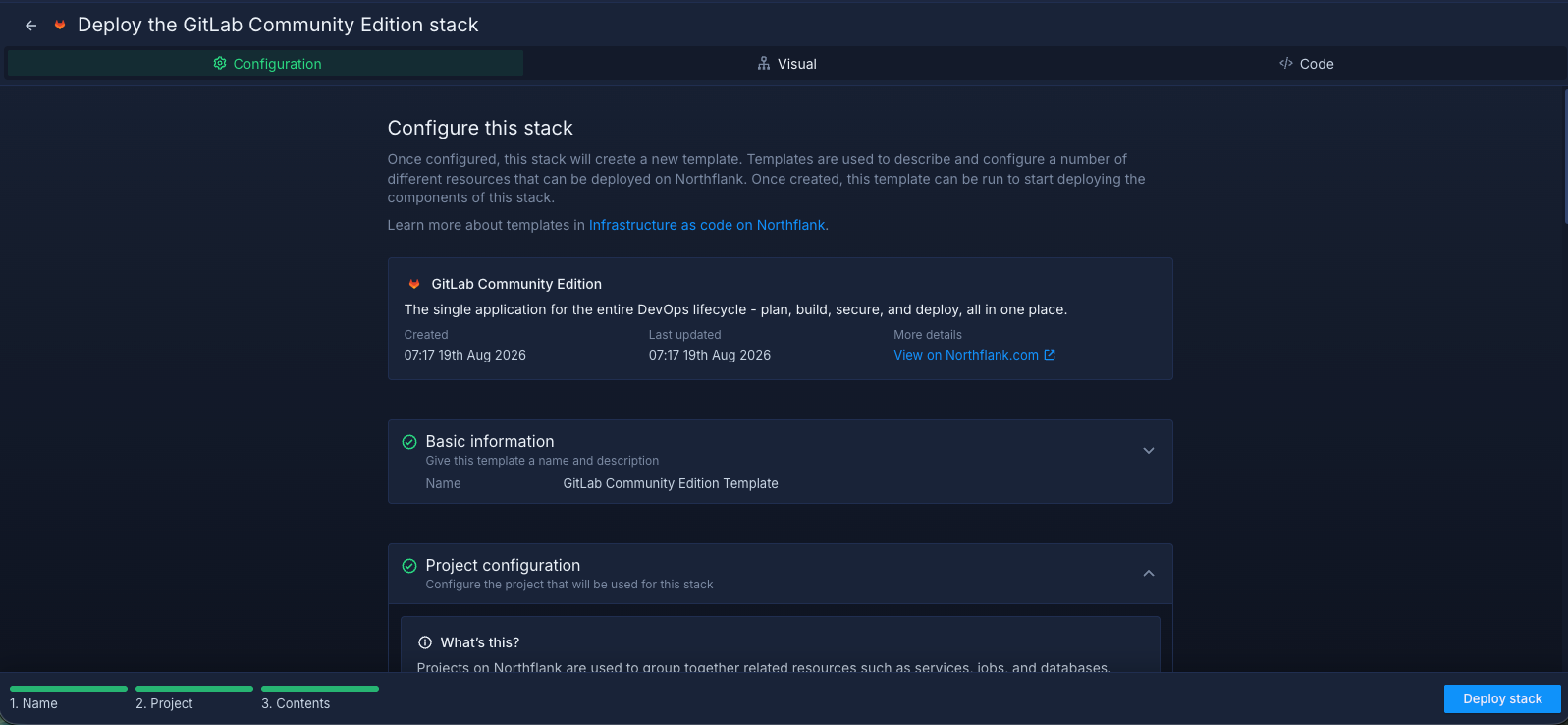
- The template uses GitLab version
19.0.8-ce.0by default. You can select a different version in the stack configuration before deploying. - Review the stack configuration and click
Deploy stack. - Northflank provisions the GitLab project, service, persistent volume, and required configuration.
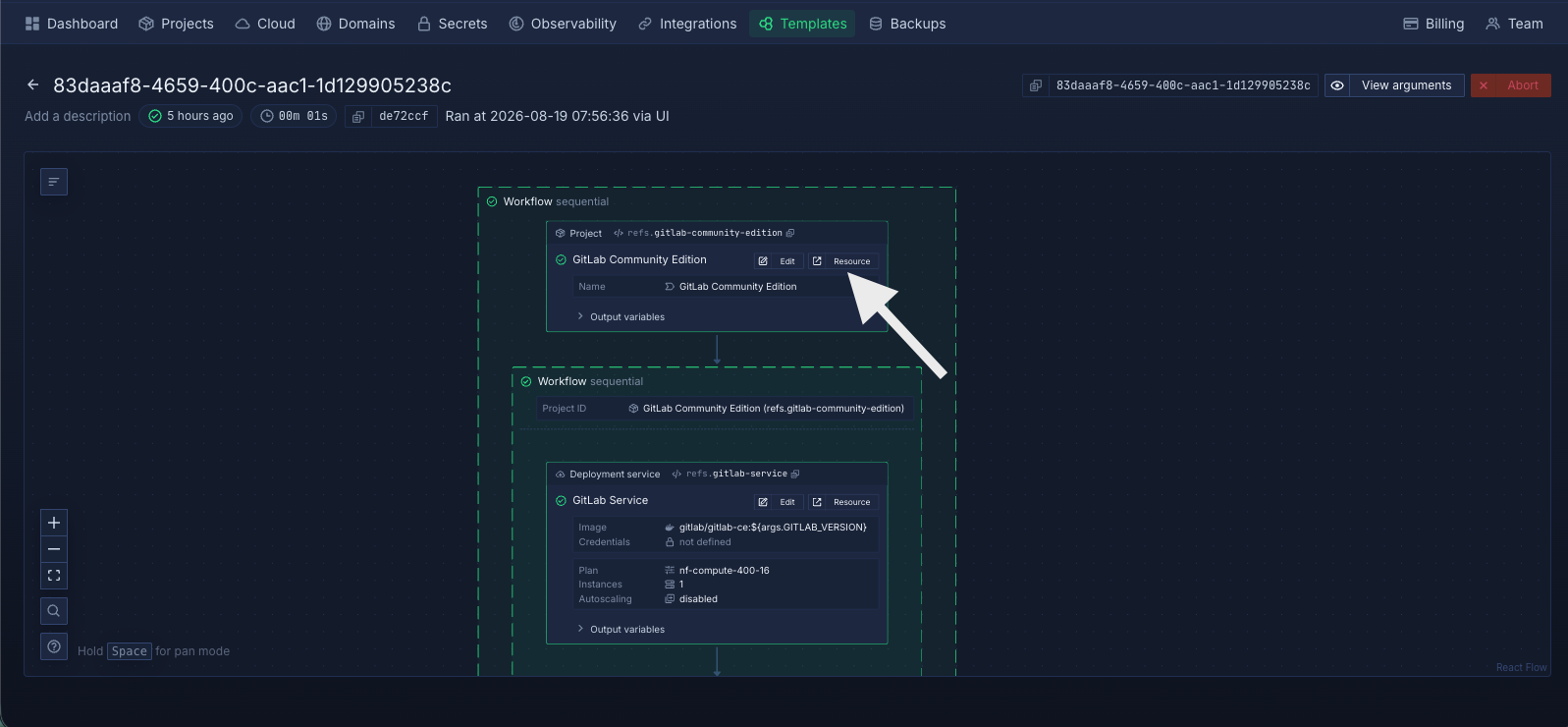
- Once the deployment is complete, click
Resource. - Open the GitLab Service.
- Open the generated public domain to access your GitLab instance.
GitLab can take several minutes to initialize on first startup. The service must complete its initialization and pass its readiness check before the GitLab UI becomes available.
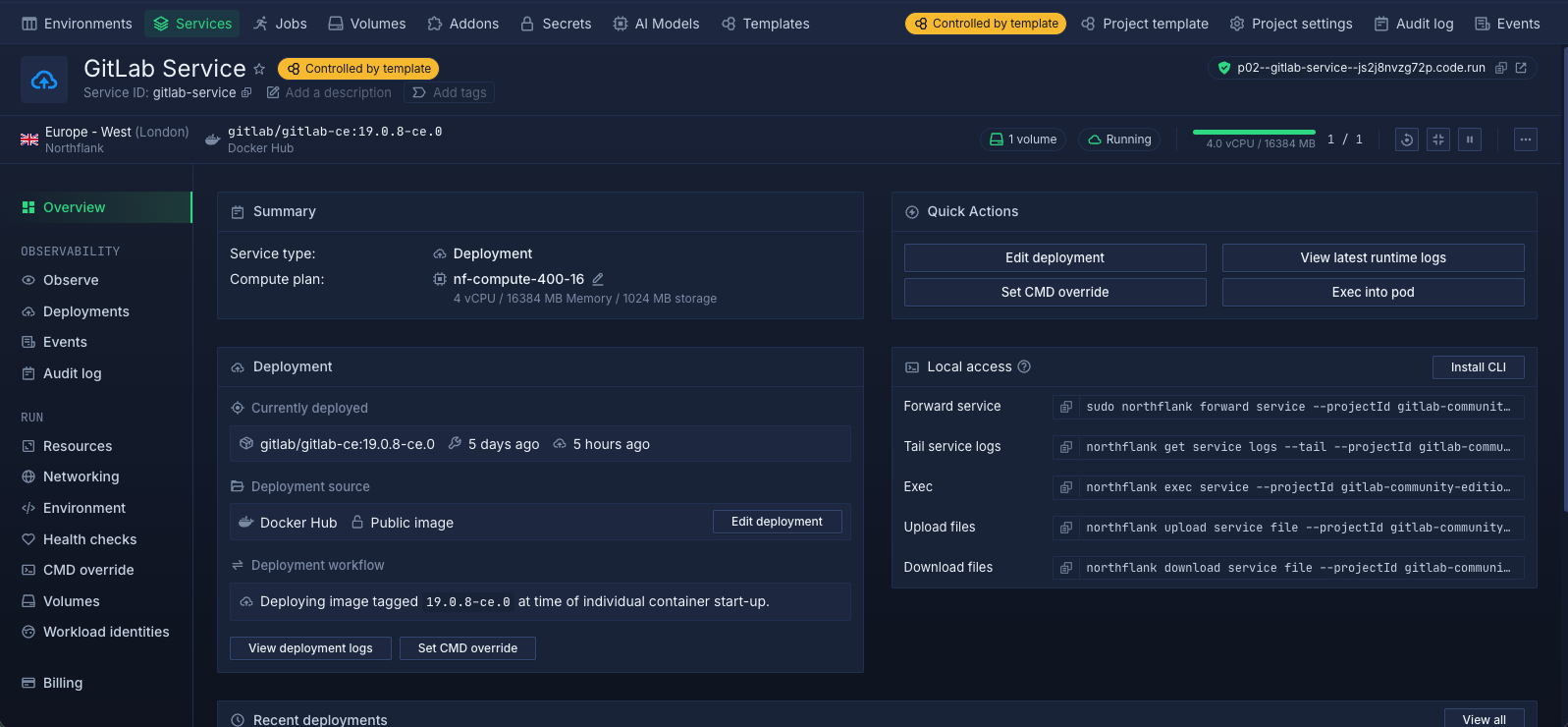
Note: The initial GitLab deployment can take around 10 minutes or longer before the GitLab UI is accessible. This is expected during the first startup.
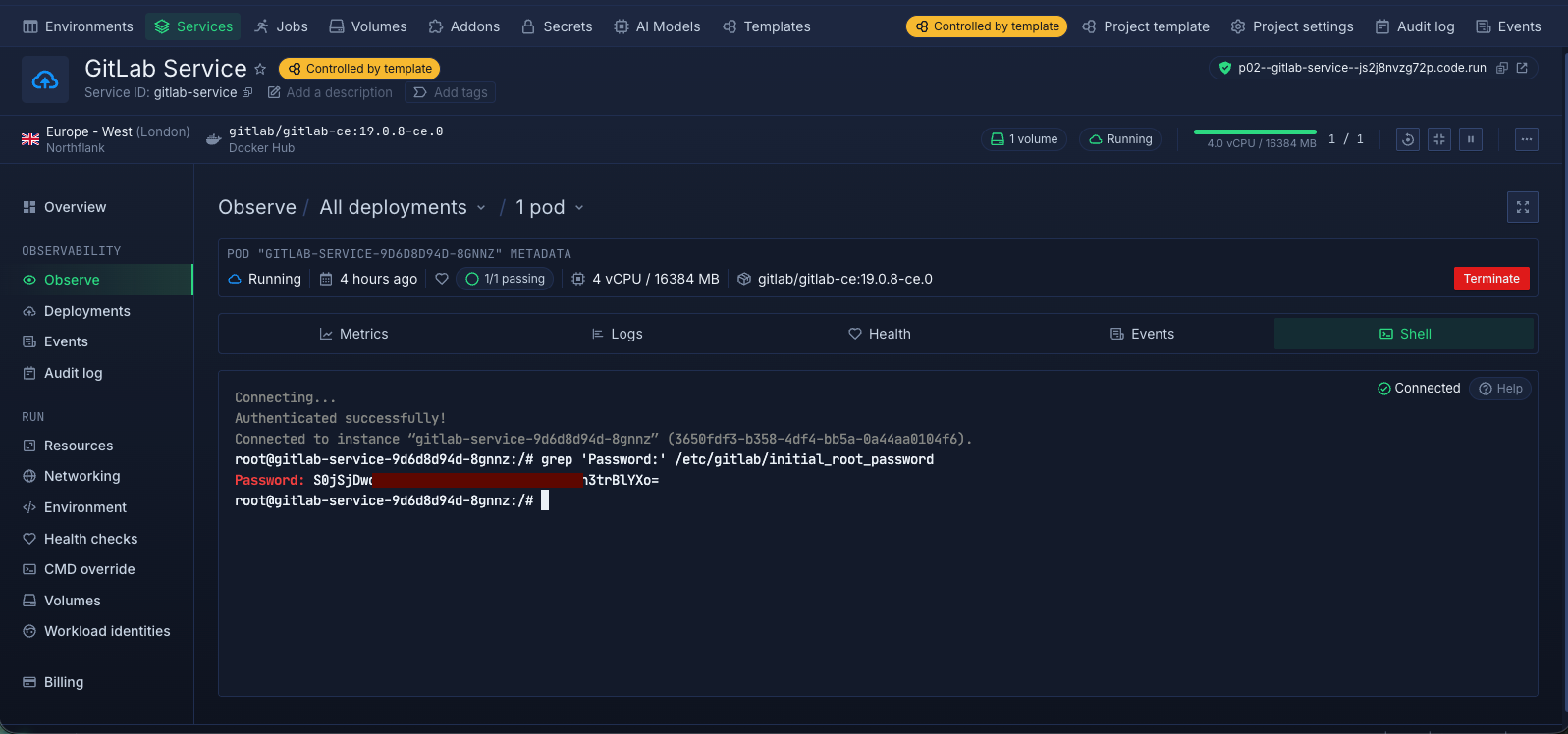
GitLab generates an initial password for the root administrator account when the instance is first initialized. You can retrieve it from the GitLab service shell.
- From the GitLab Service dashboard, open Observe under Observability.
- Select Shell.
- Run the following command:
grep 'Password:' /etc/gitlab/initial_root_password - Copy the generated password.
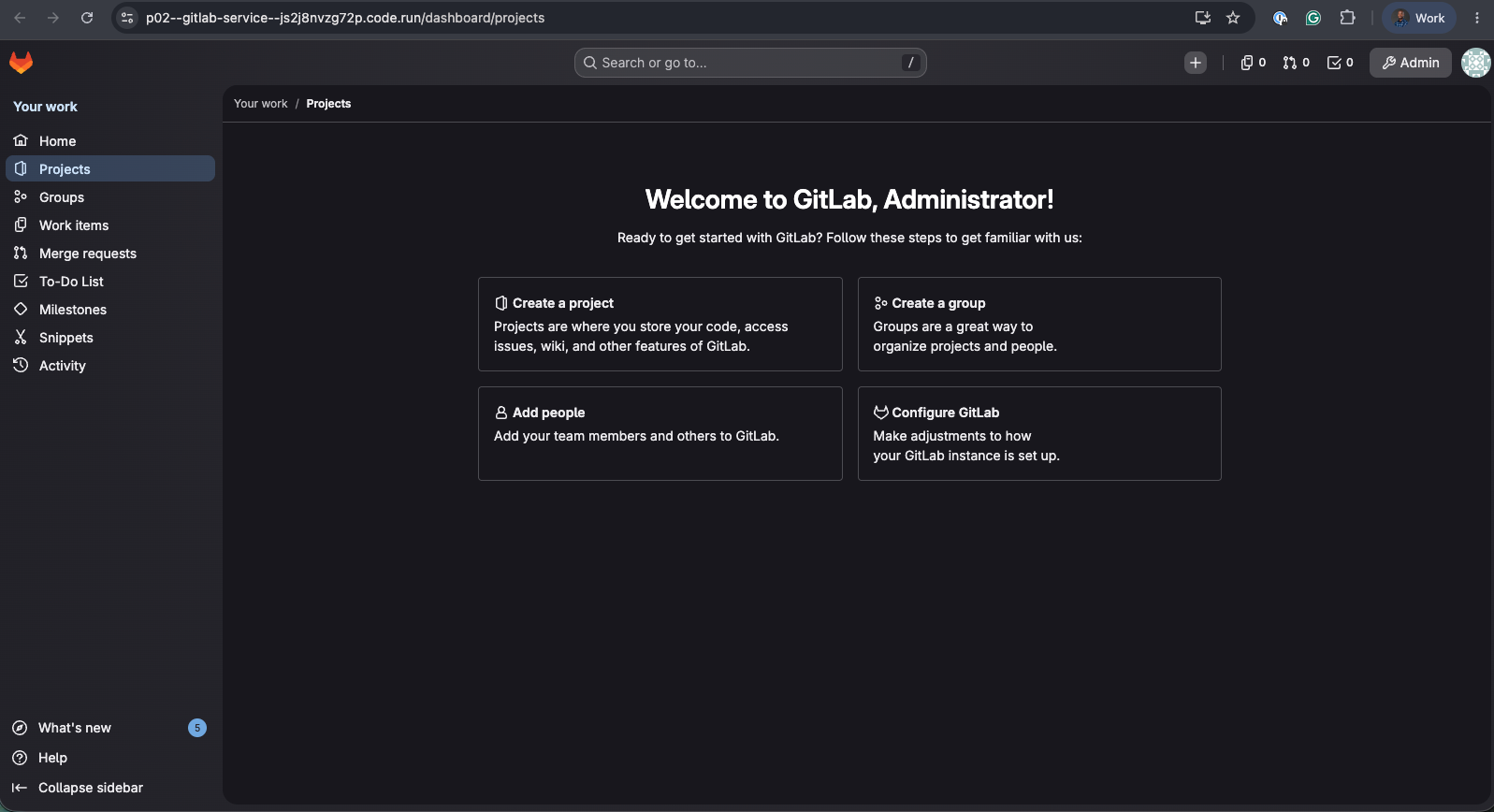
You can now open your GitLab instance and sign in with:
- Username:
root - Password: The password returned by the command above.
After signing in, change the initial password and configure your GitLab instance according to your organization's requirements.
Once GitLab is deployed, you can manage the instance and its underlying infrastructure directly from the Northflank dashboard. Key areas include:
- Service management: Start, restart, redeploy, and monitor the GitLab service from the Northflank dashboard.
- Resource management: Adjust the compute resources allocated to GitLab as your users, repositories, and workloads grow.
- Persistent storage: Manage the volume attached to GitLab and increase its capacity when you need additional storage.
- Environment configuration: Update GitLab configuration and environment variables through the service configuration and secret groups.
- Networking and domains: Manage the public domain and configure custom domains for your GitLab instance.
- Logs and observability: Use Northflank's observability tools to inspect GitLab logs, access the service shell, and troubleshoot issues.
- GitLab versions: Update the GitLab image version when you want to upgrade your deployment. Review GitLab's upgrade requirements before changing versions.
- Deployment configuration: Modify the deployment configuration as your requirements change, including compute, storage, networking, and other service settings.
- Cloud infrastructure: If you're using BYOC, manage the GitLab workload in your own cloud environment while continuing to manage the deployment through Northflank.
Managing GitLab with Northflank: You can manage the GitLab service and its underlying infrastructure from the Northflank dashboard. Adjust compute and storage, inspect logs, access the service shell, manage configuration, update the deployment, and configure domains without manually managing the underlying container orchestration.
The GitLab software and the infrastructure it runs on are separate considerations. Community Edition is available for self-managed deployments, but you still need to provide the compute, storage, networking, and other infrastructure required to operate the instance.
Yes. GitLab can be deployed in your AWS environment. With Northflank BYOC, you can deploy GitLab into your own cloud environment while continuing to manage the deployment through the Northflank platform.
Yes. You can use a deployment platform that manages the underlying orchestration layer for you. Northflank abstracts much of the underlying infrastructure management, so you can deploy and operate GitLab without manually managing Kubernetes.
It depends on the capabilities your organization needs. Community Edition provides the core GitLab platform, while Enterprise Edition is intended for organizations that need additional enterprise capabilities. Choose the edition that matches the features and licensing requirements of your team.
Yes. Northflank provides one-click GitLab templates that package the resources and configuration required for the deployment. You can choose between Community Edition and Enterprise Edition, review the configuration, and deploy the instance without manually creating each underlying resource.
Yes. Northflank BYOC allows you to deploy GitLab into your own cloud environment instead of Northflank Cloud. You retain control over the underlying cloud infrastructure while managing the GitLab deployment through Northflank.
Your backup strategy should cover the persistent data required to restore GitLab. For a production instance, define your backup frequency, retention, storage location, and recovery process, and test your backups regularly to make sure you can restore the instance when needed.
GitLab's managed platform is generally simpler if you want GitLab without managing the underlying infrastructure. Self-hosted GitLab gives you more control over infrastructure, networking, and data location, but also means taking responsibility for backups, updates, security, and maintenance. If you need that additional control without building the entire deployment infrastructure yourself, you can use a Northflank GitLab template to deploy GitLab on Northflank Cloud or in your own cloud through BYOC.
Self-hosting GitLab gives you greater control over where GitLab runs, how it connects to your infrastructure, and how your development data is managed. However, that control also comes with the responsibility of maintaining the instance, including backups, updates, security, and monitoring.
With Northflank, you can simplify the initial deployment using a one-click GitLab Community Edition or Enterprise Edition template. The templates provision the GitLab service, persistent storage, networking, and required configuration, while giving you the option to run GitLab on Northflank Cloud or in your own cloud through BYOC.
Ready to self-host GitLab?
Deploy GitLab on Northflank using the Community Edition or Enterprise Edition template, or book a demo to discuss your deployment requirements.



