Secure microVM sandboxes for untrusted code
Spawn millions of fast, secure sandboxes for agents, the code they generate, and dynamic environments.
- Codex
- Claude Code
- OpenCode
- Pi
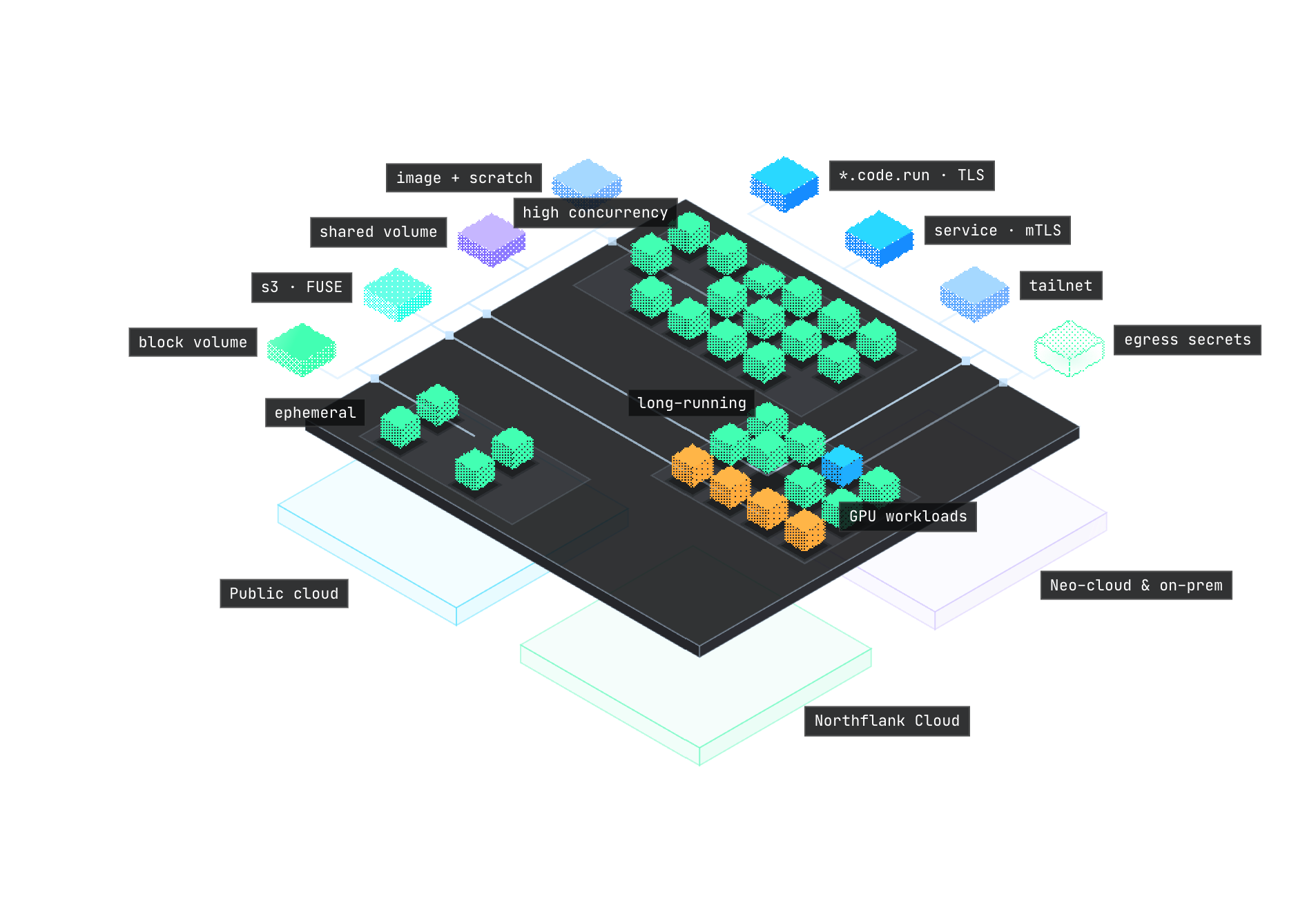
- MicroVM or gVisorCloud Hypervisor, or gVisor for GPUs
- Fast storagevirtio-blk, and volumes at 1–5 GB/s
- Secrets and networkingEgress secrets, mTLS, Tailscale
- Northflank Cloud or BYOCBilled by the second
Built for agent workloads
Agents, the code they generate, and dynamic environments, each in sandboxes created through one API.
API docs- Sandbox per tenant
- Secrets at egress
- Private endpoint
// Run each customer's agent in its own sandbox, isolated from the rest
const { data: agent } = await apiClient.create.service.deployment({
parameters: { projectId: 'support-agents' },
data: {
name: `agent-${customer.id}`,
billing: { deploymentPlan: 'nf-compute-200' },
deployment: { instances: 1, external: { imagePath: 'acme/support-agent:2.4' } },
runtimeEnvironment: { TENANT_ID: customer.id },
ports: [{ name: 'api', internalPort: 8080, public: false, protocol: 'HTTP' }],
},
});- $ node agent-runtime.js
- ▸ agent-acme running · 2 vCPU · 4 GB
- ▸ model API key injected at egress
- ✓ agent-acme:8080 ready · private
Sandboxes for every lifecycle
- Seconds
Ephemeral
Created per request or task, and deleted when it returns. Each one gets a fresh image and scratch disk.
- Code interpreters
- Browser sessions
- Tool calls
- Hours to weeks
Long-running
Stays up with its state on volumes and in S3, behind a public URL when it needs one.
- Agent runtimes
- Stateful agents
- AI app builders
- 100,000+ at once
Fan-out
Started in parallel from one image, often reading from a shared volume, and cleared when the batch is done.
- RL rollouts
- Evals
- Batch jobs
Sub-second cold starts
Create a sandbox per task, and pay per second while it runs.
- Ready in 0.8 seconds
- Scheduling, VM boot, and container start, with a cached image.
- Billed to the second
- This run is billed for 2.71 seconds.
- Deleted when done
- Delete with one API call, or attach a volume to keep state.
Isolation
- MicroVMs on Cloud Hypervisor
- A dedicated guest kernel per sandbox, with hardware virtualisation.
- gVisor for GPU workloads
- A user-space kernel that intercepts system calls. Used for GPU sandboxes.
- BYOC
- The same runtimes on BYOC clusters in your own cloud account.
Storage
A local disk for every sandbox, volumes shared between many, and S3 for state that outlives them.
- Images and ephemeral storage on virtio-blk
- Image and ephemeral disks with high throughput and low latency.
- Multi-read-write volumes
- Fast to attach, and attachable to many sandboxes concurrently.
- High-performance volumes
- Multi-read-write or block volumes at 1 to 5 GB/s, up to 64 TB.
- S3 via FUSE
- Mount S3-compatible buckets with FUSE, so state persists after a sandbox is gone.
Secrets and identity
Credentials as variables, files, egress injection, or short-lived tokens.
- Runtime and egress injection
- Inject as environment variables, or add to outbound requests at egress so the value never enters the sandbox.
- Secret files
- Mount secrets and config as files at any path.
- Workload identity
- Short-lived tokens for third-party services, instead of static keys.
Networking
Private by default, with controlled ingress and egress.
- Service mesh with mTLS
- Encrypted, mutually authenticated traffic between sandboxes and services.
- Tailscale
- Join sandboxes to your tailnet to reach private resources.
- Northflank load balancing
- Public endpoints with TLS, load-balanced across sandboxes by Northflank.
- Network policies
- Control ingress and egress by FQDN, IP range, and more.
- Cold start
- < 1s
- vCPU in one sandbox
- 288
- Memory in one sandbox
- 2 TB
- Volume storage
- 64 TB
- Sandboxes at once
- 50,000+
Platform features
Sandboxes run on the same platform as your services, jobs, and databases.
All featuresGPUs
L4 to B200 on Northflank Cloud, or your own GPU nodes. Isolated with gVisor.
Docker inside
Build images and run containers inside a sandbox.
Any image
Start from any OCI image, or build from a Dockerfile.
Ephemeral or persistent
Ephemeral by default. Attach a volume to keep state.
No time limits
Sandboxes run until you delete them, billed per second.
Databases alongside
Managed Postgres, MySQL, MongoDB, and Redis in the same project.
Pause and resume
Pause idle sandboxes to stop compute billing, and resume them when needed.
Scoped access
Scoped API tokens and RBAC for agents and users.
Logs, metrics, and cost
Per-sandbox logs, metrics, and cost.
Billed by the second
| Resource |  Northflank CloudContainers, by the second | Northflank BYOC (Your VPC)Managed node vCPU only, by the second |
|---|---|---|
| Compute | ||
| CPU | $0.01667/ vCPU / hour | $0.02083/ node vCPU / hourVolume discounts available under a CSA |
| Memory | $0.00833/ GB / hour | Not billed |
| Ephemeral storageNot persisted | Free | Not billed |
Compared with other sandboxes
| Resource | Northflank Cloud | Daytona | Difference |
|---|---|---|---|
| CPU | $12.00/ vCPU / month | $36.29/ vCPU / month | 67% less |
| Memory | $6.00/ GB / month | $11.66/ GB / month | 49% less |
| Ephemeral storageDaytona: first 5 GiB free | Free | $0.07776/ GB / month | No fee |
| Sandbox run1 vCPU · 2 GB · 10 minutes | $0.00556/ run | $0.0138/ run | 60% less |
Daytona list prices from daytona.io/pricing, checked October 2026.
Ready for enterprise
Enterprise
Run agents, AI-built software, and core systems inside your own infrastructure, with the compliance, governance, and guarantees your organisation needs.



- Bring your own cloudFully managed clusters in your own VPC, on AWS, Google Cloud, Azure, Oracle, or bare metal.
- Forward-deployed control planeRun the control plane in your own infrastructure, air-gapped if you need it. No platform data leaves your network.
- GovernanceSSO and SAML, SCIM and JIT provisioning, RBAC, and audit logs for every team and agent.
- Security and isolationMicroVM sandboxing, WAF and DDoS protection, and workload identities.
- 99.99% SLA and supportAn uptime SLA, and a dedicated Slack channel straight to our engineers.
- Volume discountsUsage discounts on Northflank Cloud and BYOC as your spend grows.
Questions
Contact usHow are sandboxes isolated?
Each sandbox runs in its own microVM on Cloud Hypervisor, with a guest kernel of its own. GPU sandboxes run under gVisor, which intercepts system calls in user space. Neither shares a kernel with other workloads or tenants.
How fast is sandbox storage?
Images and ephemeral storage use virtio-blk, for the highest read and write performance at the lowest latency. Multi-read-write and block volumes run at 1 to 5 GB/s, up to 64 TB.
Can several sandboxes share a volume?
Yes. Multi-read-write volumes attach quickly, and one volume can be attached to many sandboxes at the same time.
Can I mount S3 buckets in a sandbox?
Yes. Mount S3-compatible buckets with FUSE and access them as a regular file system, so data persists after the sandbox is deleted.
Can sandboxes run Docker?
Yes. Docker runs inside the sandbox, so builds and containers stay within its isolation boundary.
How do secrets reach a sandbox?
As environment variables or files at runtime, or added to outbound requests at egress so the value never enters the sandbox. Workload identity issues short-lived tokens for third-party services.
What networking do sandboxes support?
A service mesh with mutual TLS between sandboxes and services, Tailscale for private networks, and Northflank load balancing for public endpoints. Network policies control ingress and egress by FQDN, IP range, and more.
How large can a sandbox be?
Up to 288 vCPU, 2 TB of memory, and 64 TB of volume storage, with GPUs from L4 to B200.
Is there a time limit?
No. A sandbox can run for seconds or for weeks, and you pay for the time it actually runs.
How are sandboxes billed?
By the second, for the CPU and memory each sandbox uses on Northflank Cloud. See the pricing page for every rate.
Run your first sandbox
Start free on Northflank Cloud or in your own cloud account. Same platform and workflow either way.
npm i -g @northflank/clinorthflank login