
Top 12 AWS cost optimization tools and strategies in 2026
AWS cost optimization helps you reduce your cloud bill by removing waste and right-sizing resources. In this guide, you'll learn 12 proven strategies to optimize your AWS costs significantly without sacrificing performance.
- Right-size EC2 instances based on actual usage patterns to avoid over-provisioning
- Use spot instances for fault-tolerant workloads with automated failover to avoid downtime
- Implement S3 Intelligent-Tiering and lifecycle policies for automatic storage optimization
- Deploy auto-scaling to match resources with real demand instead of peak capacity
- Consider platform solutions like Northflank that handle cost optimization while letting you keep your AWS account and existing credits
A recommended solution for AWS cost optimization: Instead of choosing between AWS complexity and expensive Platform-as-a-Service solutions, Northflank's Bring Your Own Cloud approach lets you deploy into your own AWS account. You keep your enterprise agreements and reserved instance discounts while Northflank handles spot instance orchestration, auto-scaling, and right-sizing automatically. Teams typically see significant cost reductions within the first month without sacrificing control.
AWS cost optimization is the process of reducing your cloud spending while maintaining performance and reliability. It involves identifying and removing wasted resources, right-sizing infrastructure to match actual usage, and choosing cost-effective pricing models for your workloads.
The practice includes finding idle EC2 instances, over-provisioned databases, forgotten snapshots, and opportunities to use discounted pricing like Reserved Instances or spot instances. Effective optimization happens continuously through automation rather than periodic manual reviews.
The goal is ensuring every dollar spent on AWS infrastructure supports your business objectives, freeing up budget for innovation instead of wasted capacity.
AWS defines four key pillars in its Well-Architected Framework for cost optimization:
- Right-sizing: Match your resource capacity to actual workload requirements instead of over-provisioning for peak capacity.
- Increasing elasticity: Scale resources up during demand spikes and down during quiet periods instead of running maximum capacity continuously.
- Choosing optimal pricing models: Use Reserved Instances, Savings Plans, or spot instances based on your workload patterns instead of defaulting to on-demand pricing.
- Optimizing over time: Continuously monitor usage patterns and adjust resources as your needs evolve instead of treating optimization as a one-time project.
These pillars form the foundation of the strategies covered in this guide.
AWS's pay-as-you-go model gives you flexibility, but it also makes overspending easy. Without active cost management, expenses spiral quickly.
The typical cost waste patterns:
Most organizations waste significant cloud budget on idle EC2 instances running 24/7, over-provisioned databases using a fraction of their capacity, forgotten EBS snapshots accumulating monthly charges, and hidden data transfer fees that aren't as visible as compute costs.
Effective cost optimization frees up budget, improves team productivity, and ensures every dollar spent on AWS directly supports your business objectives.
Uncontrolled AWS costs force difficult budget conversations with finance. Wasted spend reduces your budget for innovation and hiring. Your team spends valuable time manually managing infrastructure instead of building features that drive business value.
This is where platform automation helps. Instead of manually implementing every optimization, platforms like Northflank automate these decisions while you maintain full control of your AWS account.
AWS provides several free native tools to help you monitor and reduce your cloud spending:
- AWS Cost Explorer: shows your spending patterns over the past 13 months and forecasts future costs. Use it to create custom views and identify areas where you're overspending.
- AWS Budgets: lets you set spending limits and receive alerts when costs approach or exceed your thresholds. Configure budgets for specific services, teams, or projects.
- AWS Cost Optimization Hub: consolidates recommendations from Compute Optimizer, Trusted Advisor, and other services into one dashboard.
- AWS Compute Optimizer: analyzes your resource usage and recommends right-sizing opportunities for EC2 instances, Auto Scaling Groups, and EBS volumes.
While these tools provide valuable insights, they only identify problems. The strategies below show you how to actually implement fixes and automate ongoing optimization.
These 12 strategies cover the most impactful ways to reduce your AWS costs, from quick wins you can implement today to automated solutions that deliver ongoing savings.
Your EC2 instances likely represent the largest portion of your AWS bill. Right-sizing means matching your instance types and sizes to actual workload requirements, not peak capacity fears.
Use AWS Compute Optimizer to get recommendations based on your CloudWatch metrics. Look for instances with consistently low CPU utilization or memory usage well below what you've provisioned. Consider switching to AWS Graviton processors for better price-performance.
Spot instances let you use spare EC2 capacity at steep discounts compared to on-demand pricing. AWS can reclaim them with short notice when capacity is needed elsewhere.
Manual spot management is complex because you need interruption handling, fallback logic, and continuous monitoring. Most teams abandon spot instances after their first production incident.
Automated platforms like Northflank handle spot orchestration with instant failover to on-demand instances, giving you the savings without the operational risk.
Your S3 storage costs compound quickly when you're storing terabytes of data. S3 Intelligent-Tiering automatically moves objects between access tiers based on usage patterns.
Frequently accessed data stays in the frequent access tier, while objects untouched for 30 days move to infrequent access and objects untouched for 90 days move to archive tiers. Set lifecycle rules to delete incomplete multipart uploads after seven days for immediate savings.
Without auto-scaling, you're paying for peak capacity all the time even when traffic is low. Configure your Auto Scaling Groups to add instances during peaks and remove them during lulls.
Use meaningful metrics like request count or response time, not just CPU utilization. Avoid scaling too aggressively, which creates constant instance churn and actually increases costs through repeated launches and terminations.
Platforms like Northflank use intelligent algorithms that learn your traffic patterns and scale appropriately without manual tuning.
If you run workloads continuously, Reserved Instances or Savings Plans can significantly reduce your costs compared to on-demand pricing.
Reserved Instances lock you into specific instance types for one or three years and work best for databases and core services. Savings Plans give you more flexibility across instance types and regions with the same commitment model.
Forgotten resources cost you money while delivering zero value. Use AWS Cost Explorer to find unattached EBS volumes, old snapshots, idle instances, and unused Elastic IPs.
Schedule automatic shutdown for your development instances during nights and weekends. They don't need to run continuously when nobody's using them.
Data transfer fees often surprise you because they're less visible than compute charges. Egress fees vary by destination and region.
Keep resources in the same availability zone when possible, use CloudFront for caching, and leverage VPC endpoints to avoid NAT gateway fees. Cross-AZ transfers also add up at scale.
Without proper tagging, you can't identify which teams or projects drive your costs. Tag all resources with environment, team owner, project name, and cost center.
Use AWS Cost Explorer with cost allocation tags to analyze spending by dimension and make informed optimization decisions.
Cost Optimization Hub consolidates suggestions from Compute Optimizer, Trusted Advisor, and other services into one dashboard. It identifies right-sizing opportunities, idle resources, and Reserved Instance recommendations.
These tools show you problems but don't fix them automatically. Implementation still requires manual work.
Your RDS instances often run over-provisioned. Check your CloudWatch metrics for CPU and memory utilization patterns.
If usage stays consistently low, downsize to a smaller instance class. Use General Purpose SSD instead of Provisioned IOPS unless you truly need guaranteed IOPS. Stop development databases during off-hours instead of running them continuously.
Snapshots and backups accumulate over time and increase your storage costs. Set appropriate retention periods based on your compliance requirements.
Delete old manual snapshots you no longer need. These costs add up across hundreds of snapshots over months and years.
Manual implementation of these strategies requires significant time. Your team likely spends a substantial portion of infrastructure time on cloud management instead of building features.
Platform solutions automate the optimizations you know you should do but don't have time for. The key is finding one that works in your AWS account so you keep your existing discounts and credits. Check out the best cloud hosting platforms to find one that works in your AWS account so you keep your existing discounts and credits.
For instance, Northflank's Bring Your Own Cloud approach deploys into your AWS account, letting you maintain your existing discounts while adding automated optimization.
You've learned 12 strategies for reducing AWS costs. The challenge isn't knowing what to do, it's doing it consistently while your team focuses on building products.
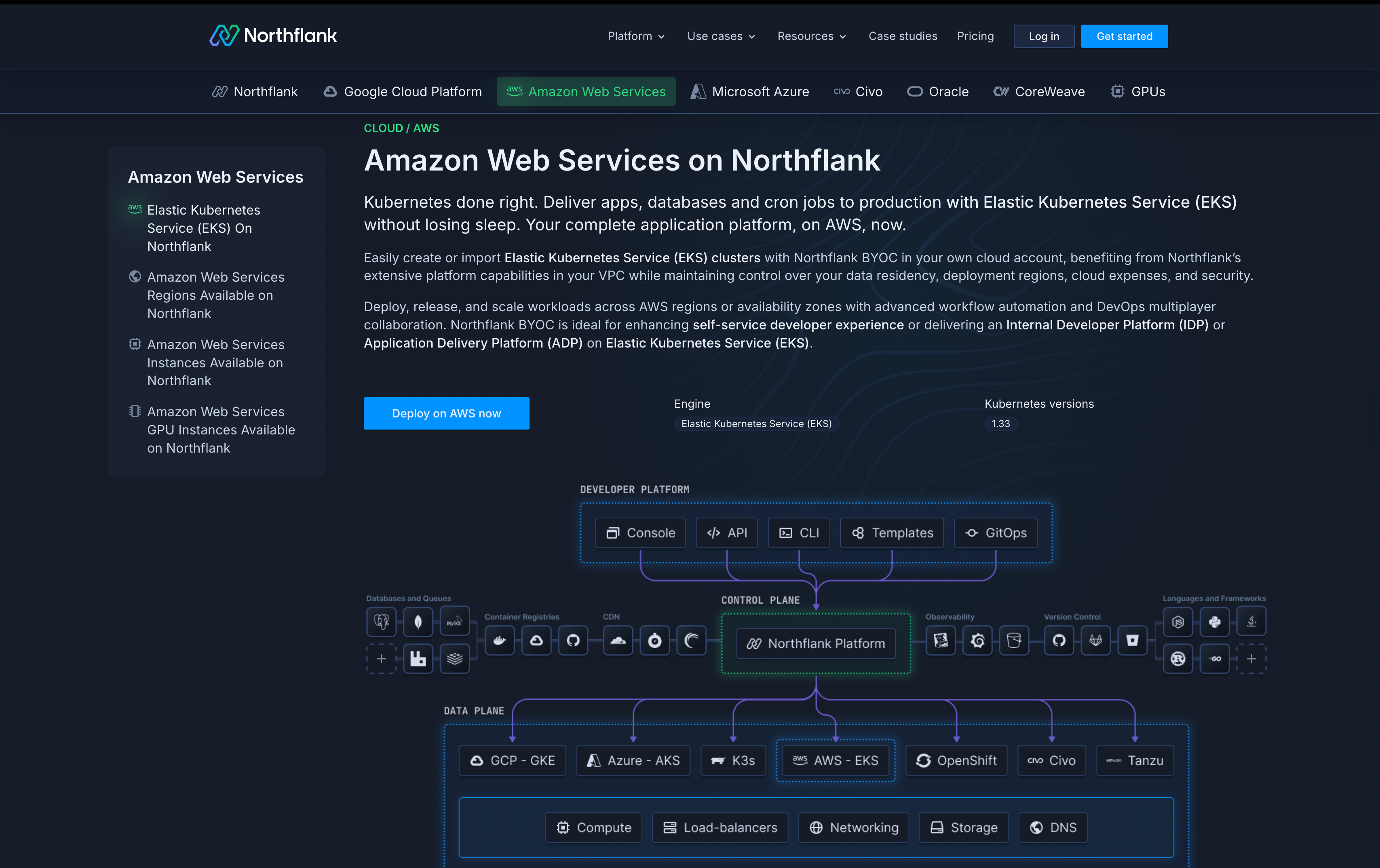
Northflank deploys into your own AWS account. You're not migrating infrastructure or changing cloud providers. You're adding an intelligent automation layer that handles optimization while you maintain complete control.
What you keep:
- Your AWS account and relationship with AWS
- Enterprise Agreement discounts and volume pricing
- Reserved Instances and Savings Plans you've purchased
- AWS startup credits or committed spend (learn how to get free AWS credits for your startup)
- Your VPC, security posture, and compliance certifications
- Full visibility into all resources and costs
- Spot instance orchestration with zero-downtime failover: Northflank manages spot instances across multiple availability zones and instance types. When AWS sends an interruption notice, it instantly fails over to on-demand instances. Your applications stay running while you capture spot savings. Learn more about how AWS spot instances work to lower your cloud costs and avoid downtime.
- Continuous right-sizing: Instead of quarterly reviews, Northflank monitors your actual resource usage in real-time and adjusts allocations automatically.
- Intelligent auto-scaling: The platform learns your traffic patterns and scales resources to match real demand, not guesses.
- Automated resource cleanup: Northflank identifies and removes unused resources like old snapshots and unattached volumes.
- Multi-cloud optionality: Start with AWS and expand to GCP or Azure later. Learn more about cloud cost optimization across multiple providers to avoid vendor lock-in.
Real cost comparison:
Running similar workloads, Northflank's BYOC approach typically costs significantly less than traditional setups because of intelligent spot usage, continuous right-sizing, and efficient allocation. You get transparent, per-second billing with no hidden fees.
Who benefits most:
You'll see the biggest impact if you're spending significant amounts monthly on AWS, have a small DevOps team, run variable workloads with fluctuating traffic, or are considering multi-cloud to avoid vendor lock-in.
Calculate your potential savings at northflank.com/pricing or explore how Northflank works with AWS at northflank.com/cloud/aws.