
How to give AI coding agents secure access to private repositories, databases, and services
- AI coding agents need access to private repositories, databases, APIs, and other services to complete real development tasks. Secure access means giving agents only the credentials and network access they need, rather than unrestricted access to your infrastructure.
- Use scoped credentials, runtime secrets injection, private networking, and isolated execution environments to control what an agent can access and limit the impact of a compromised or misbehaving agent.
- Northflank Cloud Harnesses provide the infrastructure for securely running coding agents in isolated cloud environments, with support for private repositories, secrets injection, configurable networking, microVM isolation, persistent storage, and managed cloud or self-serve bring your own cloud (BYOC) deployments. Teams can collaborate across Harnesses and see what other members are working on in real time.
Give your coding agents secure access to private repositories, databases, and services with Northflank Cloud Harnesses or book a demo to discuss your setup.
AI coding agents need real access to do real work. An agent fixing a bug in a private repository has to clone it, an agent writing a migration has to connect to a database, and an agent calling an internal API has to authenticate against it. The way most developers handle credentials locally does not always translate safely to agent workloads: a .env file in an agent's working directory is accessible to the agent and can potentially be read, modified, or committed.
This article covers how to give coding agents scoped access to private repositories, databases, and services, how secrets injection works in a coding harness, and which mistakes to avoid when configuring access for agent workloads.
A developer authenticates interactively. They log in once, their session is tied to their identity, and they can intervene if something goes wrong. A coding agent authenticates at execution time and can then run unattended, executing commands and using credentials without a human watching every action.
Agents also execute code generated by a model, so their use of credentials is not always predictable. An agent with read-write access to a database could execute a DELETE statement when the task only required a SELECT, while an agent with broad repository access could modify repositories unrelated to the task. This is why coding agents need scoped credentials and controlled access to the resources they actually need.
Personal access tokens are the default way developers authenticate against hosted Git services. They are convenient for interactive use but poorly suited to agent workloads because they can carry broad permissions and are tied to a user account. An agent running with a personal access token can inherit the same repository access as the developer who created it.
Deploy keys and short-lived tokens can scope access to a specific repository. A deploy key is a key pair where the public key is registered on the repository, granting access only to that repository. Short-lived tokens generated by apps or CI integrations expire after a fixed window, limiting how long an exposed credential remains usable. Both approaches can limit the impact if a credential is exposed or misused.
Northflank Cloud Harnesses connect to private repositories through linked Git integrations. When you create a Harness, you can select a repository and branch, and Northflank clones the repository into the Harness workspace. GitHub, GitLab, Bitbucket, Azure DevOps, Cursor Origin, and self-hosted Git providers are supported.
Org-wide tokens are a meaningful risk in agent workloads. A token that can read and write all repositories in an organisation gives an agent access to repositories unrelated to its task and increases the potential impact if the credential is misused. Restricting repository access to what the agent actually needs reduces that blast radius.
Database access for coding agents should follow the same principle as repository access: give the agent only the permissions required for the task. An agent reviewing query performance does not need write access, while an agent running a migration may need write access without needing administrator access to the entire database.
Use dedicated credentials for agent workloads rather than reusing production application credentials. Inject connection strings, API keys, and service credentials as runtime environment variables or secret files instead of hardcoding them in the repository. Northflank Cloud Harnesses support both, so you can provide agents with the credentials they need without committing them to the codebase.
The same approach applies to external APIs and internal services. Use credentials with the minimum required permissions and restrict network access to the services the agent actually needs.
| Resource | What to scope | What to avoid |
|---|---|---|
| Database | User permissions and database access | Administrator or production credentials |
| External API | API key permissions | Broad keys shared across agents |
| Internal service | Service account and network access | Broad access to unrelated services |
A coding harness manages the execution environment for an agent. Secrets injection means the harness stores credentials securely and makes them available to the agent at runtime, rather than requiring credentials to be hardcoded or stored in the working directory.
Northflank Cloud Harnesses support runtime environment variables and secret files, allowing you to provide database credentials, API keys, and other configuration to an agent without committing them to the repository or hardcoding them into the workspace.
This is safer than common local patterns such as .env files, shell commands containing credentials, or hardcoded values in configuration files. These can be read by the agent, committed to version control, or exposed in logs and shell history. Secrets injection does not prevent an agent from accessing a credential it has been given, but it reduces the risk of credentials being accidentally persisted in the workspace.
Personal access tokens and shared service credentials can give an agent access to repositories, databases, or services it has no reason to reach. Use credentials scoped to the specific resource and permissions the task requires.
Credentials stored in .env files, configuration files, or source code can be read by the agent, committed to version control, or exposed in logs. Use runtime environment variables or secret injection instead.
An agent reviewing data does not need permission to modify it. Start with read-only access where possible and grant write access only when the task requires it.
Using the same credentials across multiple agents or environments makes access harder to control and rotate. Use separate credentials for different agents, environments, and levels of access, particularly when production resources are involved.
Northflank Cloud Harnesses provide the infrastructure for giving coding agents controlled access to private resources. You can connect private repositories through Git integrations, inject secrets at runtime, configure networking, and run each Harness in an isolated environment.
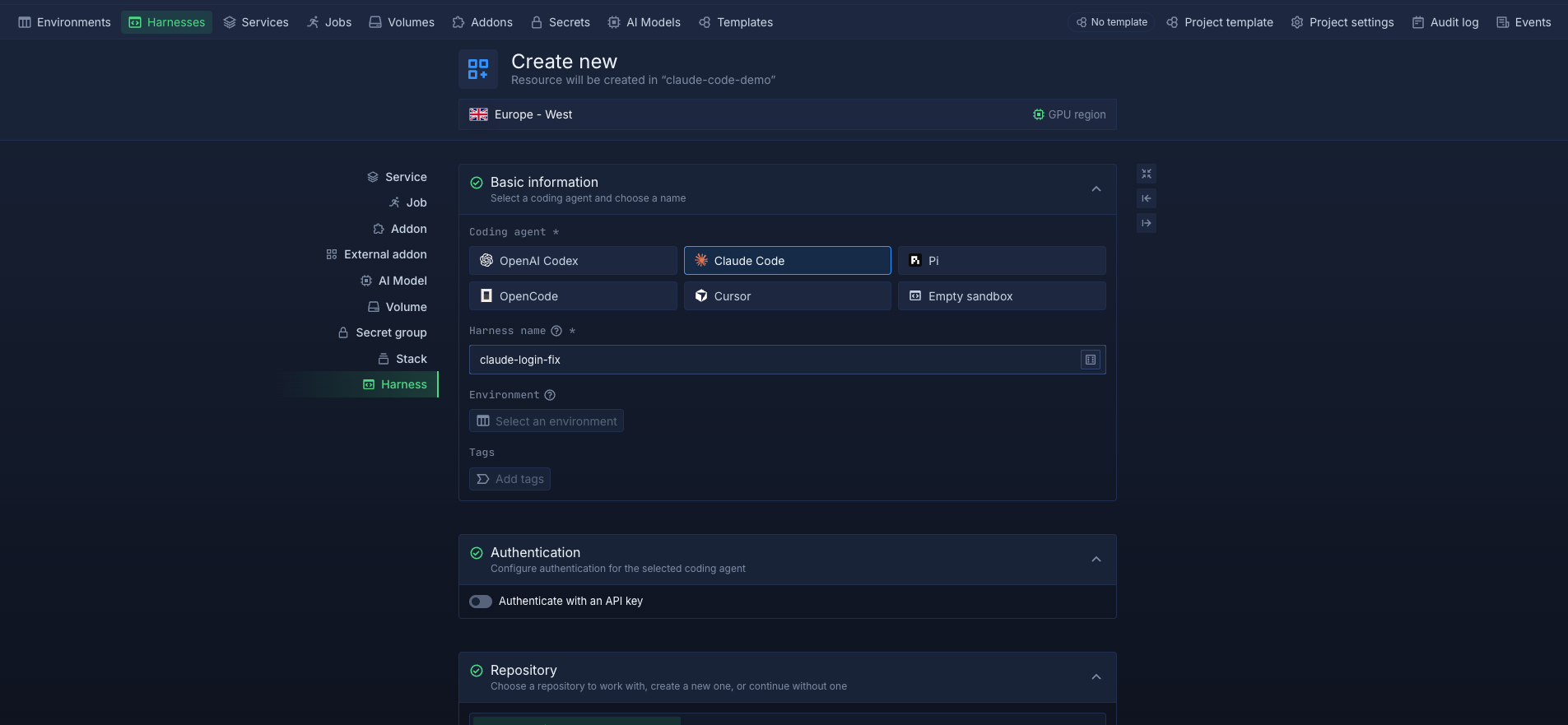
Secrets can be stored in Northflank secrets groups and attached to individual Harnesses. They are injected into the agent's environment at runtime, while secret files are also supported when credentials need to be provided as files.
Git access works through Northflank's Git integrations. When a repository is configured on a Harness, Northflank clones it into the workspace so the agent can work with the code without manually adding Git credentials to the workspace.
Each Harness runs in an isolated microVM environment. For teams that need access to private databases and internal services, Harnesses can also run through bring your own cloud (BYOC) in AWS, GCP, Azure, Oracle Cloud, or CoreWeave, allowing agents to connect to resources inside their own cloud infrastructure. Teams can collaborate across Harnesses and see what other members are working on in real time.
Give your coding agents controlled access to private repositories, databases, and services with Northflank Cloud Harnesses self-serve or book a demo to discuss your setup.
Environment variables are the delivery mechanism. Secrets injection is how a platform securely makes stored credentials available to the agent at runtime without hardcoding them in the workspace.
No. Coding agents execute model-generated code and have different access requirements from CI pipelines. Using separate credentials lets you revoke or rotate agent access without affecting your CI environment.
Update the secret in your platform and restart Harness so the new value is injected when it starts. Short-lived credentials can also reduce the need for manual rotation.
Treat the credential as compromised. Revoke or rotate it immediately, then remove it from the repository's Git history and check whether your Git provider's secret scanning detected it.
Yes. With BYOC, the Harness runs in your own AWS, GCP, Azure, Oracle Cloud, or CoreWeave infrastructure, allowing agents to connect to private resources through your cloud network.


