
How to run multiple Claude Code sessions in parallel
- You can run multiple Claude Code sessions in parallel to work on different tasks simultaneously. Each session should have its own working directory and Git state to avoid conflicts.
- Running several sessions on a single machine means they share the CPU, memory, ports, and other resources. Git worktrees help isolate the code, but not the underlying environment.
- Northflank Cloud Harnesses let you run multiple Claude Code sessions in isolated cloud environments, either by running several sessions in one Harness or giving each session its own Harness with dedicated resources. With support for Codex, Cursor, OpenCode, Pi, or a bring your own agent. Harnesses run on Northflank's managed cloud or in your own AWS, GCP, Azure, Oracle, or CoreWeave account through self-serve BYOC, with microVM isolation, persistent storage, configurable compute and networking, and SSH access.
- Use one Harness for small, related tasks that can share an environment, or separate Harnesses when sessions need independent resources and stronger isolation. Teams can collaborate across Harnesses and see what other members are working on in real time.
Run multiple Claude Code sessions in parallel with Northflank Cloud Harnesses. or book a demo to discuss your setup.
Claude Code works through one task per session. When you have a bug fix, a refactor, and a new test suite to write, running them one after another means waiting on each before starting the next. Running several sessions in parallel lets each task progress at the same time, with each session focused on its own task.
Parallel sessions on one machine introduce their own problems: two sessions editing the same files, development servers competing for the same port, and a laptop that has to stay awake until every session finishes. This guide covers how to run parallel Claude Code sessions locally, where that approach breaks down, and how to run them on Northflank Cloud Harnesses instead.
Most development work splits into independent tasks. A bug fix in the authentication module has nothing to do with a refactor of the API client. Running both in separate sessions at the same time lets you make progress on both instead of running them in sequence.
Long tasks also stop blocking short ones. A session working through a large migration can run for an hour while a second session handles a small fix and a third writes tests. You can review each result as it completes.
Each session keeps a focused context. Mixing unrelated tasks in one session fills the context window with files and history that have nothing to do with the current task. Separate sessions keep each context focused and relevant.
Parallel sessions also let you compare approaches. You can give two sessions the same problem with different instructions and compare the results.
There are three common ways to run parallel Claude Code work on your own machine.
A Git worktree is a second working directory linked to the same repository, checked out on its own branch. Each Claude Code session runs in its own worktree, so sessions do not edit the same files on disk.
# From your main repository
git worktree add ../myapp-auth-fix -b auth-fix
git worktree add ../myapp-api-refactor -b api-refactor

# Start a session in each worktree
cd ../myapp-auth-fix && claude
cd ../myapp-api-refactor && claude
Each worktree needs its own dependencies installed, since node_modules or virtual environments are not shared between working directories. When a task is complete, you can remove its worktree:
git worktree remove ../myapp-auth-fixSeparate terminal tabs are the simplest way to keep several sessions visible. tmux adds named sessions that continue running when you close the terminal window:
tmux new -s auth-fix -c ../myapp-auth-fix
tmux new -s api-refactor -c ../myapp-api-refactor
tmux ls
tmux keeps sessions alive when you close the terminal, but not when the laptop sleeps, restarts, or loses power.
Claude Code can also delegate work to subagents, which run in parallel inside a single session with their own context. This is useful for splitting one larger task into smaller pieces, such as researching several modules at once.
Subagents share the session's working environment and report back to the main session, so they are not a replacement for separate Claude Code sessions when you want independent tasks running in separate environments.
Worktrees solve file conflicts, but most other resources on the machine are still shared between sessions.
| Problem | What happens | Local workaround | On Northflank Cloud Harnesses |
|---|---|---|---|
| File conflicts | Two sessions can edit the same file and create conflicting changes | Git worktrees | Worktrees inside one Harness, or separate workspaces per Harness |
| CPU and memory | Builds and test runs across sessions compete for the same resources | Run fewer sessions at once | Each Harness has its own configured compute |
| Port collisions | Two sessions start development servers on the same port | Assign ports manually per session | Each Harness has its own network environment |
| Shared credentials | Sessions can potentially access credentials available on the same machine | Keep credentials scoped manually | Each Harness only receives the secrets configured for it |
| Laptop must stay on | Sleep, restart, or a closed lid can interrupt sessions | Keep the machine awake and plugged in | Harnesses run in the cloud independently of your laptop |
| Limited isolation | A destructive command can affect other projects or processes on the machine | Use containers or VMs | Each Harness runs in an isolated microVM |
Two or three light sessions on a capable machine can work well. The limits become more noticeable with longer tasks, heavier builds, or sessions that need to keep running after you leave your desk.
Northflank Cloud Harnesses are cloud workspaces built for coding agents. Each Harness comes with Claude Code pre-installed, a web terminal in the Northflank dashboard, SSH access from your local terminal, and an optional connected Git repository and branch. You can run several Claude Code sessions in parallel by opening multiple terminal tabs in one Harness or creating a separate Harness for each session.
When you use multiple Harnesses, each session runs in its own isolated microVM with its own compute, filesystem, network, and configuration. This keeps independent tasks from competing for resources or interfering with each other. If you use several sessions in one Harness, they share the same resources, so you can use Git worktrees to keep their files and branches separate.
Harness workspaces persist between restarts, so you can pause a Harness and return to the same workspace files later. You can also run Harnesses in your own AWS, GCP, Azure, Oracle, or CoreWeave account through self-serve BYOC when your workloads need to run inside your own cloud infrastructure. Teams can collaborate across Harnesses and see what other members are working on in real time.
- Create a new Harness and select Claude (see quick start guide).
- Connect your repository and branch if needed.
- Open the Harness terminal and create a Git worktree for each task.
- Open a new terminal tab for each session.
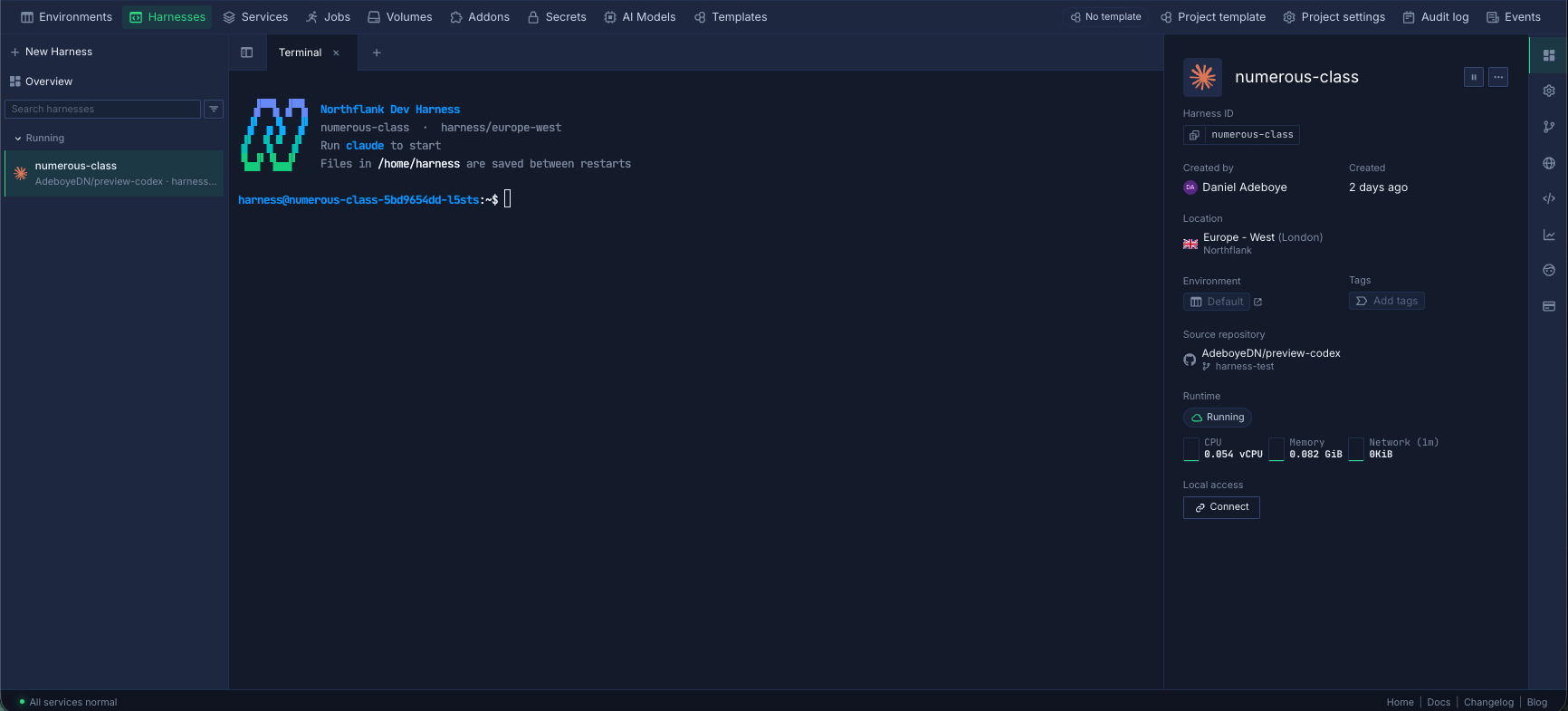
Start Claude Code in each worktree. For example:
# Session 1
git worktree add ../auth-fix -b auth-fix
cd ../auth-fix
claude
# Session 2
git worktree add ../api-refactor -b api-refactor
cd ../api-refactor
claudeAll sessions share the Harness's CPU, memory, filesystem, and network, so this setup works best when the tasks are relatively small and related.
Create a new Harness for each task (see quick start guide), connect the repository and branch, select the resources that the task needs, and start Claude Code from the Harness terminal.
Each Harness has its own workspace and resources, so you don't need Git worktrees to separate the sessions. Development servers can also use the same ports because they run in separate network environments.
This setup is useful when sessions are long-running, resource-intensive, or unrelated and should not affect each other.
| One Harness, several sessions | One Harness per session | |
|---|---|---|
| Isolation | Sessions share one environment | Each session has its own environment |
| Files | Use Git worktrees | Separate workspace per Harness |
| CPU and memory | Shared | Configured per Harness |
| Ports | Shared | Separate |
| Pause and resume | All sessions together | Each session independently |
| Setup | Open another terminal tab | Create another Harness |
| Best for | Small, related tasks | Long, heavy, or unrelated tasks |
Use one Harness with several sessions when you want to work quickly on related tasks in the same environment. Use one Harness per session when you need stronger isolation or want each task to have its own resources.
- Use one branch per session. Every session commits to its own branch, so its work can be reviewed and merged independently.
- Scope each prompt. Tell each session which directories or modules it should work on. Sessions working on separate parts of the codebase are less likely to produce merge conflicts.
- Share conventions through
CLAUDE.md. Claude Code readsCLAUDE.mdfiles in the repository, so every session can follow the same coding standards, test commands, and project rules. - Review through pull requests. Open a pull request for each branch, review the changes, and merge them as they are ready. Rebase remaining branches when necessary.
- Bring in teammates. On Northflank, teammates can access the same Harness to review a session's work or continue the task without setting up the environment again.
- Pause finished work. Pause a Harness when its task is complete so you can return to it later without keeping the environment running.
Locally, the practical limit depends on your machine's CPU and memory as well as your Claude usage limits. With Northflank, you can run multiple sessions in one Harness or create separate Harnesses with their own configured compute.
No. Each Harness has its own workspace and file system, so sessions do not share the same working directory. Git worktrees are useful when several sessions share one Harness or one machine.
Yes. Give each session its own branch, either through a Git worktree or a separate Harness connected to the same repository. Keeping each session's task scoped also reduces merge conflicts.
Yes. You can run Claude Code and Codex in separate Harnesses, with each connected to the same repository on different branches. Northflank Harnesses also support other coding agents, including OpenCode and Pi.
Yes. Northflank Cloud Harnesses let you run multiple Claude Code sessions in parallel, either as separate sessions in one Harness or in separate Harnesses with independent environments.



