
How to run multiple coding agents in parallel
- You can run multiple coding agents in parallel by giving each agent its own working copy of the repository and branch, using Git worktrees on one machine or separate environments per agent. Common patterns include running the same agent on different tasks, different agents on different tasks, or different agents on the same task to compare results.
- Running several agents on one machine can lead to file conflicts, shared CPU and memory usage, port collisions, and managing credentials for multiple model providers on one laptop. Your agents can also be interrupted when your laptop sleeps or shuts down.
- Northflank Cloud Harnesses provide isolated cloud environments for running coding agents in parallel, supporting Claude Code, Codex, Cursor, OpenCode, Pi, and Bring Your Own Agent. Teams can collaborate across Harnesses and see what other members are working on in real time. Harnesses run on Northflank's managed cloud or in your own cloud through self-serve BYOC, with microVM isolation, persistent storage, configurable compute and networking, and SSH access.
Run multiple coding agents in parallel with Northflank Cloud Harnesses, or book a demo to discuss your setup.
Development teams rarely use a single coding agent anymore. One developer might use Claude Code for refactors, Codex for test generation, and OpenCode with a different model for a specific codebase. Running these agents in parallel, across separate tasks or against each other on the same task, lets you make progress on multiple pieces of work at the same time.
Running several agents on one machine creates conflicts. Agents can edit the same files, start development servers on the same ports, and require credentials from different providers on the same laptop. Cloud environments give each agent room to work independently while making it easier for teams to collaborate and see what others are working on. This guide covers the different ways to run coding agents in parallel, how to set them up locally, and how to run them on Northflank Cloud Harnesses.
Running multiple coding agents gives you more ways to approach development work. Instead of relying on one agent to handle every task, you can split work across agents, use different agents for different parts of a project, or compare their solutions to the same problem.
For example, you could have Claude Code work on a refactor while Codex writes tests for another part of the codebase. You could also give both agents the same task and compare their implementations to see how they approach the problem. This is useful when evaluating different models and coding agents against your actual codebase.
It also gives you more flexibility when working with different model providers. If one provider reaches its usage limit or becomes unavailable, you can continue working with an agent connected to another provider.
There are three common patterns for running coding agents in parallel.
| Pattern | What it looks like | Best for | Main risk |
|---|---|---|---|
| Same agent, different tasks | Multiple sessions of the same coding agent, each working on a separate branch | Splitting a backlog across one familiar agent | File conflicts and shared resource usage |
| Different agents, different tasks | Claude Code on a refactor, Codex on tests, OpenCode on documentation | Matching different tasks to different agents | Inconsistent conventions across agents |
| Different agents, same task | Claude Code and Codex given the same prompt and starting commit | Comparing agents on your own codebase | Paying for multiple implementations of the same task |
For a detailed walkthrough of running multiple sessions of the same agent, see How to run multiple Claude Code sessions in parallel.
You can run different coding agents on your local machine using Git worktrees and separate terminal sessions. Each worktree gives an agent its own working directory and branch, so multiple agents can work on the same repository without editing the same files.
For example, you can create one worktree for Claude Code and another for Codex:
# From your main repository
git worktree add ../myapp-claude -b claude-refactor
git worktree add ../myapp-codex -b codex-tests

# Start Claude Code in its worktree
cd ../myapp-claude
claude
Open another terminal tab and start Codex in its worktree:
cd ../myapp-codex
codex
You can repeat this for other coding agents, such as OpenCode or Pi, as long as their CLIs are installed and authenticated on your machine.
Each worktree has its own working directory, so you'll need to install project dependencies separately. For example, node_modules and Python virtual environments aren't shared between worktrees. Each agent also needs its own provider authentication and configuration.
Terminal tabs are a simple way to keep each agent in a separate session. You can also use tmux to create and manage named sessions:
# Start a session for each agent
tmux new -s claude -c ../myapp-claude
tmux new -s codex -c ../myapp-codex

# List active sessions
tmux ls
You can detach from a tmux session and return to it later, even after closing your terminal window. However, tmux doesn't keep processes running if your laptop sleeps, restarts, or loses power.
Git worktrees keep the agents' working files separate, but they don't isolate the underlying machine. All agents still share your CPU, memory, network, and other local resources.
Git worktrees keep agents out of each other's working directories, but everything else on the machine is still shared. Running different agents also introduces problems that you might not encounter when running several sessions of the same agent.
| Problem | What happens | Local workaround | On Northflank Cloud Harnesses |
|---|---|---|---|
| File conflicts | Two agents edit the same files or overwrite each other's changes. | Git worktrees or separate repository clones. | Use worktrees inside one Harness or give each agent its own Harness and filesystem. |
| CPU and memory | Builds, tests, and agent processes compete for the same machine resources. | Run fewer agents at once or use a more powerful machine. | Each Harness has its own configurable compute resources. |
| Port collisions | Two agents start development servers on the same port. | Assign different ports to each agent. | Each Harness has its own network environment and endpoints. |
| Credential management | Anthropic, OpenAI, and other provider credentials accumulate on one laptop. | Manage API keys and authentication separately for each agent. | Configure the credentials each agent needs in its Harness. |
| Tooling conflicts | Agents need different CLI versions, configuration directories, or runtimes. | Use version managers and configure separate environments. | Each Harness has its own runtime and environment configuration. |
| Laptop availability | Sleep, restarts, or a closed lid can interrupt every running agent. | Keep the machine awake and plugged in. | Harnesses run in the cloud independently of your laptop. |
| Isolation | A destructive command from one agent can affect other projects and processes on the machine. | Configure containers or virtual machines manually. | Each Harness runs in its own microVM. |
Two agents handling light tasks can usually run on a capable machine. The limitations become more noticeable with long-running tasks, heavy builds, multiple providers' credentials, or agents that need to keep running after you leave your desk.
Northflank Cloud Harnesses also make parallel work easier to coordinate across a team. Multiple team members can collaborate in Harnesses and see what others are working on in real time, without sharing a single developer's local machine.
Northflank Cloud Harnesses are cloud workspaces built for coding agents. When you create a Harness, you choose the agent it runs: Claude Code, Codex, Cursor, OpenCode, Pi, or Bring Your Own Agent. The agent comes pre-installed, its credentials are configured for the environment, and the Harness can clone a connected Git repository and branch on start. You can access a Harness through the web terminal in the Northflank dashboard or over SSH from your local machine.
For parallel agents, each Harness provides a configured workspace for an agent to work independently. A Claude Code Harness, a Codex Harness, and an OpenCode Harness can all work on the same repository at the same time, each with its own branch, compute resources, filesystem, and credentials. None of them depend on your laptop staying on.
Harnesses also support team collaboration. Multiple team members can access workspaces, follow what others are working on in real time, review agent output, and continue tasks without having to share a local development environment.
Harnesses on Northflank Cloud run in isolated microVMs. Harnesses are persisted between restarts, so you can pause a Harness and resume it later with the same files, branches, and installed packages. Billing runs per second of active compute, and pausing a Harness stops compute billing while preserving its workspace.
For teams with compliance or data residency requirements, bring your own cloud (BYOC) lets you run Harnesses inside your own AWS, GCP, Azure, Oracle, or CoreWeave account.
Create your first Harness on Northflank, or follow the quick start guide for the full setup.
Each coding agent runs in its own Harness. Create one Harness per agent, connect them to the same repository, and give each one its own branch.
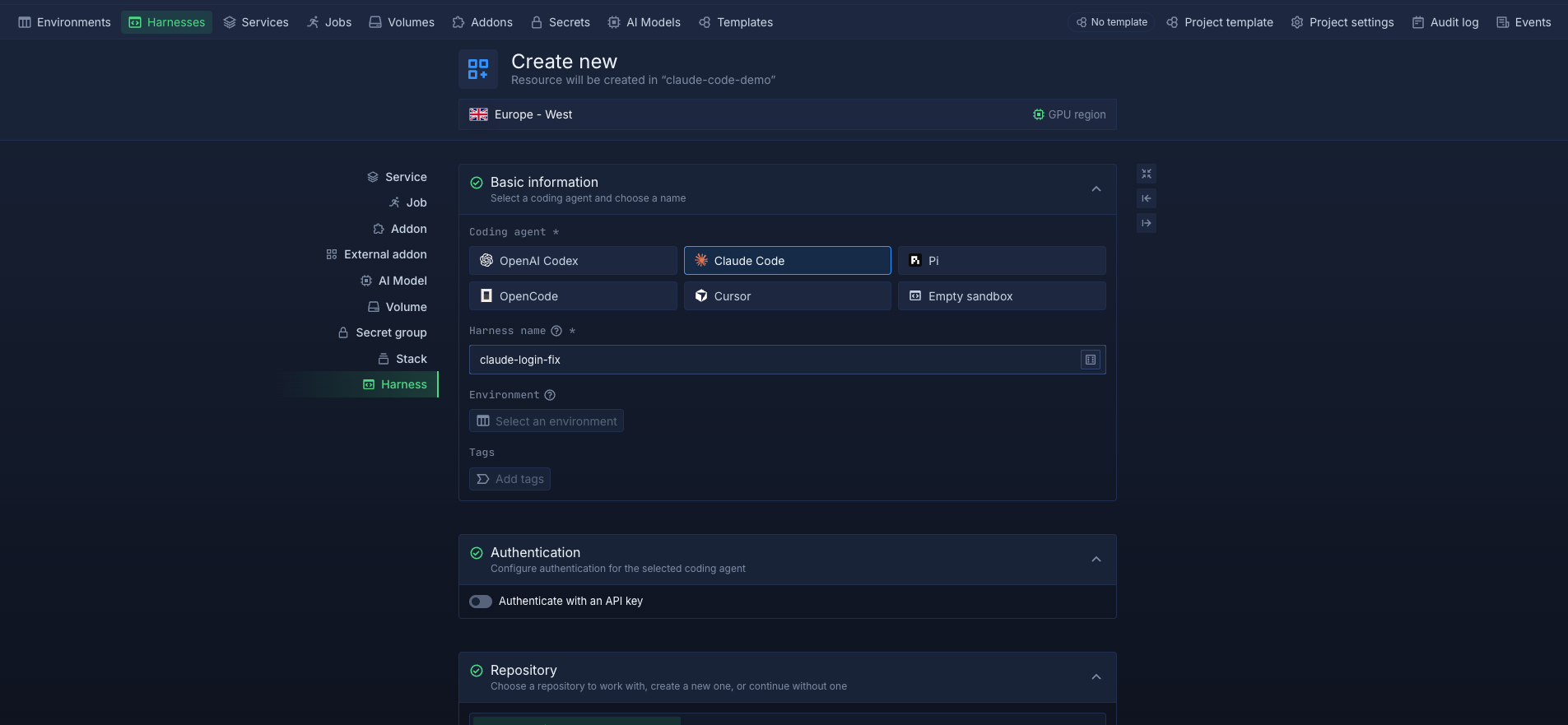
- Create a Harness and select Claude Code. Connect your repository and select a branch (see quick start guide).
- Repeat to create additional Harnesses for Codex, Cursor, OpenCode, Pi, or Bring Your Own Agent.
- Select compute size for each Harness based on its task. A large refactor may need more CPU and memory than a documentation update.
- Open each Harness from the sidebar and start its agent using the relevant CLI, such as
claude,codex, oropencode. - Give each agent its task. They can now work in parallel, each in its own microVM.
- Pause each Harness when its task is complete. You can resume it later to continue working or review its output.
Each Harness has its own repository clone and filesystem, so you don't need Git worktrees to keep agents' files separate. You can also configure compute resources and credentials independently for each Harness.
Running two or more agents on the same task lets you compare how they handle your codebase, conventions, and tests.
- Pick a base commit or branch and create one Harness per agent, all connected to the same starting point.
- Have each agent create its own branch from the base, such as
claude-auth-fixandcodex-auth-fix. - Give every agent the same prompt and acceptance criteria.
- Let each agent finish, then run the same test suite in each Harness.
- Open a pull request for each branch and compare the diffs, test results, and how much rework each implementation needs.
- Merge the implementation you want to keep and pause the other Harnesses.
Keep the prompt, base commit, acceptance criteria, and test conditions consistent across Harnesses so the comparison reflects the agents rather than differences in the setup.
- Use a separate branch for each task: Give each agent its own branch so its changes can be reviewed and merged independently.
- Scope each prompt: Tell each agent which directories, files, or modules it should work on. Assigning separate areas of the codebase reduces the chance of agents editing the same files and creating merge conflicts.
- Share instructions across agents: Keep your project conventions, coding standards, and test commands in a shared instruction file. For example, Codex and some other agents support
AGENTS.md, while Claude Code supportsCLAUDE.md. You can reference shared instructions from agent-specific files so each agent follows the same standards. - Review changes through pull requests: Open a pull request for each agent's branch and review the changes independently. After merging a branch, update any remaining branches against the latest base branch before merging them.
- Bring in teammates: With Northflank Cloud Harnesses, teammates can open an agent's Harness to review its output or continue its task without setting up the environment again. Team members can also see what others are working on in real time.
- Pause finished Harnesses: Once an agent has pushed its changes and no longer needs to run, pause its Harness to stop compute usage while preserving its workspace.
Yes. Give each agent its own branch, using Git worktrees if they share one machine or separate Harnesses if you are running them in the cloud. Connect each Harness to the same repository and assign a different branch to each agent. Scope their tasks to different parts of the codebase to reduce merge conflicts.
No. Usage limits depend on the model provider and account each agent uses, not simply on the coding agent. For example, Claude Code and OpenCode using the same Anthropic account may draw from the same usage limits. Running agents in separate Harnesses does not give you additional provider quota.
It depends on your codebase, language stack, and the models available to each agent. Rather than relying only on public benchmarks, you can give two or more agents the same task and starting commit, then compare their implementations and test results on your own repository.
No. Each Harness has its own repository clone and filesystem, so agents working in separate Harnesses cannot overwrite each other's local files. Git worktrees are useful when multiple agent sessions share one Harness or local machine.
Yes. Bring Your Own Agent lets you configure a Harness for a CLI-based coding agent that is not on the default list. You install and configure the agent in the Harness, which provides the same microVM isolation, workspace persistence, and access options available to other Harnesses.



