
How to give coding agents ephemeral development environments
- An ephemeral development environment is created for a single task and can be deleted when the task is done. For coding agents, that means every task starts from a clean workspace with the repository at a known commit, the tools the agent needs, and only the credentials that task requires.
- Ephemeral environments prevent agents from inheriting leftover files, stale dependencies, old credentials, and side effects from earlier tasks. They also limit what a misbehaving agent can affect and make it easier to run tasks in parallel.
- Northflank Cloud Harnesses provide the infrastructure to run coding agents in ephemeral development environments in the cloud. They support Claude Code, Codex, Cursor, OpenCode, Pi, and Bring Your Own Agent. Harnesses run on Northflank's managed cloud or in your own cloud through self-serve BYOC, with microVM isolation, configurable compute and networking, and SSH access. Teams can also collaborate across Harnesses and see what other members are working on in real time.
Give your coding agents a fresh environment for every task with Northflank Cloud Harnesses, or book a demo to discuss your setup.
A coding agent that reuses the same environment across tasks can accumulate state over time. Dependencies installed for one task remain for the next, files from abandoned branches stay on disk, and credentials added for previous tasks remain accessible. Each new task starts from an environment whose state is harder to understand, making agent output more difficult to reproduce and trust.
Ephemeral development environments solve this by giving each task its own isolated workspace, with the tools, dependencies, and access it needs. This guide covers what ephemeral development environments are, why coding agents benefit from them, how to set them up locally, and how to give coding agents ephemeral environments with Northflank Cloud Harnesses.
An ephemeral development environment is a development workspace created for a specific task and removed when it is no longer needed. It starts from a known state: a defined base image or toolchain, the repository at a specific commit or branch, and the configuration and secrets the task needs. Once the work is complete and the required outputs have been saved, the environment can be deleted along with its temporary files and resources.
A persistent development environment works differently. It is created once and reused across multiple tasks, retaining its files, installed packages, and configuration between sessions.
| Ephemeral environment | Persistent environment | |
|---|---|---|
| Lifecycle | Created for a task and removed when no longer needed | Created once and reused across tasks |
| Starting state | Starts from a known configuration | Retains state from previous sessions |
| Leftover files and packages | Removed when the environment is deleted | Can accumulate over time |
| Credentials | Can be scoped to the current task | May remain configured between tasks |
| Reproducibility | Easier to reproduce from a defined configuration | Results can depend on previous changes |
| Resource usage | Resources can be released after the task | Resources may remain allocated between tasks |
| Best for | Agent tasks, pull requests, and experiments | Long-running development and ongoing workspaces |
For a broader look at short-lived execution environments for AI agents, see Ephemeral execution environments for AI agents.
Giving coding agents ephemeral development environments ensures every task starts from a clean, known state. The agent gets the repository at a specific commit, the required dependencies, and the tools it needs without inheriting leftover files, stale packages, or configuration changes from previous tasks.
Ephemeral environments also prevent tasks from interfering with each other. An agent can install packages, modify files, or run commands without affecting another agent's workspace or your local machine. This makes it easier to run multiple agents in parallel, with each working in its own environment. If something goes wrong, such as a destructive command or unexpected script execution, the impact is limited to that environment. Starting from a consistent configuration also makes it easier to reproduce failures and investigate unexpected results.
They also make credentials easier to manage. You can provide each task with only the secrets and permissions it needs, rather than reusing credentials across unrelated workloads. Once the task is complete and its outputs are saved, deleting the environment removes its temporary files and releases its resources.
An ephemeral environment needs the repository, tools, resources, and access required for the agent to complete its task.
| Component | What it provides |
|---|---|
| Repository at a known commit | Gives the agent a consistent starting point and a separate branch for its changes |
| Development tools and agent CLI | Provides the language runtime, package manager, build tools, test runner, and coding agent |
| Scoped credentials | Gives the agent access to the model provider, Git repository, and services required for the task |
| Isolation | Keeps the agent's files, processes, and execution separate from other workloads |
| Configurable compute | Provides enough CPU, memory, and storage for the task |
| Lifecycle management | Allows the environment to be created, paused, resumed, and deleted when no longer needed |
Northflank Cloud Harnesses bring these components together in a cloud workspace for coding agents. Each Harness can connect to a Git repository, comes with a pre-installed agent CLI and configurable compute, and runs in an isolated microVM. You can also inject credentials as environment variables and manage the Harness throughout the task lifecycle.
A common way to create ephemeral development environments locally is to combine Git worktrees with Docker containers. The worktree gives each task its own directory and branch, while the container provides an isolated execution environment that can be removed when the task is complete.
For example, you can create a worktree for a task and start a temporary container with the project's files mounted into it:
# From your main repository
git worktree add ../task-142 -b task-142

# Start a temporary container with the task's files mounted
docker run --rm -it \
  -v "$(pwd)/../task-142:/workspace" \
  -w /workspace \
  -e ANTHROPIC_API_KEY \
  node:22 bash

# Inside the container
npm install -g @anthropic-ai/claude-code
claude
Make sure ANTHROPIC_API_KEY is already exported in your local shell before starting the container. The --rm flag removes the container when you exit, while the mounted worktree remains on your machine. You can also use development containers with a devcontainer.json file to define your project's development environment, including its image, tools, and setup steps.
When the task is complete, commit and push the agent's changes to the task branch. Once the branch is pushed, remove the worktree:
git worktree remove ../task-142Local containers give each task a separate filesystem, but they still run on your machine and share its kernel, resources, and uptime. This creates limitations when you run several agents, delegate longer tasks, or need stronger isolation.
| Problem | What happens locally | On Northflank Cloud Harnesses |
|---|---|---|
| Isolation | Containers share the host kernel and depend on their configuration for isolation | Each Harness runs in its own microVM |
| Setup per task | Tools and agent CLIs may need to be installed in every new container | Supported agent CLIs are available in Harness environments |
| Credentials | API keys and other secrets need to be passed into each container | Secrets can be configured for each Harness |
| Compute | Containers share your laptop's CPU and memory | Each Harness has configurable compute resources |
| Uptime | Local workloads depend on your machine staying available | Harnesses run in the cloud independently of your laptop |
| Team access | Other developers need access to your machine to inspect the environment | Team members can access Harnesses to review or continue work |
| Cleanup | Worktrees, images, and volumes need to be managed separately | Files and agent sign-ins are cleared on stops, restarts, or redeploys unless persistence is enabled. Harnesses can also be deleted. |
Local containers work well for short tasks that you supervise directly. They become harder to manage when agents run unattended, several tasks run simultaneously, or you need to manage credentials and infrastructure across a team. In those cases, cloud-hosted environments can take care of provisioning, isolation, and lifecycle management without relying on a developer's machine.
Northflank Cloud Harnesses are cloud workspaces built for coding agents. Each Harness is configured for one agent at creation, whether Claude Code, Codex, Cursor, OpenCode, Pi, or Bring Your Own Agent, with the agent CLI pre-installed and its credentials injected as environment variables. A Harness can clone a connected Git repository and branch on start, and you can access it through the web terminal in the Northflank dashboard or over SSH from your local terminal.
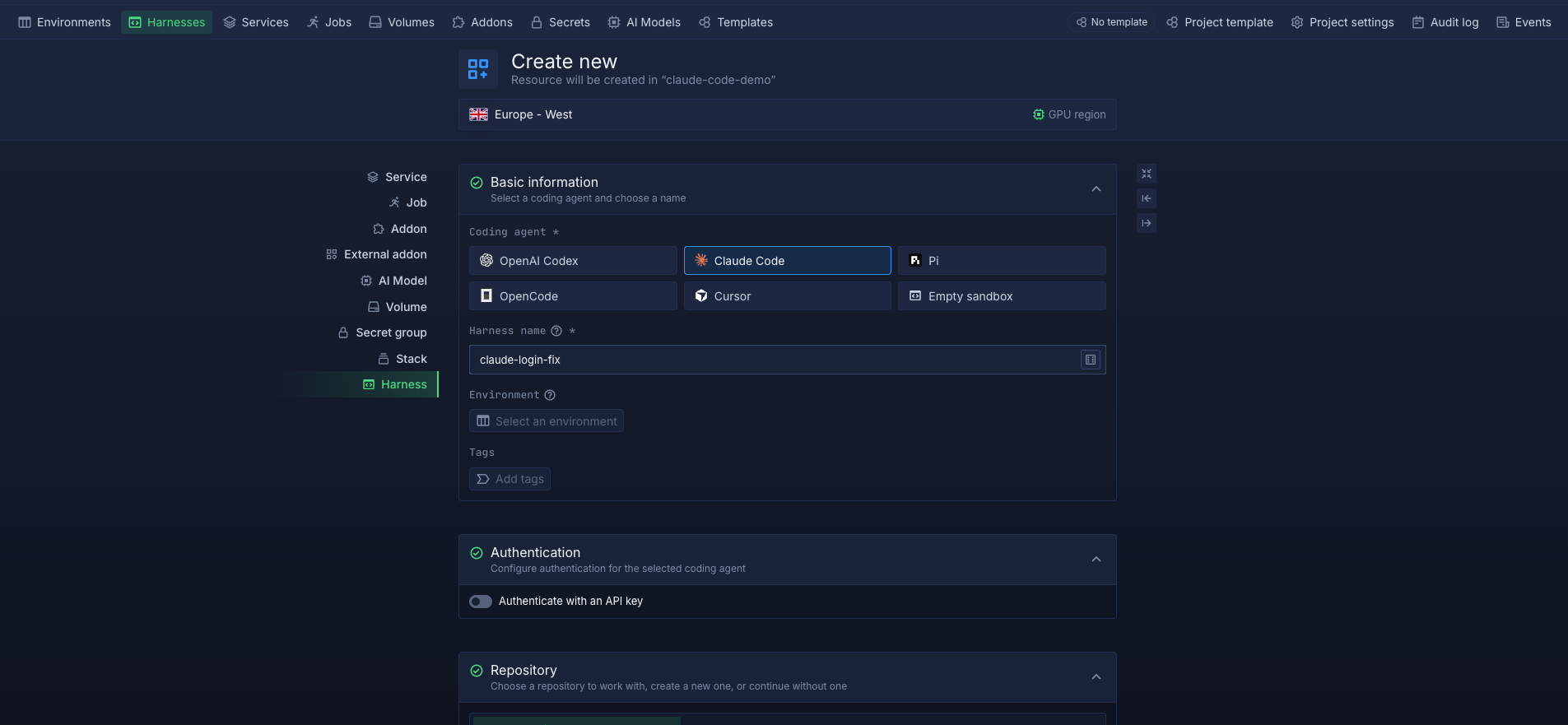
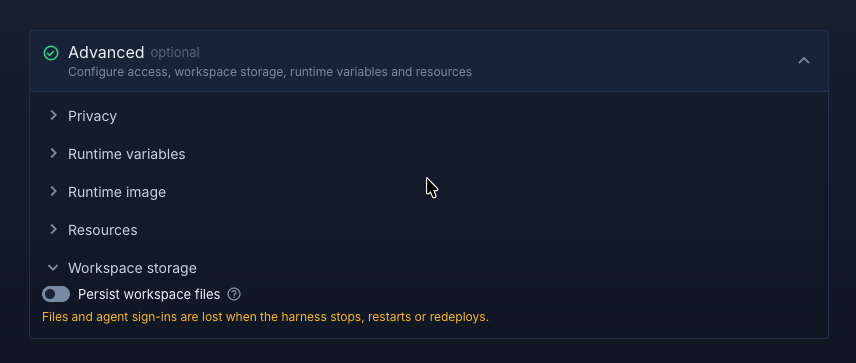
To use a Harness as an ephemeral environment, leave workspace persistence disabled. This gives the agent a temporary workspace for the task, with files and agent sign-ins cleared when the Harness stops, restarts, or redeploys. Once the agent’s work has been pushed to Git, you can delete the Harness when it is no longer needed. Harness lifecycle management can also be automated through the API.
On Northflank Cloud, Harnesses run in an isolated microVM. Each Harness has its own kernel, filesystem, compute, and network, providing isolation between concurrently running tasks. Billing runs per second of active compute, so the compute cost of an ephemeral Harness follows how long it is actively running.
When a task needs to continue across sessions, enable workspace persistence so you can pause the Harness and return to its files later. For teams with compliance or data residency requirements, BYOC lets you run Harnesses inside your own AWS, GCP, Azure, Oracle, or CoreWeave account.
Create your first Harness on Northflank, or follow the quick start guide for the full setup.
| Situation | Workspace persistence | What to do |
|---|---|---|
| Short, single-task agent work | Disabled | Push the work when finished; delete the Harness when no longer needed |
| Task spans several sessions | Enabled | Stop and resume the Harness as needed; delete it when no longer needed |
| Pull request waiting for review | Optional | Enable persistence if you want to return to the same workspace; otherwise push the work and use a new Harness for review changes |
| Task abandoned or failed | Either | Delete the Harness when it is no longer needed |
| Task involves sensitive code or credentials | Depends on the task | Keep access scoped and delete the Harness when it is no longer needed |
| Long-running development workspace | Enabled | Keep the workspace persistent across sessions |
Use workspace persistence when files and agent sign-ins need to survive stops, restarts, or redeploys. Leave it disabled for fully ephemeral tasks where each environment should start clean. Delete Harnesses when they are no longer needed.
Both, depending on how you configure and use it. You can leave workspace persistence disabled for a fully ephemeral Harness, where files and agent sign-ins are lost when the Harness stops, restarts, or redeploys. Enable workspace persistence when a task needs to retain its files across stops or restarts. You can still delete the Harness once the task is complete and its work has been pushed to Git.
A sandbox is an isolation boundary for running code safely, separate from the host system. An ephemeral development environment is a full workspace with a lifecycle tied to one task. It includes the repository, toolchain, agent, secrets, and isolation needed to complete that task.
An ephemeral development environment can run inside a sandbox. On Northflank, each Harness uses a microVM for isolation and provides the development workspace around it.
Yes. The dashboard covers manual workflows, but teams that want a Harness created for every new ticket or issue can use the Northflank API to manage Harnesses programmatically, including creating, pausing, resuming, and deleting them from a script or CI job.
Creating the environment and cloning the repository add some startup time. However, the agent CLI is pre-installed in every Harness, so you don't need to install it at the start of each task. Your project's dependencies may still need to be installed when the agent runs the build or tests.



