
How to run remote coding agents
- A remote coding agent runs on infrastructure separate from your local machine. You give it a task, disconnect, and come back later to check its progress and review the result while the agent keeps working independently.
- The main ways to run remote coding agents are on your own server or VM over SSH and managed cloud environments built for coding agents. They differ in setup effort, isolation, supported agents, and where your code runs.
- Northflank Cloud Harnesses provide the infrastructure to run remote coding agents in isolated cloud environments, with support for Claude Code, Codex, Cursor, OpenCode, Pi, and bring your own agent. Harnesses run on Northflank's managed cloud or in your own AWS, GCP, Azure, Oracle, or CoreWeave account through self-serve BYOC, with microVM isolation, persistent storage, configurable compute and networking, a web terminal, and SSH access.
Run remote coding agents with Northflank Cloud Harnesses, or book a demo to discuss your setup.
Coding agents now work through tasks that take an hour or more: large refactors, migrations, test suites, and dependency upgrades. Running that work on your laptop ties up your machine and makes the agent's availability depend on it staying powered on and connected. The agent does not need you watching every step, but on a local machine, it still depends on your machine being available.
Running coding agents remotely separates execution from your laptop. You start a task, close the session, and check in from another device or hand the work to a teammate. This guide covers the different ways to run coding agents remotely, how to set one up on your own server, where that approach breaks down, and how to use Northflank Cloud Harnesses to manage remote coding tasks.
A remote coding agent keeps working after you close your laptop. Long tasks run through lunch, overnight, or while you travel, and you can check progress from any device with a browser or SSH client. Your local machine stays free for your own work instead of running builds and tests for the agent in the background.
Remote agents also change how teams work with them. A teammate can connect to the same environment to review progress or continue a task without setting anything up. And because the agent runs on separate infrastructure, it doesn't automatically have access to files, credentials, or other projects on your local machine.
There are two common ways to run a coding agent remotely.
| Your own server or VM over SSH | Northflank Cloud Harnesses | |
|---|---|---|
| Setup effort | High: provision, install, secure, and maintain the server yourself | Low: create a Harness in the dashboard, CLI or via API |
| Isolation | Whatever you configure, often one shared machine for all tasks | MicroVM per Harness with its own kernel |
| Supported agents | Any agent you install | Claude Code, Codex, Cursor, OpenCode, Pi, or bring your own agent |
| Terminal access | Full shell over SSH | Full shell through the web terminal or SSH |
| Persistence | Depends on your disk and backups | Persistent workspace available |
| Team access | Shared SSH keys or user accounts you manage | Teammates can connect to the same Harness |
| Where your code runs | Your server | Northflank's managed cloud or your own cloud account through BYOC |
| Cost model | Server runs and bills whether or not the agent is working | Per-second active compute, with no compute charges while paused |
Your own server gives you full control, but you also have to manage the infrastructure, security, access, and scaling yourself. Northflank Cloud Harnesses provide a managed alternative, with isolated environments, multiple coding agents, persistent workspaces, and team access without requiring you to manage the underlying servers.
- Provision a Linux VM with your cloud provider and connect to it over SSH:
ssh user@your-server- Install Git, tmux, Node.js, and the agent CLI. For Claude Code:
sudo apt-get update && sudo apt-get install -y git tmux

# Install Node.js using your preferred method, then:
npm install -g @anthropic-ai/claude-code- Clone the repository and create a branch for the task:
git clone git@github.com:your-org/your-repo.git
cd your-repo
git checkout -b task-142- Start the agent inside a tmux session so it keeps running when you disconnect from SSH:
tmux new -s task-142
claude- Give the agent its task, then detach from the session. Press
Ctrl+B, followed byD, to detach without stopping the agent. You can then disconnect from SSH. To check in later, reconnect and reattach:
ssh user@your-server
tmux attach -t task-142
You also need to handle the agent's credentials yourself, including the model API key and Git credentials if the agent needs to push changes. Store them outside the repository and restrict them to the permissions the agent requires.
A self-managed server works for one developer running occasional tasks. It gets harder to manage as tasks, agents, and teammates are added.
| Problem | What happens on your own server | On Northflank Cloud Harnesses |
|---|---|---|
| Server maintenance | You patch the OS, update tools, and secure SSH | Northflank manages the infrastructure |
| No isolation between tasks | Every task shares one machine, filesystem, and set of credentials unless you configure separate environments | Each Harness runs in its own microVM |
| Long-lived credentials | API keys and Git credentials sit on a server that runs for months | Secrets are injected into each Harness and removed when it is deleted |
| Idle cost | The VM bills while the agent is idle or finished | Per-second billing, with no compute charges while paused |
| Team access | Sharing means distributing SSH keys or creating user accounts | Teammates connect with their own Northflank accounts |
| Crashes and restarts | A reboot or crash ends the tmux session and the agent with it | Persistent workspace files survive restarts |
| Scaling to more tasks | More tasks mean more servers to provision and maintain | Create another Harness |
Northflank Cloud Harnesses are cloud workspaces built for coding agents. Each Harness is configured for one agent at creation, whether Claude Code, Codex, Cursor, OpenCode, Pi, or your own agent, with the agent CLI pre-installed and its credentials injected as environment variables. A Harness can clone a connected Git repository and check out a branch on start, so the agent has everything it needs when you open the terminal (see quick start guide).
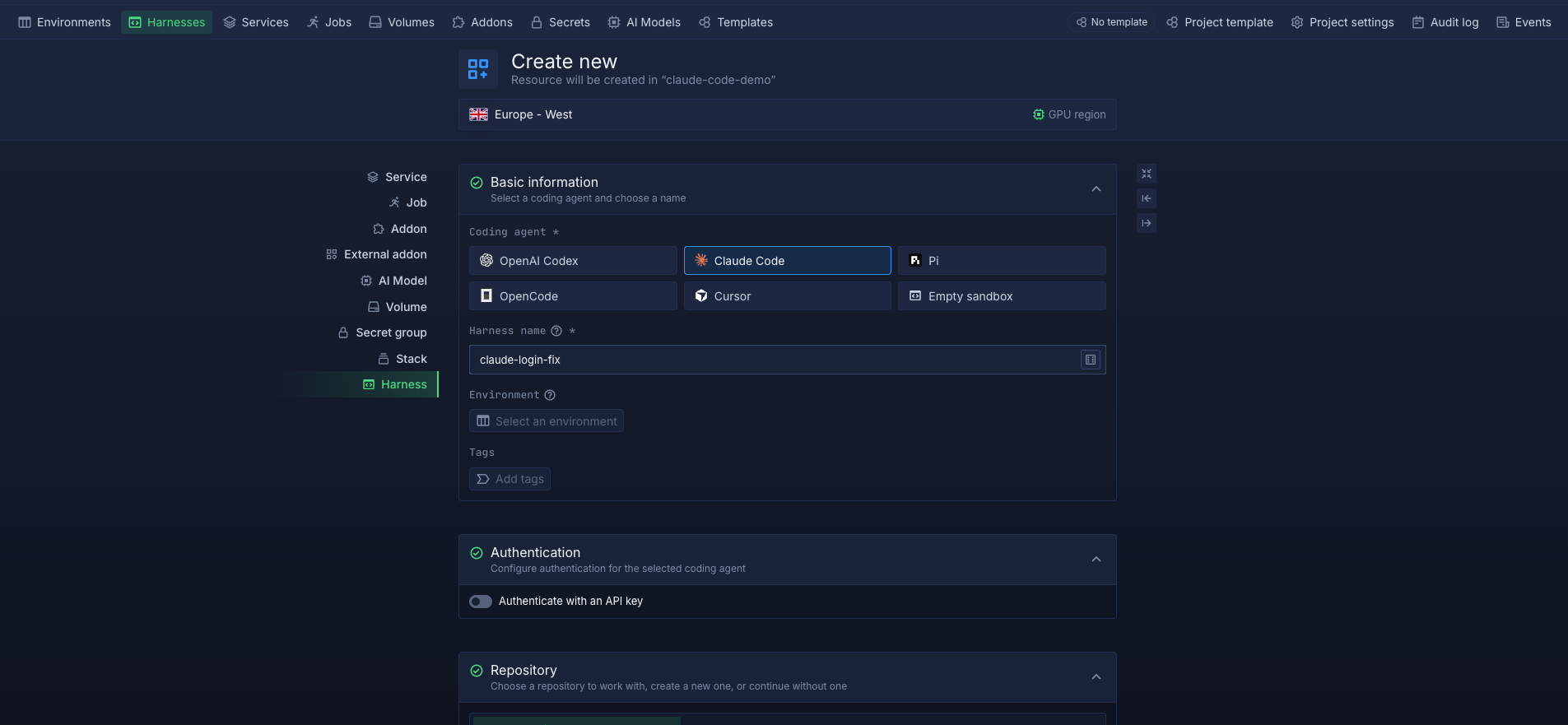
For remote work, a Harness is a server you don't have to manage. It runs in the cloud independently of your laptop, and you can access it through the web terminal in the Northflank dashboard or over SSH from your local terminal. You can start a task from one device and check on it from another. Teammates with access to the Harness can also connect to the same environment to review progress or continue the work.
Each Harness runs in its own isolated microVM, separating its workloads from other Harnesses and the underlying host infrastructure. When workspace persistence is enabled, data is retained across stops and restarts. This lets you pause a Harness and resume it later with the same files and branches. Compute is billed per second, and pausing a Harness stops compute billing.
For teams with compliance or data residency requirements, BYOC lets you run Harnesses inside your own AWS, GCP, Azure, Oracle, or CoreWeave account. Your remote agents can work on your code within your own cloud infrastructure.
Create your first Harness on Northflank, or follow How to run a coding agent in the cloud for the full setup.
A remote coding agent is a coding agent such as Claude Code, Codex, or OpenCode that runs on infrastructure separate from your local machine. You give it tasks and review its results remotely, while it continues working when you disconnect. It can run on your own server, a vendor-hosted service, or a managed cloud environment such as a Northflank Harness.
A cloud coding agent runs in a cloud environment instead of on your local machine. A remote coding agent runs on infrastructure separate from your local machine, which could be a cloud environment, server, or VM. Cloud describes a type of infrastructure where the agent runs, while remote distinguishes it from local execution. Remote agents can continue working while you disconnect and reconnect later. For more on cloud execution, see What are cloud coding agents?.
Yes. When an agent runs on remote infrastructure, it can continue working independently of your laptop, provided its environment and process remain active. On your own server, you can use tmux to keep the terminal session running after disconnecting. Northflank Harnesses run remotely, so you can disconnect and reconnect later through the web terminal or SSH.
It is safer to run coding agents in isolated environments with limited permissions. Use an environment such as a microVM to separate the agent from your local machine and other workloads. Give it only the credentials and access it needs, have it work on a separate branch, and review its changes through a pull request before merging.
Northflank Cloud Harnesses support Claude Code, Codex, Cursor, OpenCode, Pi, and Bring Your Own Agent. Bring Your Own Agent lets you configure other CLI-based coding agents that are not included in the default list.



