
What are cloud coding agents?
- A cloud coding agent is an AI coding agent that runs in a remote cloud environment instead of directly on your local machine, with the compute, storage, tools, networking, and credentials it needs to work on a codebase.
- Running coding agents in the cloud gives them isolated, persistent workspaces with dedicated resources, so they can continue working when you disconnect and stay separate from your local development environment.
- Northflank Cloud Harnesses provide the infrastructure for running coding agents in the cloud, with support for Claude Code, Codex, Cursor, OpenCode, Pi, or bring your own agent. Harnesses can run on Northflank's managed cloud, in your own AWS, GCP, Azure, Oracle, or CoreWeave account through self-serve BYOC, giving teams control over where their coding environments run.
Run your first coding agent in the cloud with Northflank Cloud Harnesses or book a demo to discuss your team’s setup.
A cloud coding agent is a coding agent that runs in a cloud environment rather than on a local machine. The agent receives tasks, generates and executes code, reads and writes files, and interacts with repositories inside an isolated workspace hosted on remote infrastructure. The actual coding work happens in the cloud, while you can connect to and manage the environment from your local machine.
Cloud coding agents can continue working when you disconnect and retain their workspace between sessions. This article explains what cloud coding agents are, how they differ from local agents, what they consist of, how they work, and where they run.
A cloud coding agent is an AI coding agent that executes inside a cloud-hosted environment rather than directly on a developer’s local machine. It can receive a task, inspect a repository, generate and modify code, run commands, install dependencies, and execute tests inside that remote environment.
What makes it a cloud coding agent is where the work is executed. The agent’s repository, filesystem, development tools, and runtime are hosted in a cloud workspace rather than on the developer’s laptop. The developer can still connect to and manage the workspace remotely, but the agent has its own environment and resources for carrying out coding tasks.
The main difference between a cloud coding agent and a local coding agent is where the agent executes its work.
A local coding agent runs directly on your computer and uses your local files, CPU, memory, network connection, credentials, and development tools. A cloud coding agent runs inside a remote environment with resources allocated specifically to the agent.
| Local coding agent | Cloud coding agent | |
|---|---|---|
| Execution | Runs on your local machine | Runs in a remote cloud environment |
| Compute | Uses your computer's resources | Uses dedicated cloud resources |
| Storage | Local filesystem | Cloud storage or persistent volumes |
| Isolation | Shares your machine environment | Can run in an isolated workspace |
| Access | Usually tied to your machine | Can be accessed remotely |
| Long-running tasks | Require your machine to stay available | Can continue running after you disconnect |
| Scaling | Limited by local hardware | Resources can be configured for the workload |
| Infrastructure | Managed by the developer | Can be managed by a cloud platform |
A local environment can be convenient for interactive development because everything the agent needs is already on your machine. Cloud environments become more useful when you need persistent workspaces, additional compute, stronger isolation, remote access, or the ability to run multiple agents independently.
A cloud coding agent has five main components working together.
- The model: The language model receives the task and determines the next action. For example, Claude Code uses Anthropic's Claude models, while Codex uses OpenAI models. The model runs on the provider's infrastructure and is separate from the cloud environment where the agent executes its work.
- The tool layer: The agent uses tools to perform actions such as running shell commands, reading and writing files, interacting with Git, installing packages, and running tests. The tool layer connects the model's decisions to real operations inside the workspace.
- The execution environment: This is the cloud workspace where the agent actually operates. It provides the operating system, development tools, repository, filesystem, and resources needed to run the code. On Northflank, this environment is provided through Cloud Harnesses, which give coding agents an isolated cloud workspace.
- Secrets and credentials: The agent may need credentials to access the model, Git repositories, APIs, package registries, or other services used by the application. These credentials need to be made available to the workspace without exposing them in the codebase.
- State and persistence: The workspace needs a way to retain files, dependencies, Git history, and other state between sessions. Persistent storage allows an agent to stop and resume work without starting from a clean environment each time.
On Northflank, this execution environment is provided through Cloud Harnesses, which give coding agents isolated, persistent cloud workspaces with configurable compute, storage, networking, and remote access.
When a developer starts a cloud coding agent, the agent runs inside a cloud workspace with access to the repository, development tools, and resources it needs. The developer gives the agent a task, and the agent works through that task inside the remote environment.
The agent typically follows an execution loop:
- Read the task and context: The agent inspects the repository, relevant files, test output, error logs, and other available context.
- Call the model: The agent sends the task and relevant context to the model, which determines the next action.
- Execute the action: The agent uses its tools to run commands, edit files, install dependencies, interact with Git, or perform other operations inside the cloud workspace.
- Observe the result: The output from the action, such as command output, file changes, or test results, is added to the agent's context.
- Continue the loop: The agent sends the updated context back to the model and determines the next action. It continues until the task is complete, fails, or is stopped.
The important distinction is that the agent's execution happens inside the cloud workspace. Your local machine can be used to connect to and manage the workspace, but it does not need to provide the compute, filesystem, or development environment where the agent performs its work.
- Isolation from your local machine: When a coding agent runs locally, it operates within your local development environment and may have access to files, credentials, processes, and other projects available to it. In the cloud, the agent can run inside a separate workspace with its own filesystem, credentials, and network configuration. This helps limit the agent's access to your local environment and reduce the potential impact of mistakes or unexpected behaviour.
- Persistence across sessions: A cloud workspace can persist after you disconnect from the agent. You can stop working and return later with the same files, Git history, dependencies, and configuration. This makes cloud environments useful for long-running coding tasks that do not need to be tied to an open terminal or laptop.
- Dedicated compute: Cloud coding agents can run with CPU, memory, storage, and other resources configured for the workload. The agent does not have to compete with your local development tools for resources, and you can provision more capacity when a task requires it.
- Run multiple agents independently: Each coding agent can run in its own workspace with its own repository state, dependencies, and resources. This makes it easier to run multiple coding tasks in parallel without their environments interfering with one another. With Northflank, teams can create multiple Cloud Harnesses and run them simultaneously on Northflank's managed cloud or inside their own VPC through BYOC.
- Run agents in your own cloud: Teams with specific infrastructure, networking, or data requirements can run coding agent environments in their own cloud infrastructure. With BYOC, the execution environment can run inside your existing cloud account while still being managed through the same platform.
Cloud coding agents can run in different types of cloud environments, including virtual machines, containers, sandboxes, and microVM-based workspaces. The right environment depends on the level of isolation, resource control, persistence, and infrastructure access the agent requires.
For coding agents, the execution environment needs to provide more than compute. It needs a filesystem, development tools, repository access, networking, credentials, and a way to persist the workspace between sessions. Managed cloud workspaces package these requirements into an environment that can be created and configured specifically for coding agents.
Northflank Cloud Harnesses provide this type of managed cloud workspace. Each Harness provides an isolated environment with configurable resources, persistent storage, remote access, and coding agent tooling. Harnesses can run on Northflank's managed infrastructure or in your own cloud through BYOC.
A cloud coding agent needs an execution environment that gives it the resources and access required to complete coding tasks. The exact requirements depend on the agent and workload, but most cloud coding environments need the following:
- An isolated execution environment: The agent needs a workspace separated from the host system and other workloads. This gives it a controlled environment where it can execute code, install dependencies, and run commands.
- Repository access: Most coding agents work against a Git repository. The workspace needs access to the repository and the credentials required to clone, pull, commit, and push changes.
- Agent credentials: Coding agents need credentials to access their underlying model and any external services required by the project. These credentials should be stored securely and injected into the environment at runtime rather than included in the codebase.
- Development tooling: The workspace needs the tools required by the project, including a shell, language runtimes, package managers, build tools, and test runners. These can be pre-installed or installed by the agent when needed.
- Configurable compute: Different coding tasks have different resource requirements. A large build or test suite may need more CPU and memory than a small code change, so the workspace should allow resources to be configured around the workload.
- Networking: The agent may need network access to clone repositories, download packages, call APIs, access databases, and interact with other services. Network access should be configurable based on the workload and security requirements.
- Remote access: Developers need a way to connect to the workspace and interact with the agent. This can include SSH, a web interface, or other remote development tools.
- Persistent storage: The workspace needs persistent storage if work should survive between sessions. This allows files, dependencies, Git history, and other state to remain available when an agent is paused and resumed.
Northflank Cloud Harnesses provide the infrastructure needed to run coding agents in isolated cloud workspaces. Each Harness gives the agent a configured execution environment with compute, storage, development tools, remote access, and persistent workspace state. You can create a Harness from the Northflank dashboard, connect to it remotely, and run a coding agent in the same way you would locally.
Cloud Harnesses support different coding agents, so you can run agents such as Claude Code, Codex, OpenCode, Cursor, and Pi, or configure your own coding agent with Bring Your Own Agent. Each workspace can be configured with the resources, storage, networking, and credentials the agent needs for its task.
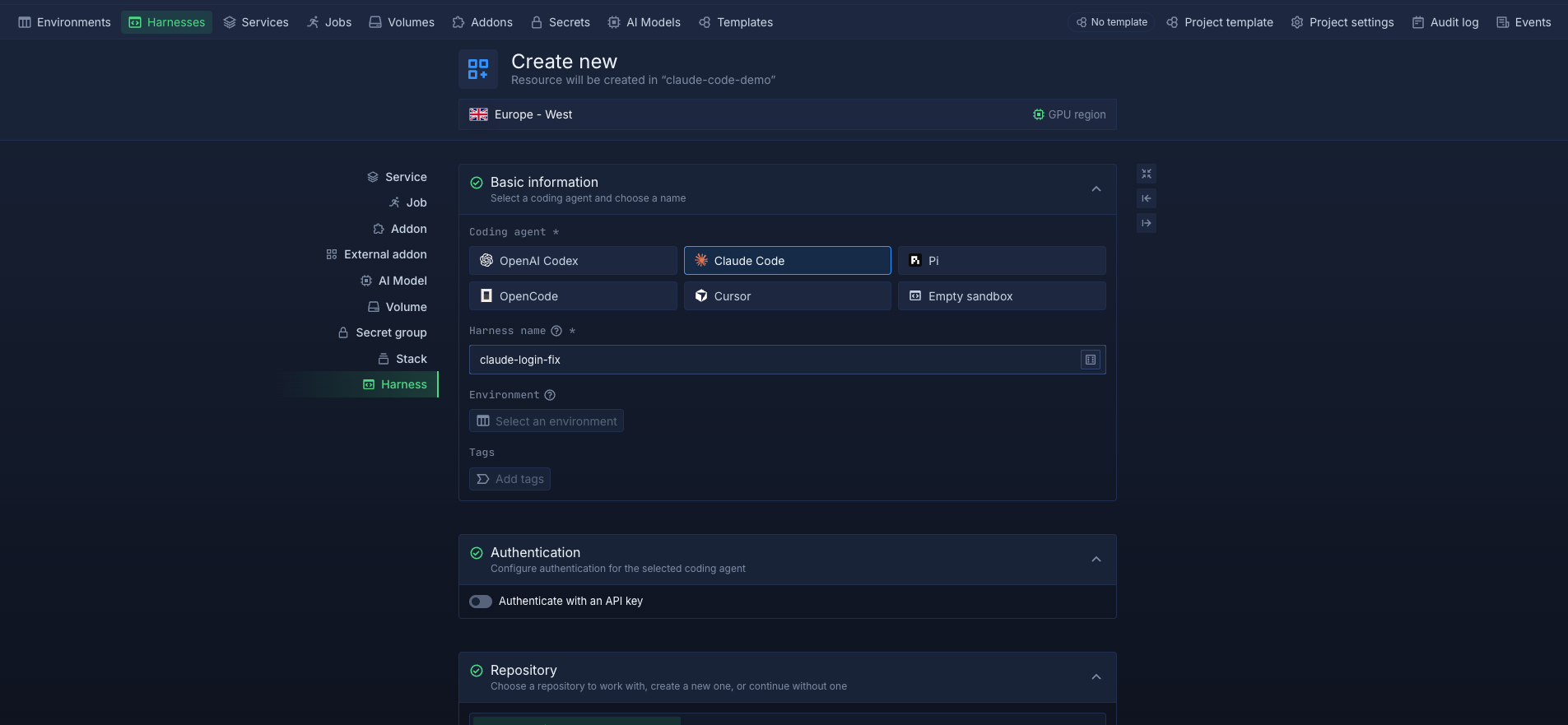
Harnesses run in isolated microVM environments and can be deployed on Northflank's managed cloud or in your own cloud through BYOC. This lets teams choose between managed infrastructure and running their coding agent environments inside their existing AWS, GCP, Azure, Oracle, or CoreWeave infrastructure.
If you want to start running coding agents in the cloud, see our guide on how to run a coding agent in the cloud. You can also follow the dedicated guides for Claude Code and Codex.
A coding agent is an AI agent that can write, edit, and execute code using tools. A cloud coding agent is a coding agent whose execution environment runs in the cloud rather than on the developer’s local machine. The model may be hosted remotely in both cases, but the key difference is where the agent’s tools, filesystem, repository, and runtime execute.
Running a coding agent in the cloud can provide an isolated workspace, persistent storage, dedicated compute, remote access, and configurable resources. It also allows agents to continue working without keeping a local machine running and makes it easier to run multiple agents in separate environments.
Yes. Cloud infrastructure can provide separate workspaces for different coding agents or tasks. Each workspace can have its own repository, dependencies, resources, credentials, and configuration, allowing agents to work independently without interfering with one another.
Cloud coding agents can run in virtual machines, containers, sandboxes, microVMs, or managed cloud workspaces. The appropriate environment depends on the workload and requirements for isolation, resource control, persistence, networking, and infrastructure ownership.
Most coding agents that can run from a command line or development environment can also run in the cloud if their runtime and authentication requirements are available. This includes agents such as Claude Code, Codex, OpenCode, and Pi. Northflank Cloud Harnesses also support Bring Your Own Agent, allowing you to configure other coding agent CLIs in a cloud workspace.



