
How to run coding agents in the cloud
- Running a coding agent in the cloud gives it an isolated environment with its own compute, storage, networking, and development tools.
- Cloud environments make it easier to run coding agents for longer tasks, preserve work between sessions, and control the resources, credentials, and infrastructure they can access.
- Northflank Cloud Harnesses provide managed cloud workspaces for coding agents, including Claude Code, Codex, Cursor, OpenCode, Pi, or Bring Your Own Agent, with persistent storage, SSH access, and Bring Your Own Cloud (BYOC) support.
Run a coding agent in the cloud with Northflank. Create a Cloud Harness and start working with your preferred coding agent. Get started or book a demo.
Coding agents, also called AI coding agents, can inspect repositories, modify files, install dependencies, run commands, and test changes with little intervention. But when you run an agent locally, it shares your machine's resources, files, credentials, and development environment. For longer or more complex tasks, this can make isolation, persistence, and resource management harder to control.
Running a coding agent in the cloud gives it a dedicated environment with its own compute, storage, networking, and configuration. You can connect to the workspace remotely, keep it running while you disconnect, and control which resources the agent can access. This guide explains why you might run a coding agent in the cloud, what the environment needs, and how to set one up with Northflank Cloud Harnesses.
A coding agent needs to execute commands and modify files to complete tasks. Running it in a dedicated cloud environment keeps those operations separate from your personal development environment.
You can give the agent access to the repository and tools it needs without giving it access to unrelated files, applications, or credentials on your laptop.
Some coding tasks involve large dependency installations, long test suites, builds, or multiple iterations. A cloud workspace can continue running while you disconnect from it.
You can pause the environment when you are finished and resume it later, with persistent workspace storage keeping the files you need between sessions.
A cloud workspace can also make coding agents easier to use across a team. Instead of an agent running on one developer's laptop, multiple authorised team members can access the same environment and collaborate on the work. Northflank Cloud Harnesses support multiple team members working in the same workspace.
Teams can also create multiple Cloud Harnesses to run coding agents in parallel, with separate workspaces for different repositories or tasks. These Harnesses can run on Northflank's managed cloud or inside your own VPC through BYOC.
For teams with specific infrastructure, networking, or compliance requirements, running the agent in your own cloud account can provide more control over where the workspace and its underlying resources run.
Northflank Cloud Harnesses can run on Northflank's managed cloud or in your own cloud infrastructure through BYOC.
A coding agent needs more than a model and a terminal. It needs a development environment where it can access code, execute tools, store its work, and reach the resources required by the task.
- Isolated workspace: The agent needs an isolated environment where it can inspect files, modify code, install dependencies, and run commands. This can be a virtual machine, container, sandbox, or managed cloud workspace.
- Repository access: Most coding tasks start with an existing codebase. The environment should be able to access the relevant repository and branch while limiting access to repositories the agent does not need.
- Agent authentication: Each coding agent requires its own credentials: an API key for Claude Code, an API key for Codex, or equivalent for other agents. These should be stored as secrets in the platform and injected at runtime, not hardcoded in the environment.
- Developer tool access: The agent needs to invoke the same tools a developer would use: package managers, build tools, test runners, linters. The environment should come with these pre-installed or allow installing them without manual setup.
- Resource configuration: Long-running tasks need enough CPU and memory to complete, while short-lived tasks should not require oversized environments. The platform should let you configure resources based on the workload and adjust them as requirements change.
- SSH connection: For CLI-based coding agents such as Claude Code, Codex, and OpenCode, SSH provides a familiar way to access the cloud environment from your local terminal.
- Pause and resume: An agent working on a multi-hour task should not require the session to stay open the entire time. Pausing the environment stops billing for compute while preserving the workspace. Resuming restores it to the exact state it was in.
Northflank Cloud Harnesses are pre-configured cloud environments for running coding agents. Each Harness includes a microVM-isolated workspace, SSH access, agent tooling, and optional Git integration. You create a Harness in the Northflank dashboard, connect to it via SSH, and run the agent as you would locally.
Northflank handles the infrastructure around the coding agent, so you do not need to provision and maintain a VM, container environment, networking, storage, and remote access yourself. You configure the workspace, connect your repository and agent, and start working from the Northflank dashboard or your local terminal.
- A Northflank account
- An account or API key for the coding agent you want to use
- A Git integration if you want to connect a repository (optional)
In the Northflank dashboard, create a new project and open Harnesses. Select the coding agent you want to use (Claude, Codex, Cursor, OpenCode, Pi), or choose Bring Your Own Agent.
Give the Cloud Harness a name and select the environment where it should run.
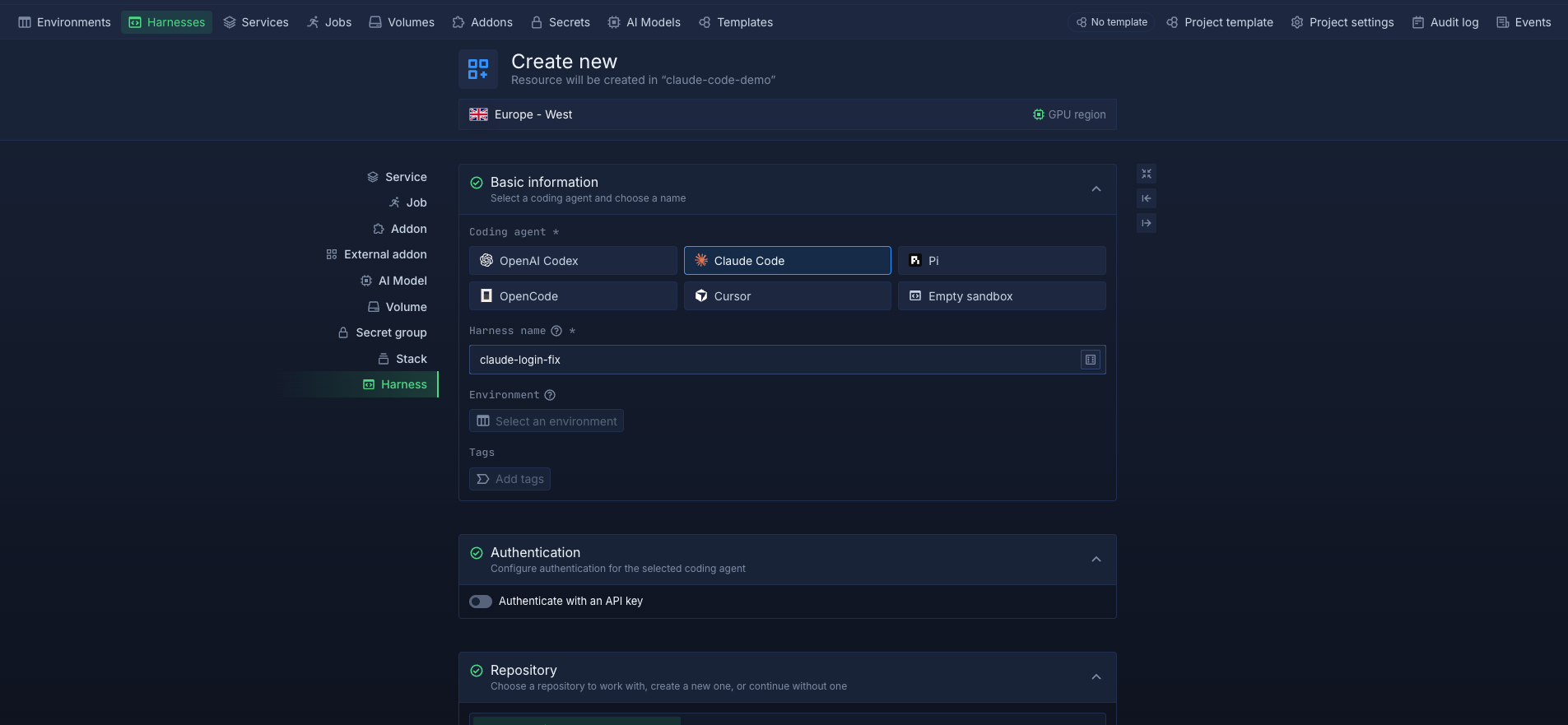
Under Authentication, choose how you want to authenticate the agent. Depending on the agent, you can use an API key or a linked account.
If you choose an authentication method that requires an interactive login, you can sign in when you first open the Cloud Harness.
Under Repository, select an existing repository and branch, create a new repository, or continue without a repository.
This gives the coding agent a ready-to-use workspace for working on your code.
Under Advanced, you can configure runtime variables, the runtime image, compute resources, and workspace storage.
Choose the resources and runtime configuration based on what your project and coding agent need. You can also configure networking and ports when the agent needs to run or preview an application.
Once the Cloud Harness is created, you can open its terminal and start working with your coding agent.
The agent can inspect the repository, modify files, install dependencies, run commands, and test changes from the cloud workspace.
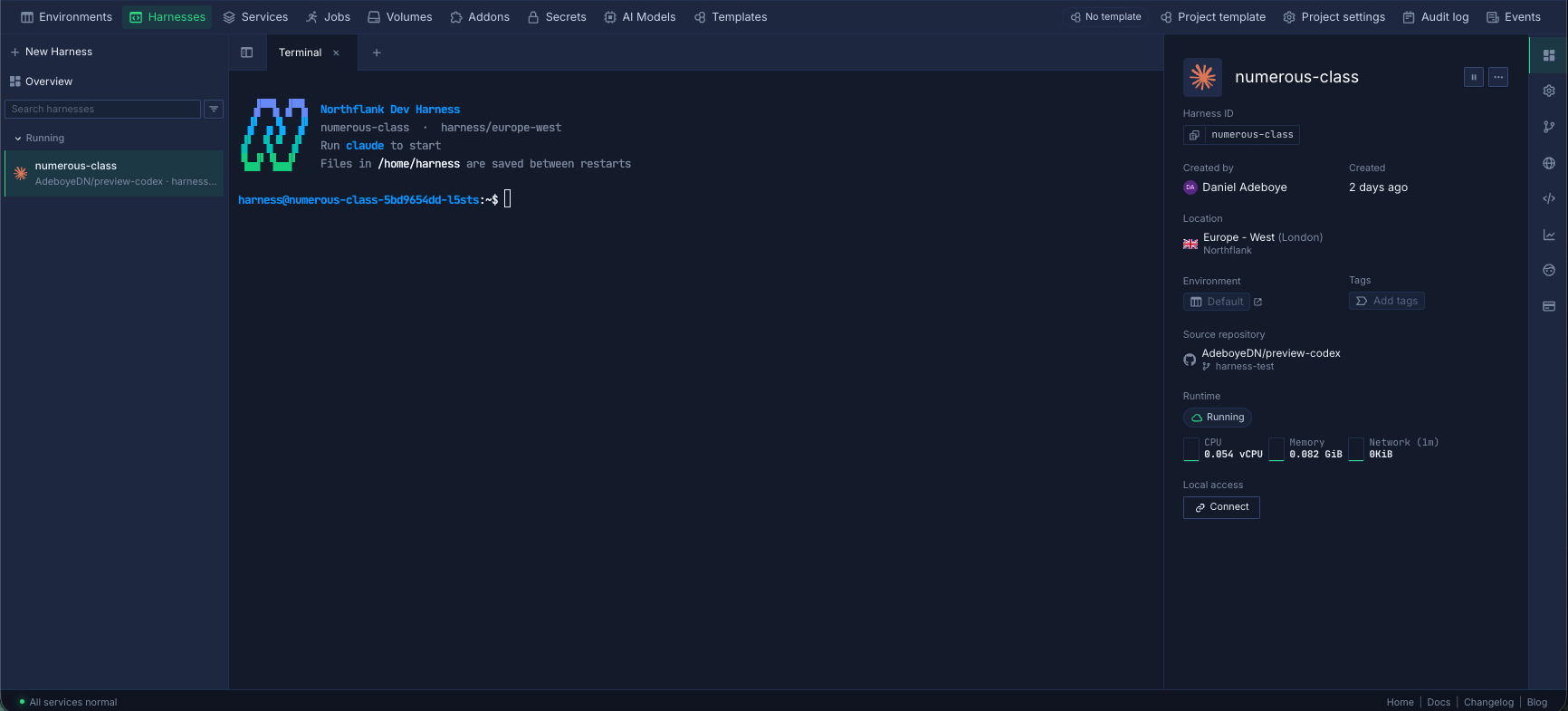
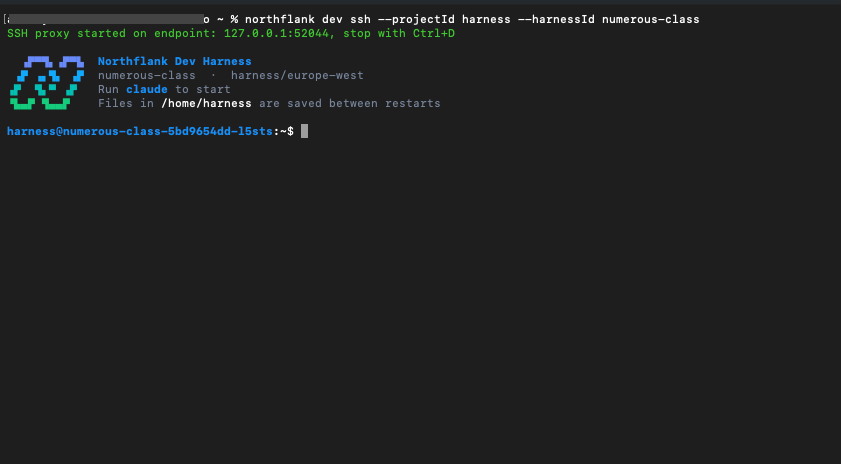
You can also connect to the same Cloud Harness from your local machine using SSH. Open the Cloud Harness overview, select Connect under Local access, copy the generated command, and run it with the Northflank CLI (install and authenticate the CLI).
This gives you a familiar terminal workflow while the coding agent and its workspace continue running in the cloud.
You can manage networking, environment variables, resources, and storage for your Cloud Harness. You can also pause, resume, and delete Cloud Harnesses as needed. You can update the configuration without losing your workspace files.
See the official guide to configuring and managing Cloud Harnesses.
A cloud coding agent is a coding agent that runs in a remote cloud environment rather than directly on your local machine. The agent can access a repository, execute commands, modify files, run tests, and use development tools from its cloud workspace.
The coding agent is responsible for reasoning and using tools, while the cloud environment provides the compute, storage, networking, and workspace where those tools run.
The right approach depends on the agent and workload, but a dedicated cloud workspace should provide isolated compute, repository access, persistent storage, controlled credentials, networking, and remote access.
A managed environment such as a Northflank Cloud Harness provides these resources without requiring you to provision and maintain the underlying infrastructure yourself.
Yes. Claude Code can run in a cloud workspace such as a Northflank Cloud Harness. You can authenticate Claude Code, connect a repository, configure the workspace, and access it through the Northflank dashboard or SSH. See the full Claude Code guide.
Yes. Codex can run in a Northflank Cloud Harness with a connected repository and configured workspace. You can access the environment through the dashboard or connect to it locally using SSH. See the full Codex guide.
A cloud environment can provide isolation and infrastructure controls, but security still depends on how the workspace and agent are configured. Limit repository, network, credential, and tool access to what the task requires, and review changes before merging them into production code.
A Cloud Harness provides the cloud workspace where an agent runs. The agent may also have its own command or tool sandbox, and these controls should be treated separately.



