
What are remote coding agents?
- A remote coding agent is a coding agent that runs on infrastructure separate from your local machine. You assign it a task, disconnect while it works, and reconnect remotely to monitor progress, provide input when needed, and review the results.
- Unlike a local coding agent, a remote agent does not depend on your laptop to keep running. It can continue working while you disconnect, use dedicated compute and credentials, and leave its work in a remote workspace for you or your team to review later.
- Northflank Cloud Harnesses provide the infrastructure to run remote coding agents in isolated cloud environments, with support for Claude Code, Codex, Cursor, OpenCode, Pi, or your own agent. Harnesses run on Northflank's managed cloud or in your own AWS, GCP, Azure, Oracle, or CoreWeave account through self-serve BYOC, with microVM isolation, persistent storage, configurable compute and networking, a web terminal, and SSH access.
Run remote coding agents with Northflank Cloud Harnesses, or book a demo to discuss your setup.
The first way most developers used coding agents was as a pair programmer in the terminal. The developer gave an instruction, watched the agent work, approved steps, and corrected it as it went. That works for interactive tasks, but it also ties the agent's execution to the developer's machine.
Running the agent remotely separates its execution environment from your laptop. The agent can run on dedicated infrastructure, continue working when you disconnect, and be accessed again when you need to check progress or review its work.
This article explains what remote coding agents are, how they differ from local coding agents, how remote tasks work, and what infrastructure they need to run safely.
A remote coding agent is a coding agent, such as Claude Code, Codex, or OpenCode, that runs on infrastructure separate from the developer's local machine. The developer connects to the remote environment to assign work, monitor progress, provide input when needed, and review the result.
The main difference from running an agent locally is that the agent's execution does not depend on your laptop. A remote coding agent can run on a server, VM, or cloud environment with its own compute, storage, networking, and credentials. You can disconnect from the environment while it continues running and reconnect later.
Local and remote describe different things. The simplest distinction is where the agent executes.
| Local coding agent | Remote coding agent | |
|---|---|---|
| Where it runs | Your laptop or workstation | Infrastructure away from your local machine |
| Local machine required | Yes | No |
| Compute | Uses your machine's resources | Uses dedicated remote resources |
| Availability | Depends on your machine | Can continue running after you disconnect |
| Access | Local terminal or editor | Remote interface, web terminal, SSH, or other client |
| Collaboration | Usually tied to one developer's machine | Remote environment can be accessible to teammates |
| Long-running tasks | Requires your machine to remain available | Can continue independently of your laptop |
A remote coding agent can run in a cloud environment, but remote and cloud are not synonymous. Remote describes the relationship between the agent's execution environment and your local machine, while cloud describes one type of infrastructure where that environment can run. A remote agent could also run on a dedicated server or VM.
For a deeper look at agents specifically running on cloud infrastructure, see What are cloud coding agents?.
A remote task follows the same basic lifecycle regardless of which agent runs it.
- The task is assigned: A developer writes the task with its scope, acceptance criteria, and how to verify the work, or the task comes from an issue or ticket.
- An environment is created: A workspace starts with the repository, the agent CLI, and the credentials and resources the task needs.
- The agent runs unattended: The agent reads the code, plans its approach, edits files, runs commands, and runs tests in a loop until the task is complete or it gets stuck.
- Progress can be saved along the way: The agent can commit and push changes to its own branch at checkpoints, so progress is preserved and visible if the task stops partway through.
- You check in: While the agent works, you can connect from any device to see what it is doing, or leave it until it is done.
- The agent prepares the result: When the task is complete, the agent pushes its branch for review and can open a pull request with a summary of the changes and any open questions.
- You review and merge: You review the pull request like any other, ask the agent for changes if needed, and merge.
- The environment is cleaned up: When the task is finished, the environment can be paused, retained for follow-up work, or deleted depending on the workflow.
Remote coding agents suit tasks that are well defined, take a long time, and can be verified with tests or other checks.
- Large refactors. Renaming a module, changing an interface used across the codebase, or moving to a new pattern across many files.
- Migrations. Moving to a new framework version, database client, or API, where the change is mechanical but touches a lot of code.
- Dependency upgrades. Upgrading packages, fixing breaking changes, and running the test suite until it passes.
- Adding test coverage. Writing tests for untested modules, where the agent can run the tests to confirm they work.
- Clearing a backlog of small bugs. Working through a list of well-scoped issues, one branch per issue.
- Overnight runs. Starting long tasks at the end of the day and reviewing the results the next morning.
- Parallel tasks. Running several agents on separate tasks at the same time, each in its own environment.
| Risk | What can happen | Mitigation |
|---|---|---|
| No one watching when a mistake happens | The agent runs a destructive command or deletes files while no one is there to stop it. | Run each task in an isolated environment, such as a microVM, that only contains the resources needed for that task. |
| Credentials in an unattended environment | A prompt injection or misbehaving agent uses or exposes credentials available to it. | Give the agent only the credentials it needs and revoke or rotate them when they are no longer required. |
| Compute left running | Finished or stuck agents continue using compute. | Pause or delete environments when tasks finish and check for idle environments. |
| Drift from what you intended | The agent solves a different problem or makes large unplanned changes. | Write a clear scope and acceptance criteria, ask the agent to commit meaningful progress, and review changes through a pull request. |
| Work lost when the environment fails | A crash or restart can interrupt the task and lose uncommitted changes. | Use persistent storage where appropriate and have the agent commit and push progress at checkpoints. |
Northflank Cloud Harnesses are cloud workspaces built for coding agents, giving remote coding agents the environment they need to work unattended. Each Harness is configured for one agent at creation, whether Claude Code, Codex, Cursor, OpenCode, Pi, or your own agent, with the agent CLI pre-installed and its credentials injected as environment variables. A Harness can clone a connected Git repository and branch on start, so the agent is ready to work as soon as you give it a task.
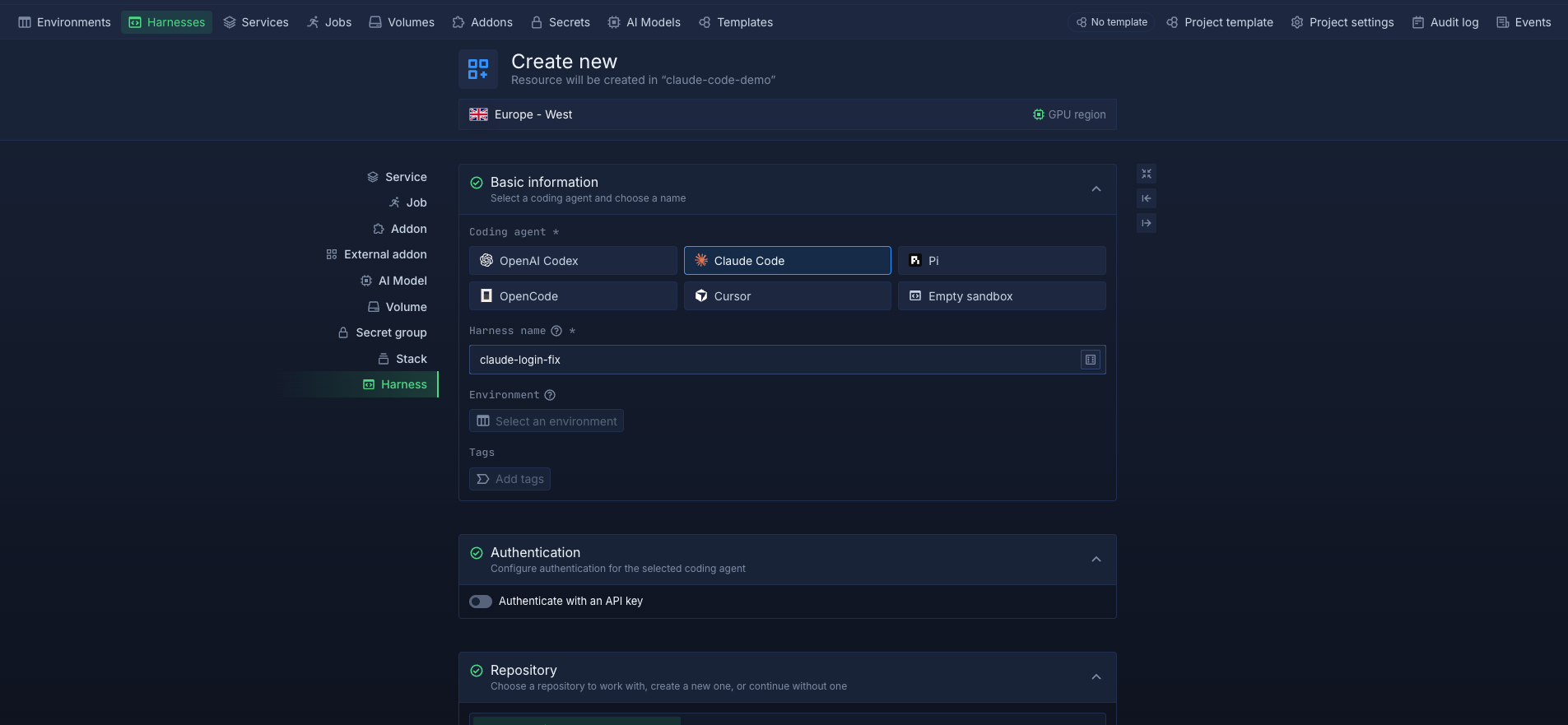
A Harness runs in the cloud independently of your laptop, so you can assign a task, close the session, and let the agent work. You can check in through the web terminal in the Northflank dashboard from any browser or over SSH from your own terminal. Teammates with access to the Harness can also connect to review progress or take over the task. Running one Harness per task keeps each remote task separate, with its own repository clone, compute, and credentials.
On Northflank Cloud, each Harness runs in its own isolated microVM. This gives each remote task its own isolation boundary from other Harnesses and the underlying host infrastructure. When workspace persistence is enabled, files are retained across restarts. When a task is waiting on review, you can pause the Harness and resume it later to continue the work. Billing runs per second of active compute.
For teams with compliance or data residency requirements, BYOC runs Harnesses inside your own AWS, GCP, Azure, Oracle, or CoreWeave account, so remote agents can work on your code within your own cloud infrastructure.
Set up a remote coding agent step by step with How to run remote coding agents, or get started on Northflank directly.
They overlap, but they describe different things. An autonomous coding agent can complete tasks without step-by-step human approval. A remote coding agent runs on infrastructure away from your machine and can continue working while you are disconnected. A remote agent can be autonomous, but it can also require human input at different points in the task.
No. Remote coding agents can take on well-defined tasks such as refactors, migrations, and test coverage. Developers still decide what to build, define the tasks, review the results, and own what gets merged. Remote agents change how developers spend their time, moving more of it toward defining work and reviewing it.
Yes. Claude Code can run on a server or cloud environment, where you can give it a task and disconnect while it works. On Northflank, create a Harness configured for Claude Code, connect your repository, start claude in the Harness terminal, and check in later from the web terminal or over SSH. See How to run Claude Code in the cloud for the setup.
Review the commits and pull request. You can ask the agent to commit meaningful progress and summarize its changes, decisions, tests, and open questions in the pull request description. You can also reconnect to the environment to inspect the agent's session history and terminal output.
Remote coding agents can run on your own server or VM, on hosted services from model vendors, or in managed cloud environments built for coding agents, such as Northflank Cloud Harnesses. The options differ in setup effort, isolation, supported agents, and where your code runs. How to run remote coding agents compares these approaches in detail.


