
Best cloud environments for AI coding agents in 2026
- Northflank: Best default for running Claude Code, Codex, Cursor, OpenCode, Pi, and other coding agents in isolated, persistent cloud environments, alongside the sandboxes, services, databases, and infrastructure they build and test against.
- GitHub Codespaces: Best for teams on GitHub that want a dev container per repository.
- Ona (part of OpenAI): Best for agent-driven development environments with its own built-in agent.
- Coder: Best for self-hosted development environments on infrastructure you already operate.
- E2B: Best for running AI-generated code in short-lived sandboxes through an SDK.
Northflank runs coding agents in Cloud Harnesses, isolated microVM environments with the agent pre-installed, a connected repository, persistent workspaces, a web terminal, and SSH access. The same platform runs isolated sandboxes, application deployment, preview environments, databases, and CI/CD, so agents and the applications they work on can share one platform. You can also deploy Harnesses in your own cloud with self-serve BYOC when you need more control over your infrastructure and data. Get started with Northflank or book a demo.
A coding agent such as Claude Code or Codex needs more than a place to execute code. It reads and edits a repository, runs builds and tests, installs packages, and can keep working for an hour or more without supervision. The environment it runs in determines how safely and reliably it can do that.
- Isolation: The agent runs model-generated commands. A microVM provides a stronger isolation boundary than a container because containers share the host kernel with other workloads. Stronger isolation limits what a mistake or prompt injection can reach.
- Supported agents: Some platforms can run any CLI-based agent you install. Others are built around one vendor's agent or require manual setup for each one.
- Persistence: Long-running tasks need the workspace to survive pauses, restarts, and disconnects, with files, branches, and installed packages kept in place.
- Interactive access: A web terminal or SSH access lets you check on the agent, answer its questions, and review its work while it runs.
- Unattended operation: The environment needs to keep running when you close your laptop, so the agent can finish its work without your machine staying online.
- Secrets and repository access: Credentials should be injected at runtime and scoped to the task, while the repository should be cloned at a known branch.
- Team access: Teammates should be able to connect to the same environment to review or continue the work.
- Where it runs: Teams with compliance or data residency requirements may need the option to run environments in their own cloud account or on their own infrastructure.
- Billing model: Agents are often idle between tasks. Per-second billing and the ability to pause environments can keep idle time from turning into unnecessary cost.
These criteria separate two kinds of platform. A cloud development environment gives the agent a full, interactive workspace that persists across sessions. A sandbox API gives an application a short-lived execution environment that it creates and destroys programmatically. Coding agents that work on a repository over long sessions fit the first model. AI products that execute generated code in many short runs fit the second.
Northflank Cloud Harnesses are isolated cloud environments built specifically for running coding agents. You create a Harness for an agent such as Claude Code, Codex, Cursor, OpenCode, Pi, or your own agent, and configure its authentication, repository, branch, resources, and environment. You can work with the Harness through the web terminal in the Northflank dashboard, over SSH with the Northflank CLI, or from VS Code or Cursor through an SSH connection.
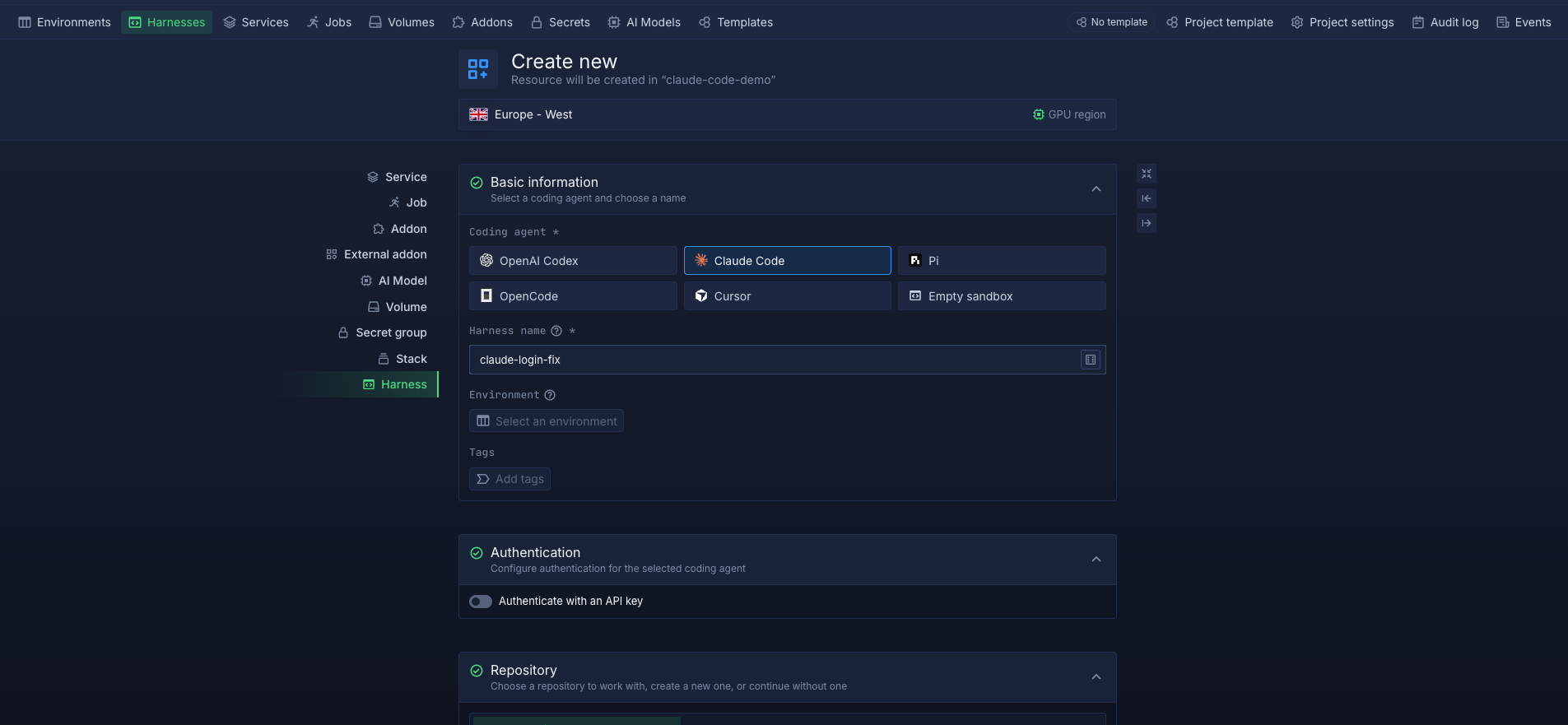
Each Harness runs in its own isolated microVM, giving every agent task a dedicated environment. Workspace files persist across pauses, restarts, and redeployments by default, and a Harness keeps running until you pause or delete it, whether or not a terminal is open. Harnesses run on Northflank's managed cloud or inside your own cloud account through BYOC, on the same platform that runs your services, databases, jobs, and sandboxes.
Key features:
- Any coding agent: Harnesses for Claude Code, Codex, Cursor, OpenCode, and Pi, plus Bring Your Own Agent for other agents and an empty sandbox with no agent installed.
- MicroVM isolation: each Harness runs in its own isolated microVM, providing a stronger isolation boundary between agent workloads
- Persistent workspaces: files persist across pauses, restarts, and redeployments by default, and persistence can be turned off at creation for throwaway environments
- Pause, resume, and delete: pausing scales a Harness to zero and stops compute billing, resuming restores the workspace, and deleting removes it for good
- Interactive access: a web terminal with multiple tabs, SSH through the Northflank CLI, and editor access from VS Code or Cursor
- Repository and secrets: connect a repository and branch at creation, and add runtime variables and secret files to each Harness
- Team and private modes: team Harnesses let teammates work in the same environment at the same time, while private Harnesses restrict workspace access to their creator
- Networking: add public or private ports and attach domains to publicly exposed ports, so agents can run and preview web services
- BYOC: run Harnesses in your own AWS, GCP, Azure, Oracle, or CoreWeave account, with self-serve setup
- API access: create, pause, resume, and delete Harnesses through the Northflank API
Best for: teams running Claude Code, Codex, or several coding agents that need isolated, persistent cloud environments, with the option to keep code and credentials inside their own cloud account.
Pricing: usage-based Northflank compute pricing, billed per second. CPU is $0.01667 per vCPU per hour, memory is $0.00833 per GB per hour, and disk is $0.15 per GB per month. Paused Harnesses do not use compute. Free projects support one Harness. With BYOC, you pay your provider the infrastructure cost. See Northflank pricing.
GitHub Codespaces provides cloud development environments for GitHub repositories. Each Codespace runs in its own virtual machine, built from a dev container configuration in the repository, and you can open it in the browser, VS Code, or over SSH with the GitHub CLI.
Coding agents such as Claude Code or Codex can be installed in a Codespace like any other CLI tool. Codespaces is designed around interactive development, and environments stop after a configurable idle timeout, which can interrupt agents meant to run unattended. Environments run on GitHub's infrastructure, with no option to run them in your own cloud account.
Best for: teams already using GitHub that want a consistent dev container per repository and are comfortable running agents on GitHub-hosted infrastructure.
Pricing: compute is billed per hour by machine size, starting at $0.18 per hour for a 2-core machine and $0.36 per hour for a 4-core machine, and storage is $0.07 per GB per month. Personal accounts get a monthly free allowance of compute hours and storage. Organization plans do not include a free quota.
Ona is a cloud development environment platform built around software engineering agents and is now part of OpenAI's Codex team. It creates environments from repository configuration and provides its own agent, while also supporting third-party coding agents such as Claude Code. Each environment is designed to give an agent a complete development environment with its codebase, tools, dependencies, services, and network access rather than just a code execution sandbox.
Ona supports environments running inside customer-controlled AWS or GCP VPCs on its Enterprise offering, with scoped credentials, security controls, and audit capabilities. Its integration with OpenAI's Codex team also makes Ona particularly relevant for teams building workflows around Codex and background agents.
Best for: teams that want an agent-oriented development environment platform, especially those planning to use Ona's own agent alongside third-party agents.
Pricing: Custom pricing. Contact Ona's sales team for pricing.
Coder is an open-source platform for self-hosted cloud development environments. You deploy Coder on your own infrastructure and define workspaces as Terraform templates, which can run as Kubernetes pods, Docker containers, or cloud VMs depending on the template.
Coder supports Claude Code, Codex, Cursor, and other AI coding agents inside its workspaces. Coder Agents are available on Premium, while AI Premium adds unlimited Coder Agents and API-driven background workflows. Because Coder runs on infrastructure you operate, it gives you control over networking, data location, and the workspace runtime, but your team also has to provision, secure, and maintain the platform and its infrastructure.
Best for: platform teams that want self-hosted development environments on infrastructure they already run and have the capacity to operate the platform themselves.
Pricing: the Community edition is free and open source. Premium is priced annually per user, and AI Premium is custom, with pricing available through Coder's sales team. You also pay for the infrastructure the workspaces run on.
E2B provides sandboxes for AI applications, built on Firecracker microVMs. Developers create and control sandboxes through E2B's SDKs, run code inside them, and shut them down when the task is complete. Custom sandbox templates let you install tools, including coding agent CLIs, into the sandbox image.
E2B is designed for programmatic, short-lived execution inside AI products rather than long interactive sessions. Session length depends on the plan, from up to 1 hour on Hobby to up to 24 hours on Pro, with multi-day and persistent sessions on Enterprise.
Best for: AI products that need to execute model-generated code in many short-lived, isolated sandboxes through an SDK.
Pricing: the Hobby plan is free with a one-time $100 usage credit. Pro is $150 per month plus usage. Usage is billed per second at $0.000014 per vCPU and $0.0000045 per GiB of memory. Enterprise is custom, with a $3,000 per month minimum, and includes BYOC deployment.
| Platform | Environment type | Isolation | Coding agents | Persistence | Interactive access | Runs in your cloud |
|---|---|---|---|---|---|---|
| Northflank | Cloud development environment for coding agents | MicroVM per Harness | Claude Code, Codex, Cursor, OpenCode, Pi, or BYOA | Persistent, pause and resume | Web terminal, SSH, VS Code, Cursor | Yes, self-serve BYOC |
| GitHub Codespaces | Cloud development environment | VM per Codespace | Install any CLI agent yourself | Persistent until deleted, stops on idle timeout | Browser, VS Code, SSH | No |
| Ona | Cloud development environment with built-in agent | Managed environment per task | Ona's agent, Claude Code, Codex | Environment lifecycle depends on configuration and plan. | Browser, editors | Enterprise, customer VPC |
| Coder | Self-hosted cloud development environment | Depends on your templates | Install any CLI agent yourself | Depends on your templates | Browser, editors, SSH | Yes, self-hosted |
| E2B | Sandbox API | Firecracker microVM | Install agent CLIs in custom templates | Session limits by plan | SDK | Enterprise |
Choose Northflank when you want isolated, persistent environments for one or more coding agents, set up for you, with the option to run them in your own cloud account. Choose GitHub Codespaces when your team already works in GitHub and agents are an addition to developer workspaces. Choose Ona when you want an agent-first platform and plan to use its own agent. Choose Coder when you need self-hosting and have a platform team to operate it. Choose E2B when you are building an AI product that runs generated code in short sandboxes through an SDK.
Pricing varies significantly across these platforms. The table below uses publicly listed pricing where available; custom-priced platforms are marked accordingly. The 4 vCPU, 16 GB estimate is only included where the published pricing supports a reasonable comparison.
| Platform | CPU | Memory | Storage | Plan fee | 4 vCPU, 16 GB for one hour |
|---|---|---|---|---|---|
| Northflank | $0.01667 per vCPU per hour | $0.00833 per GB per hour | $0.15 per GB per month | None on pay-as-you-go | About $0.20 |
| GitHub Codespaces | Billed per machine size | Included in machine size | $0.07 per GB per month | None, free allowance for personal accounts | $0.36 (4-core machine) |
| Ona | NA | NA | NA | NA | NA |
| Coder | Your infrastructure cost | Your infrastructure cost | Your infrastructure cost | Community free, Premium per user | Your infrastructure cost |
| E2B | $0.000014 per vCPU per second | $0.0000045 per GiB per second | 10 to 20 GiB included by plan | Pro $150 per month | About $0.46 |
| Platform | BYOC available | Clouds supported | Access model | Pricing model |
|---|---|---|---|---|
| Northflank | Yes | AWS, GCP, Azure, Oracle, CoreWeave, and more | Self-serve | You pay your provider the infrastructure cost |
| GitHub Codespaces | No | Not applicable | Not applicable | Not applicable |
| Ona | Yes | AWS, GCP | Enterprise plan | Custom |
| Coder | Self-hosted | Any infrastructure you run | Self-managed | Community free, Premium per user |
| E2B | Yes | Not listed publicly | Enterprise plan | Custom, $3,000 per month minimum |
A cloud development environment is a full workspace for interactive work: a shell, a cloned repository, installed tools, and files that persist across sessions. A sandbox is an isolated, usually short-lived environment that an application creates through an API to execute code. Coding agents working on a repository over long sessions fit a development environment. AI products that run generated code in many small executions fit a sandbox. Northflank offers both, with Cloud Harnesses for coding agents and Sandboxes for programmatic execution.
Coding agents run commands generated by a model, often without supervision, so the environment should contain the impact of any mistakes. A microVM provides a stronger isolation boundary between the workload, host, and other workloads than a container that shares the host kernel. For agents working on sensitive code or running unattended, stronger isolation can reduce the impact of a compromised or misbehaving workload.
Yes, on some platforms. Northflank runs Cloud Harnesses in your own AWS, GCP, Azure, Oracle, or CoreWeave account through self-serve BYOC. Ona and E2B offer VPC or BYOC deployment on their Enterprise plans. Coder is self-hosted on infrastructure you run. GitHub Codespaces runs on GitHub's infrastructure.
It depends on how long agents run and how much time they spend idle. Usage-based pricing billed per second, combined with the ability to pause environments, keeps cost closer to actual work. On Northflank, a 4 vCPU, 16 GB Harness costs about $0.20 per hour of active compute, and paused Harnesses use no compute. Free tiers, such as Codespaces' personal allowance or Northflank's free project with one Harness, cover light use.
Cloud environments for AI coding agents range from developer workspaces with agents added on, such as GitHub Codespaces and Coder, to agent-first platforms such as Ona, to sandbox APIs such as E2B. The right choice depends on whether your agents need long, interactive sessions on a repository or short programmatic runs, how strongly they need to be isolated, and whether your code needs to stay in your own cloud.
Northflank Cloud Harnesses are built specifically for coding agents. Each Harness runs Claude Code, Codex, Cursor, OpenCode, Pi, or your own agent in an isolated microVM, keeps its workspace across pauses, and can run on Northflank's managed cloud or in your own AWS, GCP, Azure, Oracle, or CoreWeave account. Because Harnesses run on the same platform as Northflank services, databases, sandboxes, preview environments, and CI/CD, agents can build and test applications alongside the infrastructure they depend on.
Get started with Northflank Cloud Harnesses (self-serve), read the Cloud Harness quickstart, or book a demo to discuss your setup.



