
What are dev environments?
- A dev environment is the workspace where code is written, run, and tested before it is shipped. It includes the source code, runtime and dependencies, development tools, configuration and secrets, supporting services such as databases, and the compute needed to run them.
- Dev environments can run locally, inside containers, or on remote cloud infrastructure. They can also be configured specifically for AI coding agents that execute commands, run tests, and work on tasks autonomously.
- Northflank Cloud Harnesses provide cloud dev environments for developers and AI coding agents, with support for Claude Code, Codex, Cursor, OpenCode, Pi, bring your own agent, or an empty workspace. Run them on Northflank's managed cloud or in your own AWS, GCP, Azure, Oracle, or CoreWeave account through self-serve BYOC, with microVM isolation, persistent storage, a web terminal, SSH access, and VS Code and Cursor support.
Create a cloud dev environment for yourself or your coding agents with Northflank Cloud Harnesses, or book a demo to discuss your setup.
A dev environment used to mean a developer's own machine, configured with the tools, runtimes, and dependencies needed to run an application. But local setups can drift between developers, making onboarding harder and creating the familiar “works on my machine” problem.
Today, dev environments can run locally, inside containers, or in the cloud. They can also provide isolated workspaces where AI coding agents access repositories, execute commands, and work through tasks autonomously. This guide explains what a dev environment is, what it includes, the main types, and what changes when the environment is built for AI coding agents.
A dev environment, short for development environment, is the workspace where code is written, run, debugged, and tested. It combines the source code with everything needed to work on it, including the language runtime, dependencies, development tools, configuration, and supporting services such as databases and APIs.
The term can also refer to the development stage in a deployment pipeline. In this article, a dev environment means the workspace where code is changed and tested, rather than a shared deployment stage before QA, staging, and production. For more on how these stages differ, see Dev, QA, preview, test, staging, and production environments.
- Source code and repository: A clone of the project's repository, checked out on a working branch, with Git configured so changes can be committed and pushed.
- Runtime and dependencies: The language runtime, such as Node.js, Python, Go, or the JVM, at the version the project expects, plus the packages and libraries it depends on.
- Tooling: The editor or IDE, debugger, linters, formatters, build tools, and test runner. For AI-assisted development, this can also include a coding agent CLI such as Claude Code or Codex.
- Configuration and secrets: Environment variables, configuration files, and credentials for services the code calls, such as API keys and database connection strings. These should be scoped to development and kept out of the repository.
- Supporting services: The databases, caches, queues, and internal APIs the application depends on, either running alongside the code or reachable over the network. Teams often use local or test instances to avoid affecting production data.
- Compute and storage: The CPU, memory, and disk resources the environment uses, along with storage for files and other work that needs to persist between sessions.
- Local dev environments: run directly on a developer's laptop or workstation. They provide direct access to local tools and can work offline, but each developer maintains their own setup. Differences in installed tools, dependencies, and configuration can cause environments to drift, and available resources are limited by the machine.
- Containerized dev environments: package the runtime, tools, and dependencies into a container image to make setups easier to reproduce. Dev containers, defined in a
devcontainer.jsonfile, are a common way to specify a development environment for compatible editors and platforms. Containers can run locally or remotely, although consistency still depends on how the image and configuration are maintained. - Remote and cloud dev environments: run on servers or cloud infrastructure instead of the developer's machine. Developers connect through a browser, a local IDE over SSH, or a terminal. Remote environments can provide more compute resources, centralised configuration, and access to cloud-hosted services. For a deeper look, see What is cloud development?.
- Agent dev environments: provide workspaces for AI coding agents such as Claude Code or Codex. They include the repository, tools, compute, and scoped credentials the agent needs to execute commands, modify code, and run tests. These environments can be configured to run unattended and kept separate for different tasks or agents.
| Factor | Local | Containerized | Remote or cloud | Agent environment |
|---|---|---|---|---|
| Where it runs | Developer's machine | Local machine or remote host | Remote server or cloud | Local or remote infrastructure, often isolated per task |
| Setup | Installed and maintained locally | Defined through an image and configuration | Provisioned on remote infrastructure | Configured for the agent and task |
| Team consistency | Can vary between machines | Reproducible when images and configuration are maintained | Can be standardised with shared templates | Can use a consistent configuration for each task |
| Isolation | Shares the host environment | Container-level isolation, sharing the host kernel | Depends on the platform and runtime | Depends on the isolation model; may use containers or microVMs |
| Persistence | Files remain on the machine | Depends on volumes and container lifecycle | Depends on workspace storage and lifecycle | Depends on workspace storage and lifecycle |
| Access from other devices | Requires additional remote access setup | Possible when running on a remote host | Usually available through a browser, SSH, or an IDE | Depends on how the agent environment is hosted and exposed |
| Best for | Individual development and offline work | Reproducible tools and dependencies | Shared workspaces, remote access, and larger workloads | Unattended coding tasks and parallel agents |
A dev environment for AI coding agents is a workspace where an agent such as Claude Code, Codex, or OpenCode can access a repository, edit code, execute commands, and run tests, often without a developer supervising each step.
Because agents can run unattended and work on multiple tasks in parallel, their environments need appropriate isolation, scoped credentials, and a clear persistence strategy. Separate environments also help prevent concurrent tasks from interfering with each other.
| Requirement | Developer's environment | AI coding agent's environment |
|---|---|---|
| Interaction | Interactive editing and debugging | Often works unattended |
| Lifetime | Reused across tasks | Temporary or persistent |
| Isolation | Depends on the local setup | Limits access to unrelated workloads |
| Credentials | Used by the developer's tools | Scoped to the task |
| Parallel work | Often managed with branches | Separate environments for concurrent tasks |
| Access | Editor and terminal | Agent terminal, with web terminal or SSH for review |
The infrastructure that provides an agent with its workspace and execution environment is often called a coding harness. See What is a coding harness?.
Northflank provides cloud dev environments through Cloud Harnesses. You can create a Harness with Claude Code, Codex, Cursor, OpenCode, Pi, or bring your own agent, or start with an empty environment and configure your own development tools.
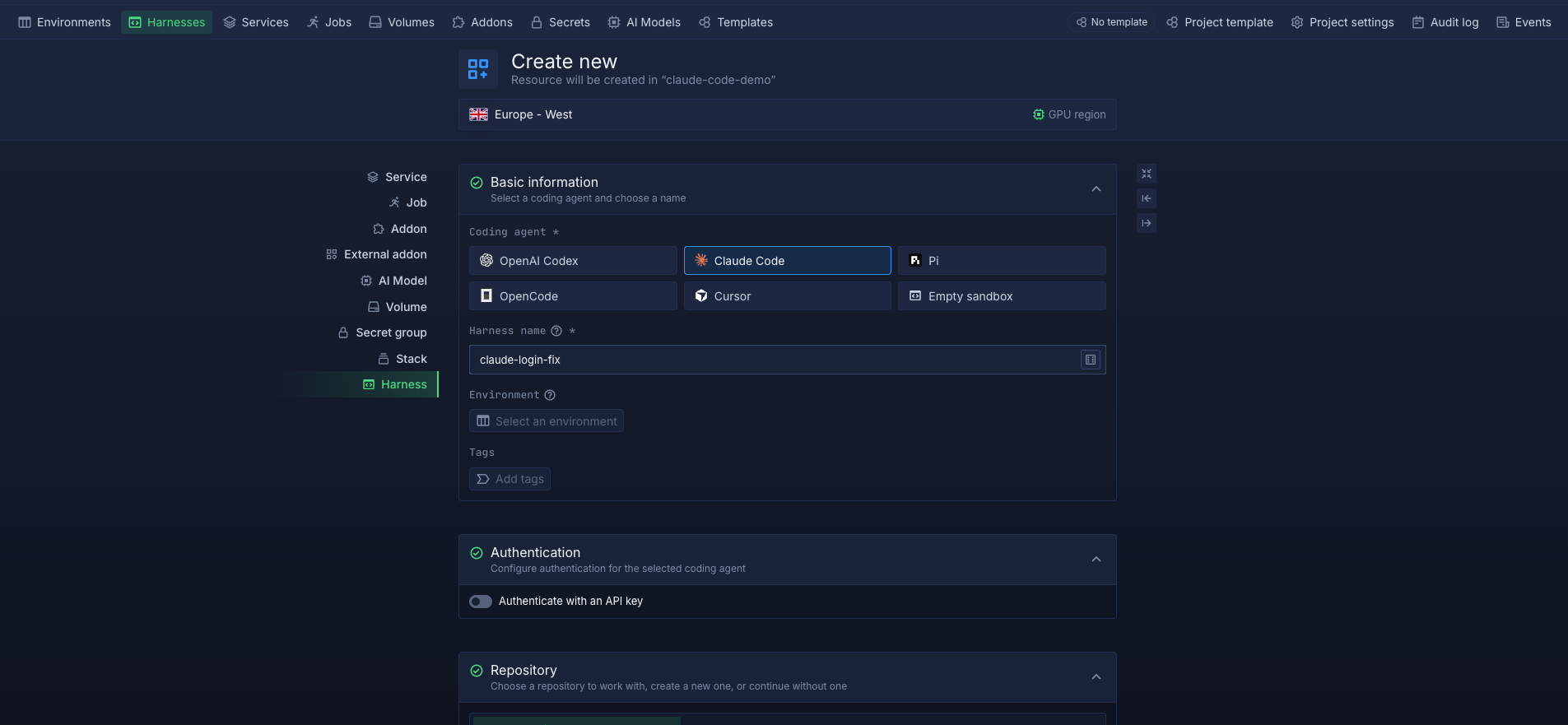
Each Harness runs in an isolated microVM with configurable compute, networking, environment variables, and secret files. You can connect a repository and branch, customise the runtime image, and access the workspace through the web terminal, SSH, VS Code, or Cursor. Workspace files persist across pauses, restarts, and redeployments, so you can return to unfinished work without rebuilding the environment. Teammates can also access a shared Harness to collaborate on a task, while private Harnesses restrict workspace access to their creator. You can pause a Harness to scale compute to zero and stop compute billing, or delete it when you're done.
Harnesses run on Northflank's managed cloud or in your own AWS, GCP, Azure, Oracle, or CoreWeave infrastructure through bring your own cloud (BYOC). Northflank also provides application deployments, managed databases, jobs, CI/CD pipelines, and preview environments to test the applications your agents build.
Get started with Cloud Harnesses, or explore our guides on running coding agents in the cloud and giving agents ephemeral development environments.
A dev environment is the workspace where code is written, run, and tested while it is being changed. A development stage is a phase in a deployment pipeline where code is deployed for development and validation before progressing through stages such as QA, staging, and production. The workspace is where development happens; the stage is part of the delivery process.
A dev container is a development environment configured through a development container specification, commonly defined in a devcontainer.json file in the repository. It can specify the base image, tools, extensions, and setup commands so developers can reproduce the environment. Dev containers can run locally with Docker or on cloud platforms that support the specification.
They overlap. A remote development environment runs on a machine separate from the developer's own computer, including a server managed by the team. A cloud development environment runs on cloud infrastructure, often with workspace provisioning, storage, and access managed by a platform.
Yes, if the environment supports a compatible remote connection. With Northflank Cloud Harnesses, you can connect VS Code or Cursor over SSH using the Northflank CLI, or work directly in the browser through the web terminal.
A dedicated environment can help agents work independently, particularly when running unattended or in parallel. Separate environments help isolate tasks, limit access to the resources and credentials each agent needs, and reduce conflicts between concurrent workloads.



