
Bring your own cloud app hosting: how BYOC works and when to use it
- Bring your own cloud (BYOC) app hosting is a deployment model where a vendor's software runs inside your own cloud account. Your workloads and data remain within your cloud boundary, while the vendor manages the software through a remote control plane.
- BYOC sits between traditional SaaS, where the vendor typically runs the software and stores your data, and self-hosted, where you generally run and operate everything yourself. You get a managed platform experience with control over where your data lives.
For teams that need a managed deployment platform without moving data outside their cloud account, Northflank's BYOC provisions and manages Kubernetes clusters inside your VPC, then provides a full platform layer on top: services, databases, CI/CD pipelines, preview environments, and GitOps, across AWS, GCP, Azure, Oracle, Civo, and CoreWeave, with support for on-premises and bare-metal infrastructure via BYOK (Bring Your Own Kubernetes).
Bring your own cloud (BYOC) app hosting is a deployment model where the platform runs inside your own cloud account rather than on the vendor's infrastructure. Engineering teams get a managed platform experience while keeping workloads and data within their existing cloud boundary.
This article covers how BYOC works, how it compares to SaaS (software as a service) and self-hosted models, when it makes sense, and how Northflank implements it across major cloud providers.
Bring your own cloud app hosting is a model where a deployment platform splits into two planes. The control plane stays with the vendor and handles orchestration, updates, and management. The data plane runs inside the customer's cloud account and typically handles workloads, databases, volumes, secrets, and networking resources.
It is worth noting upfront that BYOC app hosting is not the same as self-hosted cloud storage solutions. BYOC app hosting is about running a full application deployment platform inside your own cloud account, with the vendor continuing to manage the software on your behalf.
The terminology around deployment models gets used inconsistently. This table covers the distinctions worth understanding before making an infrastructure decision.
| Model | Where it runs | Who operates it | Where data lives | Typical use case |
|---|---|---|---|---|
| Multi-tenant SaaS | Vendor's cloud, shared | Vendor | Vendor's cloud | Default for most SaaS products |
| Single-tenant SaaS | Vendor's cloud, dedicated | Vendor | Vendor's cloud | Enterprise SaaS with stricter isolation needs |
| BYOC | Customer's cloud account | Vendor (control plane) | Customer's cloud | Regulated industries, data residency requirements |
| Self-hosted | Customer's environment | Customer | Customer's environment | Full control, customer takes on operations |
| On-premises | Customer's data center | Customer | Customer's data center | Air-gapped or sovereign deployments |
Single-tenant SaaS is the model most commonly confused with BYOC. The distinction is that single-tenant SaaS still runs in the vendor's cloud on dedicated infrastructure. With BYOC, the workloads and data generally run in the customer's own cloud account.
Understanding the architecture is the clearest way to understand what BYOC provides and what it does not.
The control plane runs in the vendor's infrastructure and handles orchestration, updates, and management of the software. The data plane runs inside the customer's cloud account and contains the workloads, data, and networking resources. In most BYOC architectures, only orchestration metadata passes through the control plane; application data does not. The specific boundaries vary by platform, so reviewing the architecture documentation of any platform you evaluate is worthwhile.
To use a BYOC platform, you connect your cloud account by providing the platform with the credentials or permissions it needs to interact with your cloud environment. The specific setup steps and the degree of infrastructure management the platform takes on vary by provider and platform.
Once the infrastructure is set up, you deploy workloads through the platform's management interface. The platform handles scheduling workloads onto the underlying infrastructure within your cloud account. How workloads are defined and deployed depends on the specific platform you are using.
For teams running workloads on AWS, GCP, Azure, or Oracle that need a managed deployment platform without moving data outside their cloud account, Northflank's BYOC provisions and manages Kubernetes clusters inside your cloud account, with full support for services, databases, pipelines, preview environments, and GitOps. Get started (self-serve) or book a demo if you have specific infrastructure or compliance requirements.
- Use other cloud providers with Northflank: overview of how BYOC works and how to connect your cloud account
- BYOC and BYOK requirements: minimum infrastructure requirements before you connect
- Deploy and scale node pools: configure compute, spot instances, and availability zones for your cluster
- See how Upwork's Lifted runs production workloads inside its own VPC with Northflank and uses BYOC for infrastructure control, compliance, and operational visibility.
BYOC is not the right model for every team. A few common characteristics tend to define the situations where it applies, outlined below.
Teams subject to GDPR, HIPAA, SOC 2, or similar frameworks often need workloads and data to remain within specific geographic or organisational boundaries. BYOC platforms are generally designed to keep the data plane within the customer's cloud account, which can support meeting those requirements. Northflank is SOC 2 Type 2 compliant and HIPAA compliant, and signs BAAs directly with customers handling PHI, on both managed cloud and BYOC. This applies independently of which deployment model a team chooses.
It is worth being precise here: whether a specific BYOC implementation satisfies the data residency dimension of a given framework depends on the platform's architecture, and compliance remains a shared responsibility between the customer, the cloud provider, and the platform.
Organisations with existing cloud commitments, credits, or enterprise agreements may be able to apply them to the infrastructure consumed by BYOC workloads, depending on how the platform structures its billing.
In some BYOC platforms, infrastructure costs flow directly through the customer's cloud provider account rather than through the vendor. It is worth reviewing how any platform you evaluate handles billing before committing.
Some teams need CI/CD, deployment pipelines, preview environments, and managed databases but cannot place workloads or data on a vendor's shared infrastructure. BYOC platforms are generally designed to provide the platform layer while keeping data within the customer's cloud account, though the degree of isolation varies by platform and implementation.
Managed software as a service (SaaS) deployments, where the vendor runs the platform on shared infrastructure, are lower friction to start with in certain situations. Small teams with no regulatory requirements and no existing cloud commitments may find the overhead of connecting and maintaining a cloud account alongside a platform subscription higher than a fully managed SaaS deployment.
If data residency is not a constraint and cost consolidation against cloud commitments is not a factor, a fully managed SaaS deployment is worth considering first. BYOC tends to make more sense as compliance requirements and cloud footprint grow.
Northflank is a developer platform that abstracts the complexity of Kubernetes infrastructure, giving teams a consistent interface to deploy services, databases, CI/CD pipelines, and preview environments across multiple cloud providers.
Through its BYOC offering, Northflank provisions and manages Kubernetes clusters inside your own cloud account across AWS, GCP, Azure, Oracle, Civo, and CoreWeave, with support for on-premises and bare-metal infrastructure via BYOK (Bring Your Own Kubernetes). Through BYOC, workloads, databases, volumes, and secrets run inside your VPC. Northflank does not access workload data or secrets.
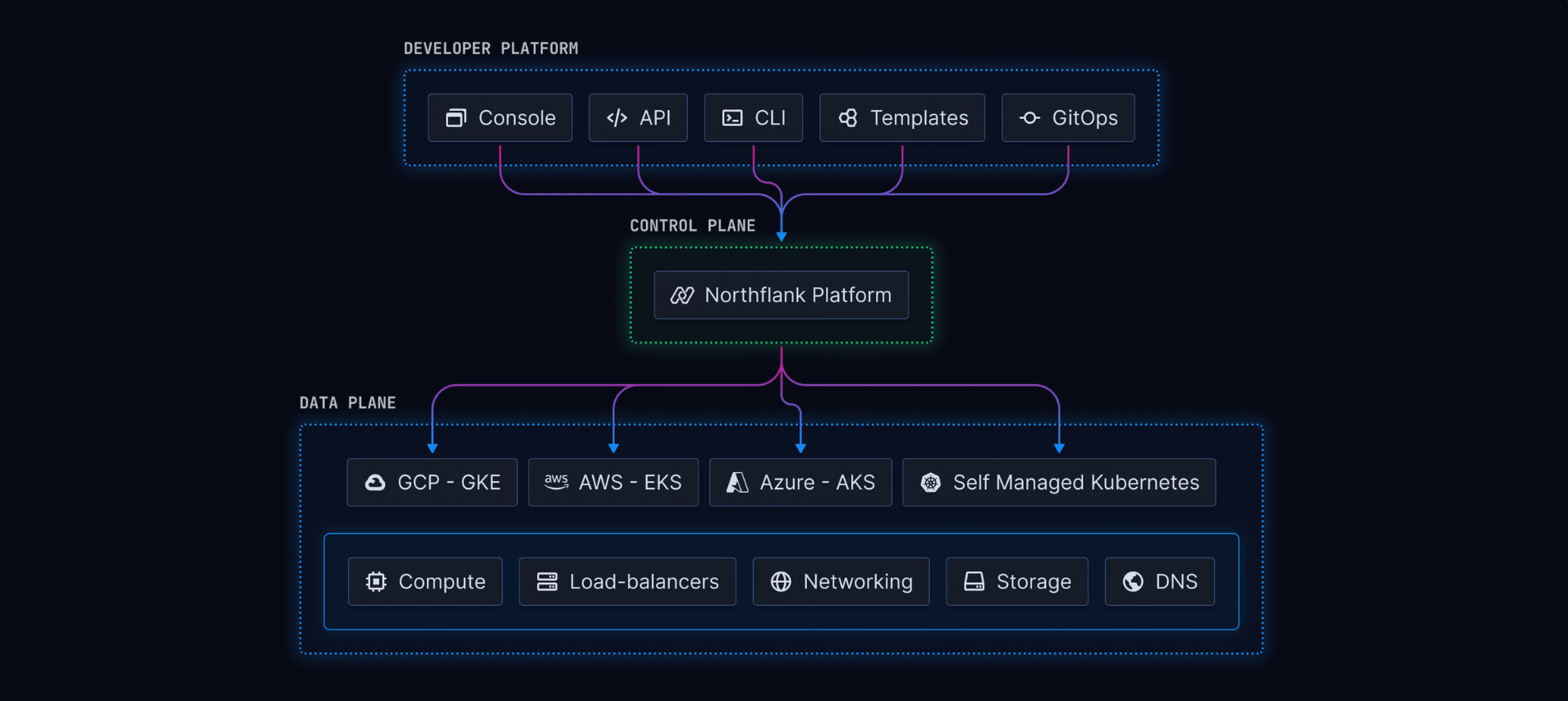
Once your cluster is connected, Northflank provides a full platform layer on top of your infrastructure.
- Cluster and infrastructure management: Northflank provisions and manages Kubernetes clusters using the provider's native managed Kubernetes service. This covers cluster lifecycle management, node pool configuration, spot instance support for cost reduction on interruption-tolerant workloads, multi-availability-zone deployment for redundancy, and custom resource plans for workload sizing.
- Developer platform layer: Northflank's core tooling available on managed cloud is also available on BYOC clusters: web UI, CLI, API, GitOps, deployment pipelines, preview environments per pull request, release flows, and infrastructure-as-code templates. Builds are supported from Dockerfiles, buildpacks, or images pulled from any container registry. The platform integrates natively with GitHub, GitLab, and Bitbucket, including self-hosted instances.
- Databases and stateful workloads: Northflank supports deploying containerised databases including PostgreSQL, MySQL, MongoDB, and Redis on your cluster, with persistent volumes using the cloud provider's native storage: EBS on AWS, Persistent Disks on GCP, and Azure Disks on Azure. Backup, restore, and point-in-time recovery are supported.
- Security and multi-tenancy: Workloads run in isolated namespaces with network policies. A service mesh with mTLS handles encrypted inter-service communication. Sandboxed execution via Kata Containers or gVisor provides VM-grade workload isolation. Secrets are injected into workloads without being exposed through the platform interface.
Northflank supports the following providers for BYOC cluster provisioning:
| Provider | Kubernetes engine | Notes |
|---|---|---|
| AWS | EKS | Supports Graviton ARM and GPU nodes |
| GCP | GKE | Supports custom machine types and GPU accelerators |
| Azure | AKS | Supports specialised VM types and GPU instances |
| Oracle Cloud | OKE | High-performance networking and block storage |
| Civo | Civo Kubernetes | Lightweight Kubernetes clusters |
| CoreWeave | CKS | Specialised GPU infrastructure for AI/ML workloads |
You can also import existing clusters from any of these providers, or from on-premises and bare-metal infrastructure, via BYOK. See the next section.
Both BYOC and BYOK are Northflank-specific terms for two different ways of running the platform in your own infrastructure.
- BYOC (Bring Your Own Cloud): Northflank provisions a new managed Kubernetes cluster in your cloud account. Minimum requirements are 1 node per cluster, 4 vCPUs per node, 8GB RAM per node, 12 vCPUs per cluster, and 24GB RAM per cluster. 100GB ephemeral storage per node is recommended.
- BYOK (Bring Your Own Kubernetes): You import an existing Kubernetes cluster into Northflank. The minimum is 3 nodes with the same per-node specs as BYOC. Your cluster must have certain components pre-installed, such as Cilium as the CNI plugin and a CSI driver, and must not have others pre-installed, such as Istio and Prometheus, as Northflank installs these during the import process. Northflank recommends using a fresh cluster rather than one running production workloads. See the full BYOK requirements before importing.
Deploy Northflank in your cloud account
- AWS on Northflank: connect your AWS account and deploy using EKS
- GCP on Northflank: connect your GCP account and deploy using GKE
- Azure on Northflank: connect your Azure account and deploy using AKS
- Configure your cluster: set build infrastructure, request modifiers, and volume deletion preferences
- Deploy workloads to your cluster: schedule services, jobs, and databases to specific node pools
- Bring your own cloud product page: full overview of Northflank BYOC
Get started (self-serve), or book a session with an engineer if you have specific infrastructure or compliance requirements.
In most BYOC architectures, the data plane runs inside the customer's cloud account. Application data, databases, volumes, and secrets are generally designed to remain within the customer's cloud boundary. Orchestration metadata, such as deployment state and configuration, passes through the vendor's control plane. The specifics vary by platform, so reviewing the architecture documentation of any platform you evaluate is worthwhile.
Northflank supports AWS (EKS), GCP (GKE), Azure (AKS), Oracle Cloud (OKE), Civo, and CoreWeave for BYOC cluster provisioning. On-premises and bare-metal infrastructure are supported via BYOK, where you import an existing cluster rather than having Northflank provision a new one.
For BYOC, the minimum is 1 node per cluster, 4 vCPUs per node, 8GB RAM per node, 12 vCPUs per cluster, and 24GB RAM per cluster. For BYOK, the minimum is 3 nodes with the same per-node specs. See the BYOC and BYOK requirements for the full list of prerequisites.
With BYOC, the vendor manages the software through a remote control plane. Updates, operations, and platform maintenance are typically the vendor's responsibility. With self-hosted, the customer generally takes on both the infrastructure and operational burden. BYOC can reduce operational overhead compared to self-hosted, though this depends on the platform; self-hosted gives you more control at the cost of running it yourself.
Yes. Northflank supports importing existing Kubernetes clusters via BYOK. The cluster must meet specific requirements, including having certain components pre-installed such as Cilium as the CNI plugin, and must not have others pre-installed such as Istio and Prometheus, as Northflank installs these during the import process. Northflank recommends using a fresh cluster rather than one running active production workloads. See the BYOC and BYOK requirements for the complete prerequisites.