
How to run AI coding agents in a secure sandbox: Claude Code, Codex, Cursor, and OpenCode
- AI coding agents need sandboxes because they execute code, install packages, run shell commands, and make network requests autonomously
- A secure sandbox should provide strong workload isolation, ephemeral sessions, egress controls, scoped credential injection, resource limits, and audit logging.
- Northflank Harnesses provide cloud coding environments for running agents such as Claude Code, Codex, and OpenCode in isolated environments with dedicated resources, networking, and configuration. Northflank supports multiple isolation runtimes, including Kata Containers with Cloud Hypervisor, Firecracker, and gVisor.
- Harnesses run on Northflank's managed cloud or inside your own cloud through BYOC. Get started (self-serve) or book a demo.
AI coding agents have moved beyond autocomplete. Tools like Claude Code, OpenAI Codex, Cursor, and OpenCode write files, install packages, run shell commands, make network requests, and execute code against real infrastructure. That capability is what makes them useful. It is also what makes running them without a sandbox a security problem.
Without a sandbox, a coding agent operates in the same environment as the rest of your system. A misconfigured agent, a prompt injection attack, or an agent following a hallucinated instruction can delete files, exfiltrate secrets, install malicious packages, or make destructive changes to infrastructure. The sandbox is the boundary between what the agent is supposed to do and what it can do.
A secure sandbox for a coding agent needs more than an isolated process. It should combine a strong workload isolation boundary with controls around networking, credentials, resources, and session lifecycle.
- Kernel-level isolation: Standard containers share the host kernel, so a successful container escape can expose the underlying host and potentially other workloads on the node. MicroVM isolation gives each session its own dedicated kernel, creating a stronger boundary between untrusted execution, the host, and adjacent workloads. This is a strong baseline for running untrusted or AI-generated code.
- Ephemeral sessions: Each coding agent session runs in a fresh environment and is discarded when the session ends. No state persists from one session to the next unless explicitly saved to external storage. This prevents a compromised session from leaving artifacts that affect future sessions or the host system.
- Egress controls: Default-deny outbound networking means the agent can only reach the services it is explicitly configured to reach. Unexpected outbound requests from agent-generated code fail immediately. An agent redirected by a prompt injection attack cannot reach arbitrary external endpoints.
- Scoped credential injection: API keys, database credentials, and service tokens are injected from a secrets Manager at session start and removed at session end. The agent can use the credentials to complete its task. The code the agent generates never holds the credential value directly. Even if a prompt injection attack redirects the agent's outbound traffic, there is no credential to steal from inside the sandbox.
- Audit logging: Every action the agent takes, every tool call, every network request, every file write, is logged at the platform level with a timestamp and session identity. This is the forensic record for investigating unexpected agent behavior.
Northflank Harnesses are cloud coding environments that let you run coding agents like Claude Code, Codex, and OpenCode in isolated, secure environments. Instead of running agents on your local machine or directly against your codebase, Harnesses provide a controlled workspace with its own resources, networking, and configuration.
Each Harness runs in an isolated environment using microVM by default, with gVisor available as an alternative based on your isolation requirements. Harnesses run on Northflank's managed cloud or in your own cloud infrastructure on AWS, GCP, Azure, Oracle, or CoreWeave.
You can update its configuration and monitor its resource usage at any time from the Northflank dashboard or your local machine via SSH.
- A Northflank account
- An account or API key for your coding agent
- A Git integration if you want to connect a repository
- In your Northflank dashboard, create a new project and click Harnesses
- Select the coding agent you want to run.
- Enter a name for your Harness
- Select the environment where you want to run the Harness.
- Configure authentication for the agent.
- Select a repository and branch, create a repository, or continue without one.
- Optionally, configure runtime variables, resources, storage, and other settings as needed.
- Click Create Harness
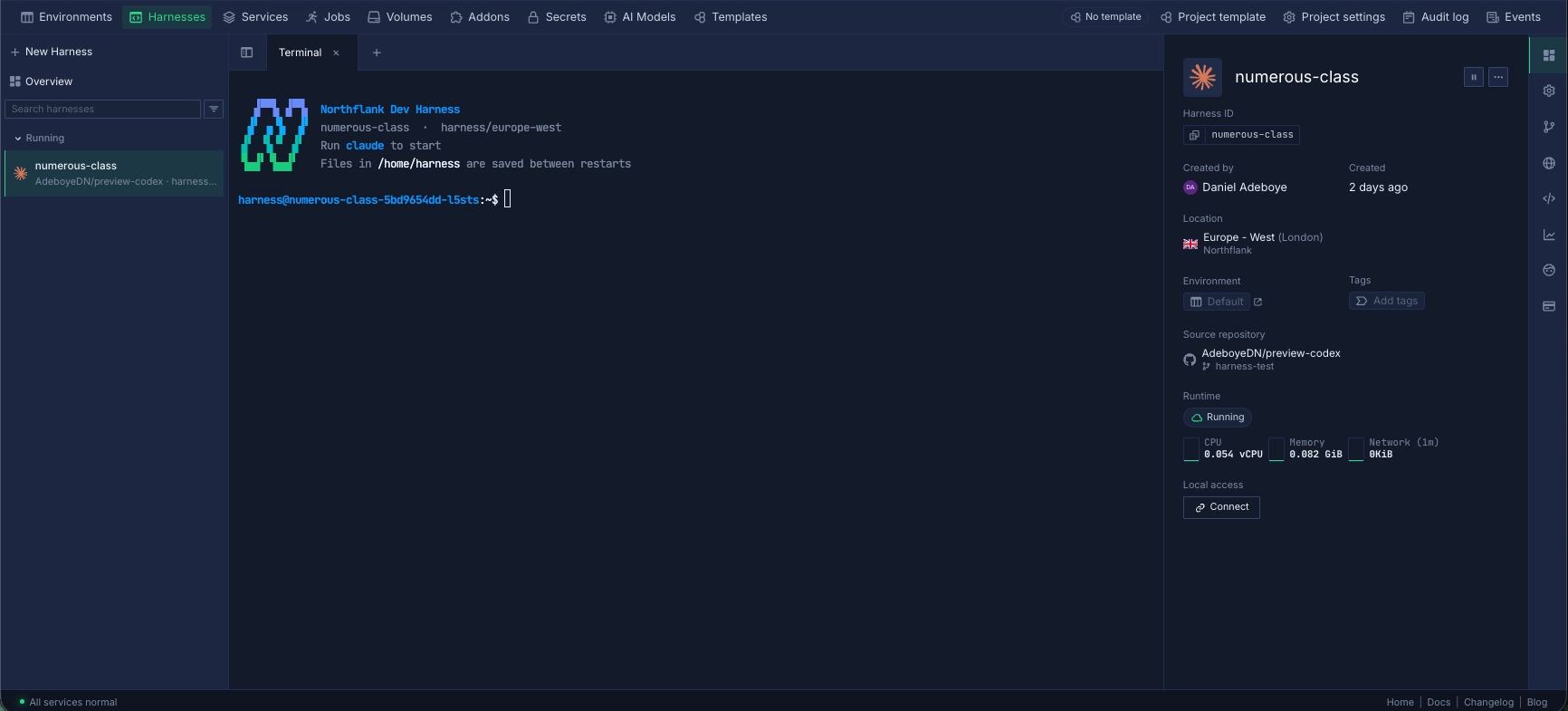
You will be redirected to the Harness terminal.
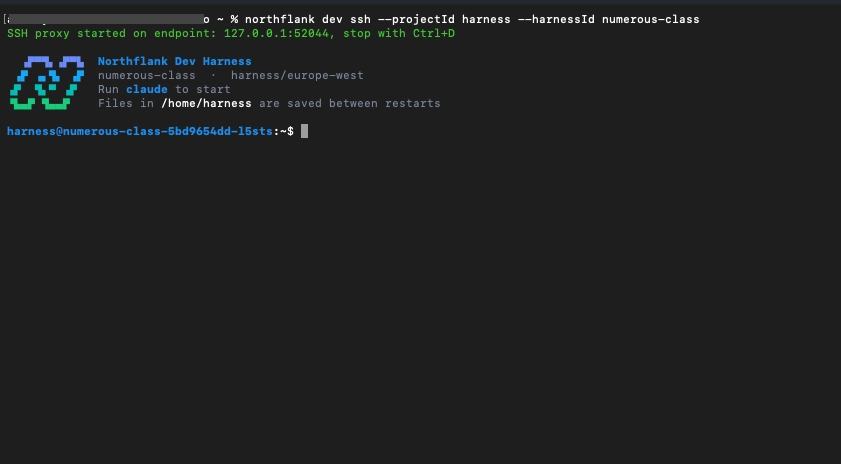
You can connect to the Harness from your local machine and keep your existing terminal workflow while the coding agent runs in the cloud.
Prerequisite:
To connect:
- Open the Harness overview in the dashboard
- Under Local access, click Connect
- Copy the SSH command shown (eg.
northflank dev ssh --projectId harness --harnessId your-harness-id) - Run it in your terminal
You are now working inside the isolated Harness environment from your local machine. Your coding agent is running in the cloud, while your local terminal connects to the Harness over SSH.
Once your Harness is running, you can continue to manage it from the Northflank dashboard or CLI. You can monitor resource usage, update its configuration, pause and resume the environment when you are not using it, or delete the Harness when the work is complete
Running coding agents securely means operating more than the agent itself. Someone has to provision isolated environments, manage their lifecycle, control networking and credentials, allocate resources, and support the infrastructure as the number of concurrent sessions grows.
Northflank provides this execution layer through Harnesses and Sandboxes, with the rest of the platform available around the agent workload.
- MicroVM isolation: Each Harness runs in a microVM-isolated environment using Kata Containers with Cloud Hypervisor by default. gVisor is available as an alternative. Each session gets its own dedicated kernel. This provides a stronger isolation boundary between Harness workloads, the host, and adjacent sessions.
- Ephemeral and persistent environments: Sandboxes can run as short-lived environments or use persistent workspace storage when state needs to survive between sessions.
- Managed cloud or BYOC: Harnesses run on Northflank's managed cloud across 6+ regions, or inside your own AWS, GCP, Azure, Oracle, or CoreWeave account with self-serve BYOC. Agent execution stays inside your own VPC when using BYOC.
- Secrets management:** Secret groups store credentials and inject them at Harness startup. Credentials are not read from your local machine environment.
- RBAC and SSO:** Northflank provides role-based access control across the platform and enterprise SSO through SAML and OIDC.
- Audit logging:** Platform and workload logs provide visibility into Harness activity and infrastructure changes, giving teams a record that can be used to investigate unexpected behavior.
- Broader workload support: Agents can run alongside applications, APIs, workers, databases, jobs, and GPU workloads through the same platform.
Running AI coding agents securely requires more than limiting what the agent is allowed to do. The execution environment needs to enforce those boundaries with strong isolation, controlled networking, scoped credentials, resource limits, and an ephemeral lifecycle.
Northflank Harnesses provide a cloud execution environment for coding agents, combining isolated workloads with the infrastructure needed to run them in production. You can run Harnesses on Northflank's managed cloud or in your own cloud environment through BYOC, while keeping the coding agent, repository, and workload resources inside a controlled environment.
Yes. Coding agents such as Claude Code, Codex, Cursor, and OpenCode can run inside isolated execution environments. The sandbox provides the infrastructure boundary around the agent, while the coding agent handles the development workflow. Northflank Harnesses provide cloud coding environments designed to run coding agents in isolated environments.
AI coding agents can execute shell commands, install packages, modify files, and make network requests without a developer manually approving every action. A sandbox limits the blast radius if the agent follows a malicious instruction, runs compromised code, accesses a sensitive file, or makes an unexpected network request.
It depends on the workload and threat model. Containers provide useful process and filesystem isolation, but they share the host kernel. For highly untrusted code, stronger isolation technologies such as microVMs can provide an additional security boundary between the workload and the underlying host.
Give the agent only the credentials required for its task and limit their permissions as much as possible. Credentials should be provided at runtime rather than committed to the repository or baked into the sandbox image, and should not provide unnecessary access to production or host infrastructure.
No. Coding agents may need network access for package installation, source control, APIs, or other services, but unrestricted egress increases the potential for data exfiltration and unauthorized access. A stronger approach is to deny outbound traffic by default and explicitly allow the destinations the agent needs.



