
What is AWS Firecracker? The microVM technology, explained
AWS Firecracker is an open-source virtual machine monitor (VMM) that creates and manages lightweight virtual machines called microVMs. Developed by Amazon Web Services, Firecracker combines the security isolation of traditional VMs with the speed and resource efficiency of containers.
Firecracker powers AWS Lambda and AWS Fargate, handling trillions of function executions monthly. It boots microVMs in as little as 125 milliseconds, consumes less than 5 MiB of memory overhead per VM, and supports creating up to 150 microVMs per second on a single host.
The technology is open-source under the Apache 2.0 license and has been adopted by platforms including Northflank, and others, for workloads ranging from serverless functions to AI code execution sandboxes.
Firecracker is a Virtual Machine Monitor (VMM) built specifically for serverless and container workloads. Written in Rust, it uses Linux's Kernel-based Virtual Machine (KVM) to create microVMs, which are lightweight virtual machines stripped down to the essentials needed for running modern cloud workloads.
AWS released Firecracker as open-source software in November 2018 after developing it internally to power Lambda and Fargate. The project emerged from a realization that existing virtualization technologies weren’t optimized for the event-driven, often short-lived nature of serverless workloads.
Traditional VMMs like QEMU were designed for general-purpose virtualization, including desktop and server use cases. They emulate a full range of hardware devices (USB controllers, displays, sound cards, PCI buses, BIOS) that serverless functions simply don't need. This unnecessary complexity increases the attack surface and resource overhead.
Firecracker takes the opposite approach: minimalism. It implements only five emulated devices (virtio-net, virtio-block, virtio-vsock, serial console, and a minimal keyboard controller) and communicates with guest kernels through optimized virtio interfaces rather than simulating traditional hardware.
A Firecracker microVM is a lightweight virtual machine that provides hardware-level isolation with minimal overhead. Each microVM runs its own guest kernel, completely separate from other microVMs and the host system.
When you start a Firecracker microVM, the process looks like this:
- The Firecracker VMM process starts and exposes a RESTful API endpoint
- You configure the microVM via API calls, setting vCPUs, memory, network interfaces, and block devices
- You provide a Linux kernel image and root filesystem
- Firecracker boots the guest kernel and launches user-space code
The entire process completes in approximately 125 milliseconds. For comparison, traditional VMs typically take seconds to minutes to boot.
Boot time: Firecracker initiates user-space code in as little as 125ms, with ongoing work to reduce this further.
Memory overhead: Less than 5 MiB per microVM, enabling thousands of VMs on a single host.
Creation rate: Up to 150 microVMs per second per host.
Supported architectures: 64-bit Intel, AMD, and ARM processors with hardware virtualization support.
Host requirements: Linux with KVM enabled, kernel version 4.14 or above.
Firecracker includes a companion program called the jailer that provides defense-in-depth security. The jailer applies:
- cgroup isolation to limit resource consumption
- namespace isolation to restrict visibility of system resources
- seccomp filters to limit available system calls
- chroot to restrict filesystem access
This creates multiple security boundaries. Even if an attacker somehow escaped the virtualization barrier, they would still face the jailer's containment measures.
Understanding Firecracker requires understanding the trade-offs between traditional approaches:
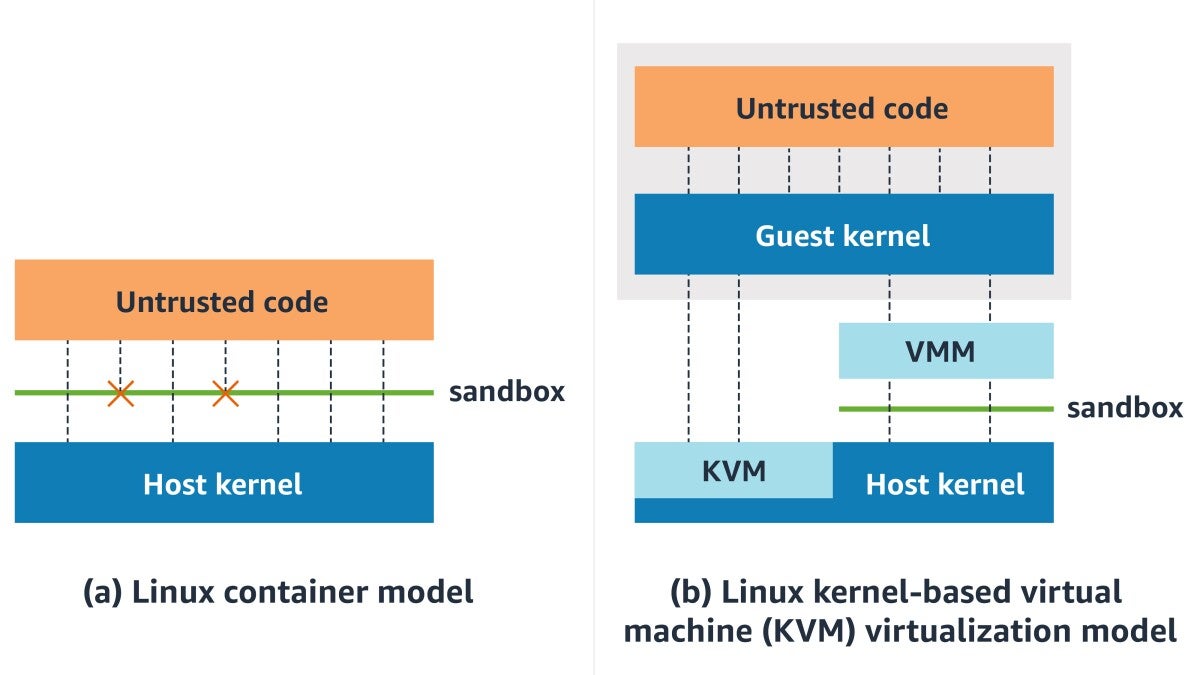
Traditional VMs provide strong isolation, each VM has its own kernel and cannot access other VMs or the host directly. However, they carry significant overhead: large memory footprints, slow boot times, and resource inefficiency when running many small workloads.
Containers (Docker, containerd) share the host kernel, making them lightweight and fast to start. However, kernel sharing means a vulnerability in the kernel could potentially allow one container to affect others. For truly untrusted workloads, this shared-kernel model presents risk.
Firecracker occupies the middle ground. MicroVMs provide the security isolation of VMs (dedicated kernel per workload) with startup times and resource efficiency approaching containers. Each microVM is completely isolated at the hardware virtualization level, but without the bloat of traditional virtualization.
| Attribute | Traditional VM | Container | Firecracker MicroVM |
|---|---|---|---|
| Isolation | Strong (dedicated kernel) | Weak (shared kernel) | Strong (dedicated kernel) |
| Boot time | Seconds to minutes | Milliseconds | ~125 milliseconds |
| Memory overhead | Hundreds of MiB | Minimal | < 5 MiB |
| Density | Low | High | High |
| Attack surface | Large | Medium | Minimal |
Firecracker isn't the only microVM technology available. Here's how it compares to alternatives:
QEMU is a general-purpose emulator and virtualizer supporting a vast range of hardware and use cases. Firecracker is purpose-built for serverless. It sacrifices QEMU's flexibility for a dramatically smaller attack surface and lower overhead. If you need USB passthrough, GPU support, or Windows guests, use QEMU. If you need to run thousands of isolated Linux workloads efficiently, Firecracker is the better choice.
Cloud Hypervisor is another Rust-based VMM focused on cloud workloads. It offers more features than Firecracker (including GPU passthrough and live migration support) while maintaining a relatively small footprint. Cloud Hypervisor and Firecracker share similar design philosophies and similar boot times (~100-150ms). Cloud Hypervisor may be preferable when you need features Firecracker doesn't support.
Kata Containers is a container runtime that runs OCI-compatible containers inside lightweight VMs. It can use multiple hypervisors as backends, including QEMU, Cloud Hypervisor, and Firecracker itself. Kata Containers is the integration layer; Firecracker (or another VMM) provides the actual isolation. Many platforms use Kata Containers with Cloud Hypervisor or Firecracker as the underlying VMM.
gVisor takes a fundamentally different approach. Rather than running workloads in a VM with a dedicated kernel, gVisor intercepts system calls in user space using a component called Sentry. This provides isolation without the overhead of full virtualization but doesn't offer the same hardware-level isolation guarantees as Firecracker. gVisor has lower overhead for some workloads but weaker isolation boundaries.
The canonical Firecracker use case. AWS Lambda runs each function invocation in its own Firecracker microVM, providing strong isolation between customers while maintaining fast cold starts and high density. When a Lambda function executes, it runs inside a microVM with its own kernel, no shared kernel vulnerabilities can cross function boundaries.
For organizations running containers in multi-tenant environments, Firecracker (often via Kata Containers) provides stronger isolation than standard Docker containers. Each container runs in its own microVM, eliminating shared-kernel risks. AWS Fargate uses this approach for running customer containers securely.
Running untrusted or AI-generated code requires strong isolation. Platforms like Northflank use Firecracker microVMs to sandbox code execution. Each execution session gets its own microVM that's destroyed when complete, ensuring no data leakage between sessions and no persistent compromise if code behaves maliciously.
Firecracker's minimal resource requirements make it suitable for edge deployments where compute resources are constrained. Its fast boot times enable responsive scaling at edge locations.
Build systems executing untrusted code (user-submitted builds, open-source project CI) benefit from Firecracker's isolation. Each build runs in a fresh microVM, preventing build-time attacks from affecting other builds or the host system.
AWS Lambda: Processes trillions of function executions monthly using Firecracker for customer isolation. Each function invocation runs in its own microVM.
AWS Fargate: Runs customer containers inside Firecracker microVMs rather than dedicated EC2 instances, improving density and reducing costs while maintaining isolation.
According to the official Firecracker documentation, the technology has been adopted by:
- Northflank — cloud platform for deploying applications and AI workloads
- Kata Containers — as one of several supported VMM backends
- Koyeb — serverless platform
- Fly.io — global application platform
- OpenNebula — cloud computing platform
- Qovery — deployment platform
- webapp.io — preview environments
- containerd via firecracker-containerd integration
- Weave Ignite (now archived) — GitOps for Firecracker
- microvm.nix — NixOS on Firecracker
Firecracker's minimalist design means it intentionally doesn't support features that other VMMs provide:
- No GPU passthrough: Applications requiring GPU access cannot use Firecracker. Use QEMU or Cloud Hypervisor instead.
- No live migration: You cannot migrate running Firecracker microVMs between hosts. Workloads must be stateless or handle migration at the application layer.
- Linux guests only: Firecracker supports Linux and OSv guests. Windows is not supported.
- No USB or arbitrary device passthrough: Only the five emulated virtio devices are available.
- Bare metal or nested virtualization required: Firecracker requires direct KVM access. On AWS, this means running on .metal instances or instances with nested virtualization enabled.
These limitations are intentional trade-offs. Every feature not implemented is attack surface that doesn't exist.
Building and operating Firecracker infrastructure directly requires significant engineering investment: configuring KVM, managing kernel images, setting up networking, implementing the jailer security model, and handling orchestration at scale. Most teams use Firecracker through a platform that abstracts this complexity.
Northflank provides production-ready microVM infrastructure powered by Kata Containers and Cloud Hypervisor, giving you Firecracker-grade isolation without the operational burden. The platform processes over 2 million isolated workloads monthly, with the engineering team actively contributing to Kata Containers, QEMU, containerd, and Cloud Hypervisor.
To run isolated workloads on Northflank:
- Sign up at northflank.com
- Create a project — select your region or connect your own cloud account (AWS, GCP, Azure) for BYOC deployment
- Deploy a service — use any OCI container image from any registry
- Run with microVM isolation — Northflank provisions isolated infrastructure automatically
Northflank is particularly suited for:
AI code execution sandboxes: When AI agents generate and execute code, that code runs in isolated microVM-backed environments. Each execution is contained, preventing malicious or buggy code from affecting other workloads.
Multi-tenant deployments: SaaS platforms and developer tools running workloads on behalf of customers get strict isolation boundaries between tenants.
Untrusted workload execution: Any scenario involving code you didn't write benefits from hardware-level isolation.
For teams with specific requirements, book a demo with Northflank's engineering team to discuss microVM configurations, compliance needs, or enterprise pricing.
A Firecracker microVM is a lightweight virtual machine created by the Firecracker VMM. It provides hardware-level isolation with minimal overhead—booting in ~125ms and consuming less than 5 MiB of memory. Each microVM runs its own Linux kernel, completely isolated from other microVMs and the host.
Yes. Firecracker is open-source software released under the Apache 2.0 license. You can use, modify, and distribute it freely. AWS developed it but released it to the community.
Docker containers share the host kernel, providing process-level isolation. Firecracker microVMs each have their own kernel, providing hardware-level isolation. Docker is faster to start and has lower overhead but provides weaker isolation. Firecracker provides stronger security boundaries at the cost of slightly more overhead.
No. Firecracker supports only Linux guests (and OSv). Its minimalist design intentionally excludes the device emulation required for Windows. For Windows workloads, use QEMU or Hyper-V.
Firecracker is a VMM, it creates and manages virtual machines. Kata Containers is a container runtime that can use various VMMs (including Firecracker, QEMU, or Cloud Hypervisor) as backends. Kata Containers provides the OCI/Kubernetes integration layer; Firecracker (or another VMM) provides the actual isolation.
No. Firecracker does not support GPU passthrough or any device passthrough beyond its five emulated virtio devices. For GPU workloads, use QEMU or Cloud Hypervisor.