
Best platforms for long-running sandbox environments in 2026
The best platform for long-running sandboxes depends on how long your AI agent needs to run continuously and what must survive between tasks: files, installed dependencies, or running processes.
- Northflank: Best for long-running AI agent sandboxes with no fixed session time limit. A fit for teams that need isolated code execution, persistent volumes, fast startup, and thousands of concurrent sandboxes for coding agents, APIs, scripts, and GPU tasks.
- E2B: Best for agent execution with memory-preserving pause and resume. A fit for teams that need to retain files and process state between tasks, with active session limits that vary by plan.
- CodeSandbox: Best for reusable coding environments with snapshot and fork workflows. A fit for teams whose agents branch from shared state and resume development environments across sessions.
- Modal: Best for GPU workloads with volumes and snapshot-based recovery. A fit for teams that can run tasks within a 24-hour sandbox limit and carry saved files into subsequent environments.
- Fly.io Sprites: Best for persistent Linux environments that idle between tasks. A fit for teams that need files and installed tools to survive inactivity without keeping compute running continuously.
Start with the Northflank sandbox quickstart to run an agent in an isolated environment, or talk to an engineer about long-running sandbox workloads.
Most early sandbox decisions are made under prototype conditions, where every run is short, stateless, and independent. That works fine for quick code execution or one-shot agent tasks. It stops working when your agent needs to retain its working environment.
A coding agent refactoring a large codebase across multiple interactions needs access to its previous changes. An AI assistant working on a user's project needs somewhere to retain files and task history. A data pipeline agent processing files for hours needs enough continuous runtime to finish its work.
Short session limits can require checkpointing state to external storage, restoring environments, or downloading datasets again. Choosing a persistence model that matches your workload reduces that work. Continuous runtime and retained state are separate capabilities: saved files can survive even when the original process has stopped.
Session length is only part of the equation. The platforms below differ in what survives between runs, how quickly they start sandboxes, and which agent workloads they support.
Northflank provides isolated sandbox environments for AI agents and code execution with no fixed session time limit. Run coding agents, scripts, generated APIs, repository builds, and GPU tasks in custom container environments, with persistent volumes for files that need to survive between sessions.
For long-running workloads, Northflank combines continuous execution with persistent storage, sub-second sandbox boot times on Northflank Cloud, and support for thousands of concurrent sessions. You can keep an agent environment active across a multi-day task or pause compute between tasks while retaining files on an attached volume.
Key features:
- No fixed session time limit: Run sandboxes for short tasks or keep them active for days or weeks without a platform-imposed session cutoff.
- Persistent storage: Attach volumes to retain repositories, dependencies, generated files, and task artifacts across pauses and restarts. Pausing stops processes and terminal sessions; save files you need to keep to the volume because ephemeral data is lost.
- Isolation: Northflank Cloud uses microVMs for CPU sandboxes and gVisor for GPU sandboxes, with isolation enabled automatically.
- Startup and concurrency: Sub-second sandbox boot times on Northflank Cloud and support for thousands of concurrent environments.
- Custom workloads: Use your own container images for coding agents, generated APIs, scripts, test suites, and GPU tasks.
- Programmatic lifecycle: Create, inspect, pause, resume, and delete sandboxes through APIs, SDKs, and CLI tools, and integrate execution into agent pipelines.
- Managed cloud or bring your own cloud (BYOC): Run on Northflank Cloud or your own infrastructure. With bring your own cloud (BYOC), Northflank acts as the control plane to run coding agents and their sandboxes in your virtual private cloud (VPC).
- Security: Northflank is SOC 2 Type II and HIPAA compliant, with Business Associate Agreements (BAAs) supported under Enterprise contracts.
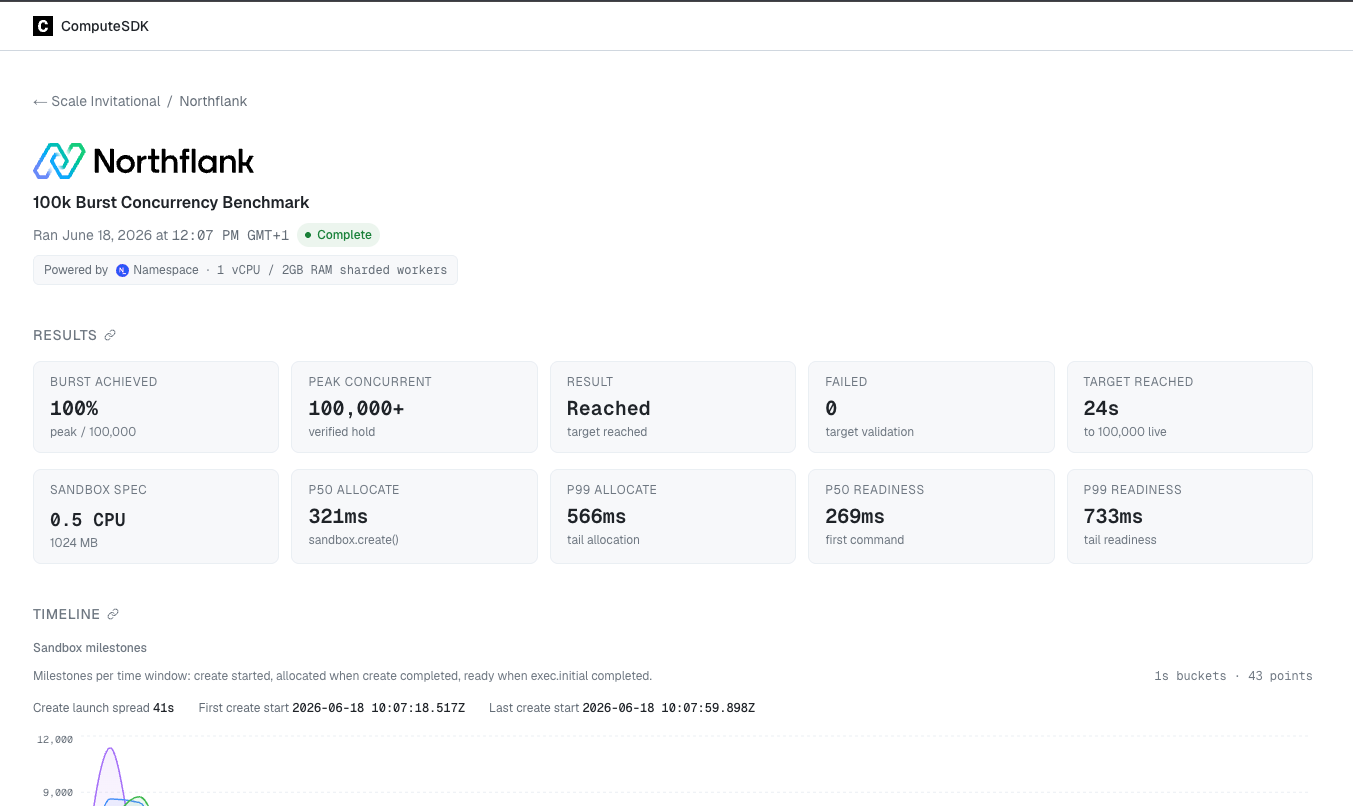
Northflank at 100,000 concurrent sandboxes. In the June 18, 2026 ComputeSDK Scale Invitational, Northflank reached 100,000 concurrent live sandboxes in 24 seconds using a 1-vCPU configuration. This measures burst provisioning at scale; it does not measure how long an individual agent task takes to complete.
Best for: AI agents that work across days or weeks, teams running many isolated coding environments concurrently, and workloads that need persistent files, custom images, or GPU execution.
Pricing: $0.01667/vCPU-hour and $0.00833/GB-hour, with H100 GPU plans at $2.74/hour all-inclusive (CPU and RAM included). The free developer Sandbox tier offers always-on compute with no sleeping, two free services, one database, and two cron jobs for development and testing. Pay-as-you-go supports CPU and GPU workloads with per-second billing. Enterprise plans provide custom pricing, 24/7 support, service-level agreements (SLAs), and enterprise access controls. See the full pricing details for additional GPU options and plans.
Get started on Northflank to run isolated AI agent sandboxes with persistent files and no fixed session cutoff, or book a demo with an engineer to discuss your workload.
E2B supports pause and resume for sandboxed code execution. A normal pause preserves filesystem and memory state, allowing an agent to return to its environment later. A filesystem-only pause preserves files but reboots on resume, so processes and memory state are lost.
Active sessions run for up to one hour on Hobby and 24 hours on Pro, with custom multi-day options on Enterprise. These runtime limits are separate from retaining a paused environment. Python and TypeScript SDKs manage creation, execution, file access, and lifecycle operations.
You can configure a sandbox to pause automatically when its timeout expires instead of being deleted. Bring your own cloud (BYOC) is available on Enterprise for AWS, GCP, and Azure.
Best for: AI agent workflows that need to preserve process state between tasks and can work within the chosen plan's active session limits.
Pricing: Hobby includes a $100 one-time usage credit. Pro costs $150/month plus usage, with up to 24-hour sessions and configurable CPU and RAM. Enterprise pricing is custom.
CodeSandbox persists development environments across sessions and supports snapshot, restore, and fork workflows. Agents can branch from a shared starting point, test different changes, and return to an existing environment instead of rebuilding it for each task.
CodeSandbox is part of Together AI. Its SDK uses microVM infrastructure with memory snapshotting and supports environment customization through Docker and Dev Containers. Session length is listed as unlimited, while concurrency and available VM sizes depend on the plan. Enterprise dedicated clusters are offered separately from the standard shared service.
Best for: Iterative coding agents, parallel runs from shared state, and development tools that need reusable environments and snapshot recovery.
Pricing: Build is free. Scale starts at $170 per workspace per month, with included VM credits and additional usage charges. CPU and memory are bundled into VM tiers; Enterprise pricing is custom.
Modal sandboxes support long-running tasks through configurable runtime limits, persistent volumes, and snapshots. The default timeout is five minutes, and a sandbox can run for up to 24 hours. For longer workflows, save the relevant files and continue in a subsequent sandbox.
Filesystem snapshots capture the root filesystem for reuse, while Modal Volumes provide persistent mounted storage. Filesystem and directory snapshots have a default 30-day retention period that can be changed or disabled. Memory snapshots are an alpha feature with separate restrictions, including no GPU support and seven-day retention.
You can configure environments through Python, JavaScript, or Go clients and use existing container images. Standard sandboxes use gVisor; CPU-only VM Sandboxes are also available in beta. GPU execution is supported in standard sandboxes, but not with memory snapshots enabled.
Best for: Agent workloads that need GPUs, custom dependencies, and saved files or snapshots, with each continuous run fitting within the 24-hour limit.
Pricing: Per-second usage billing. Sandbox CPU costs $0.1419/physical-core-hour (two vCPUs), and memory costs $0.0240/GiB-hour. GPU configurations and persistent volumes have their own rates.
Fly.io Sprites are persistent Linux environments with a 100 GB filesystem backed by durable object storage and a local cache. Files, installed packages, and repositories survive idle periods. Filesystem checkpoints let agents roll back changes without recreating the environment.
Sprites pause automatically when inactive. A warm pause freezes memory and processes; a later cold transition discards memory, and processes start fresh on the next wake. Files remain available in both cases. Checkpoints preserve filesystem state, not running process memory.
Compute charges stop during idle periods, while retained cold storage continues to incur charges. This suits agent environments with irregular activity, where retaining files matters more than keeping every process continuously active.
Best for: Coding agents that return to persistent files between tasks, and teams that want automatic idle behavior without paying for continuously active compute.
Pricing: Through September 30, 2026, CPU costs $0.07/CPU-hour and memory costs $0.04375/GB-hour. From October 1, the rates are $0.03825/CPU-hour and $0.021875/GB-hour. Storage is metered separately.
The right choice depends on whether your agent needs uninterrupted execution, retained files, or a saved process state.
Northflank is a strong fit for multi-day execution with no fixed session cutoff, persistent volumes, custom container images, and CPU or GPU tasks. It also supports self-serve bring your own cloud (BYOC) deployment when sandboxes need to run in your infrastructure.
E2B fits workflows that need explicit pause and resume with saved memory. CodeSandbox supports reusable environments and forks with unlimited session length. Fly.io Sprites suits persistent files with automatic idle behavior. Modal fits GPU and compute-heavy tasks that can use volumes or snapshots to continue across separate sandbox runs.
| Platform | Session limit | Persistence model | Bring your own cloud (BYOC) | Isolation |
|---|---|---|---|---|
| Northflank | No fixed session time limit | Attached volumes retain files across pauses and restarts; pause stops processes | Yes, self-serve | MicroVMs for CPU and gVisor for GPU on Northflank Cloud |
| E2B | 1 hour Hobby; 24 hours Pro; custom Enterprise limits | Pause/resume retains files and memory; filesystem-only pause is also available | AWS, GCP, and Azure on Enterprise | Firecracker |
| CodeSandbox | Unlimited session length; plan-based concurrency | Persistent environments, snapshots, and forks | No | MicroVMs |
| Modal | Up to 24 hours | Volumes and filesystem/directory snapshots; memory snapshots in alpha | No | gVisor; CPU-only VM option in beta |
| Fly.io Sprites | No fixed session cutoff; automatic idle pause | Persistent filesystem; warm pause retains memory, cold transition does not | No | Firecracker |
Pricing checked on September 30, 2026. Hourly equivalents are rounded where needed. The table shows usage rates; subscription fees and included allowances vary by plan.
| Platform | CPU | Memory | Storage | GPU | Billing model |
|---|---|---|---|---|---|
| Northflank | $0.01667/vCPU-hr | $0.00833/GB-hr | $0.15/GB-month | L4: $0.80/hr, A100 40GB: $1.42/hr, A100 80GB: $1.76/hr, H100: $2.74/hr | Per second |
| E2B | $0.0504/vCPU-hr | $0.0162/GiB-hr | 10 GiB Hobby / 20 GiB Pro included | No GPU compute | Per second; Pro adds $150/month plus usage |
| Fly.io Sprites | $0.07/CPU-hr through Sept. 30; $0.03825 from Oct. 1 | $0.04375/GB-hr through Sept. 30; $0.021875 from Oct. 1 | $0.000683/GB-hr hot; $0.000027/GB-hr cold | No GPU compute | Actual usage, metered hourly; idle compute is free, retained cold storage is billed |
| CodeSandbox | Pico VM: $0.075/VM-hr (1 core and 2 GB RAM) | Included in VM price | Plan-dependent; 20 GB per VM on standard plans | No GPU compute | VM credits; subscription and included credits depend on plan |
| Modal Sandboxes | $0.1419/physical-core-hr (2 vCPU) | $0.0240/GiB-hr | Volumes: $0.09/GiB-month; 1 TiB/month included | L4: $0.80/hr, A100 40GB: $2.10/hr, A100 80GB: $2.50/hr, H100: $3.95/hr, H200: $4.54/hr | Per second |
Billing units differ: CodeSandbox includes CPU and RAM in its VM price, while Modal charges per physical core (two vCPUs). The CodeSandbox VM rate is before subscription savings.
The table below shows how each platform handles bring your own cloud (BYOC) deployment, which clouds are supported, and whether it requires a sales process.
| Platform | Bring your own cloud (BYOC) available | Clouds supported | Access model | Pricing model |
|---|---|---|---|---|
| Northflank | Yes, self-serve | AWS, GCP, Azure, Oracle, CoreWeave, Civo, and supported Kubernetes infrastructure, including on-premises and bare-metal | Self-serve; Enterprise contracts available | Cloud infrastructure costs plus Northflank management charges |
| E2B | Yes, Enterprise | AWS, GCP, and Azure | Contact sales | Custom Enterprise pricing plus cloud infrastructure costs |
| Modal | No | Managed only | — | — |
| Fly.io Sprites | No | Managed only | — | — |
| CodeSandbox | No | Managed service; dedicated cluster option on Enterprise | Contact sales for dedicated clusters | Custom dedicated-cluster pricing |
A dedicated cluster does not by itself mean the service runs in your cloud account.
Session limits help providers manage resource allocation and workload lifecycles. They vary by product and plan, and are separate from whether files or snapshots remain available afterward. For long-running agents, check both the continuous runtime limit and the supported recovery method.
The terms vary by provider. Check whether persistence means keeping the same environment available, retaining files after compute stops, or saving memory and processes. Northflank retains attached-volume files when paused but stops processes. E2B's normal pause preserves files and memory. Sprites retains its filesystem through idle periods, but a cold transition discards memory.
Yes. A sandbox can connect to a database when network access and credentials permit. On Northflank, you can deploy Postgres, Redis, MySQL, or MongoDB alongside your sandbox and connect them privately. Other sandbox providers can also connect to external database services.
Northflank is a strong fit for agents that need continuous execution without a fixed session time limit, with persistent volumes, custom environments, and optional GPU access. If your agent stops between tasks, also compare what each provider preserves during a pause and how it restores the environment.
Compute billing stops when a Sprite pauses. Retained cold storage continues to be billed. Files survive idle periods; memory and processes survive a warm pause but are discarded during a cold transition.
By default, the sandbox is terminated when its timeout expires. You can configure automatic pause on timeout to retain state for resumption instead. Normal pause preserves files and memory; filesystem-only pause retains files but restarts processes on resume. Explicitly deleting a sandbox prevents it from being resumed.
Long-running agents need a sandbox lifecycle that matches their work. A task that must run continuously for days has different requirements from an agent that stops between interactions but needs its files back later.
Northflank combines isolated AI agent code execution, no fixed session time limit, persistent volumes, fast startup, and support for thousands of concurrent environments. It is a strong starting point for teams running coding agents, generated APIs, scripts, and GPU tasks that need to keep working across sessions.
Get started on Northflank or talk to the team to see how long-running sandboxes fit your agent workloads.



