
Kata Containers vs Docker
Kata Containers and Docker both run containerised workloads, but they make fundamentally different tradeoffs around isolation, security, and operational complexity. Docker is the standard for cloud-native application deployment. Kata Containers is what you reach for when Docker's shared kernel model is not an acceptable security tradeoff.
This article compares Kata Containers and Docker on architecture, isolation strength, startup speed, and use case fit, and covers how to run both on Northflank.
What is Northflank?
Northflank is a full-stack cloud platform that runs both Docker containers and Kata Containers microVM-backed sandboxes in the same control plane. Deploy services, sandboxes, databases, and GPU workloads without managing the underlying infrastructure. Get started (self-serve) or book a session with an engineer.
| Docker | Kata Containers | |
|---|---|---|
| Type | Container runtime | Container runtime with VM-level isolation |
| Isolation | OS-level (namespaces, cgroups) | Hardware-level (KVM via VMM) |
| Kernel | Shared host kernel | Dedicated guest kernel per workload |
| Startup time | Milliseconds | ~150ms to ~300ms depending on VMM and configuration |
| Memory overhead | Minimal | Low (varies by VMM) |
| Kubernetes integration | Native | Native via CRI / RuntimeClass |
| Security boundary | Process isolation | Hardware isolation |
| Multi-tenant untrusted code | Not recommended | Designed for it |
| Best for | Trusted internal workloads, CI/CD, cloud-native apps | Untrusted workloads, multi-tenant platforms, AI sandboxes |
Docker is a container runtime that packages applications and their dependencies into OCI-compliant images and runs them as isolated processes on the host operating system. Isolation is achieved using Linux namespaces (process, network, filesystem) and cgroups (CPU and memory limits). The container shares the host kernel.
Docker is the dominant deployment standard in cloud-native infrastructure. Kubernetes orchestrates Docker-compatible containers at scale, and the OCI image format means a container built once runs on any compliant runtime.
Strengths of Docker
- Millisecond startup, no OS boot required
- Minimal memory overhead
- Very high workload density
- OCI standard, runs on any compliant runtime
- Massive ecosystem and tooling
- Native Kubernetes integration
Limitations of Docker
- Shares the host kernel (a kernel vulnerability affects all containers on the host)
- Not suitable for running untrusted code from external sources
- Weaker isolation for multi-tenant environments
- Container escapes are possible via kernel exploits
Kata Containers is an open-source container runtime that runs workloads inside lightweight virtual machines rather than standard container processes. It is maintained under the OpenInfra Foundation and supports multiple VMM backends: Cloud Hypervisor (default), Firecracker, and QEMU. Each workload gets its own dedicated guest kernel enforced by hardware virtualisation via KVM.
Kata Containers is not itself a VMM. It is the orchestration framework that sits on top of a VMM and makes microVMs integrate natively with container tooling. From Docker or Kubernetes' perspective, a Kata-backed workload behaves like a standard container. The isolation model underneath is hardware-enforced rather than OS-level. See What are Kata Containers? for a full technical breakdown.
Strengths of Kata Containers
- Hardware-level isolation via KVM per workload
- Dedicated guest kernel per container
- Native Kubernetes integration via CRI / RuntimeClass
- Choice of VMM backend (Cloud Hypervisor, Firecracker, QEMU)
- Works with existing OCI container images
- Designed for untrusted and multi-tenant workloads
Limitations of Kata Containers
- Higher startup overhead than standard containers (150ms to 300ms, depending on VMM and configuration)
- Requires nested virtualisation support on cloud hosts
- Not all Kubernetes features behave identically inside a Kata VM
- Higher operational complexity than Docker for simple trusted workloads
- Requires KVM support on the host
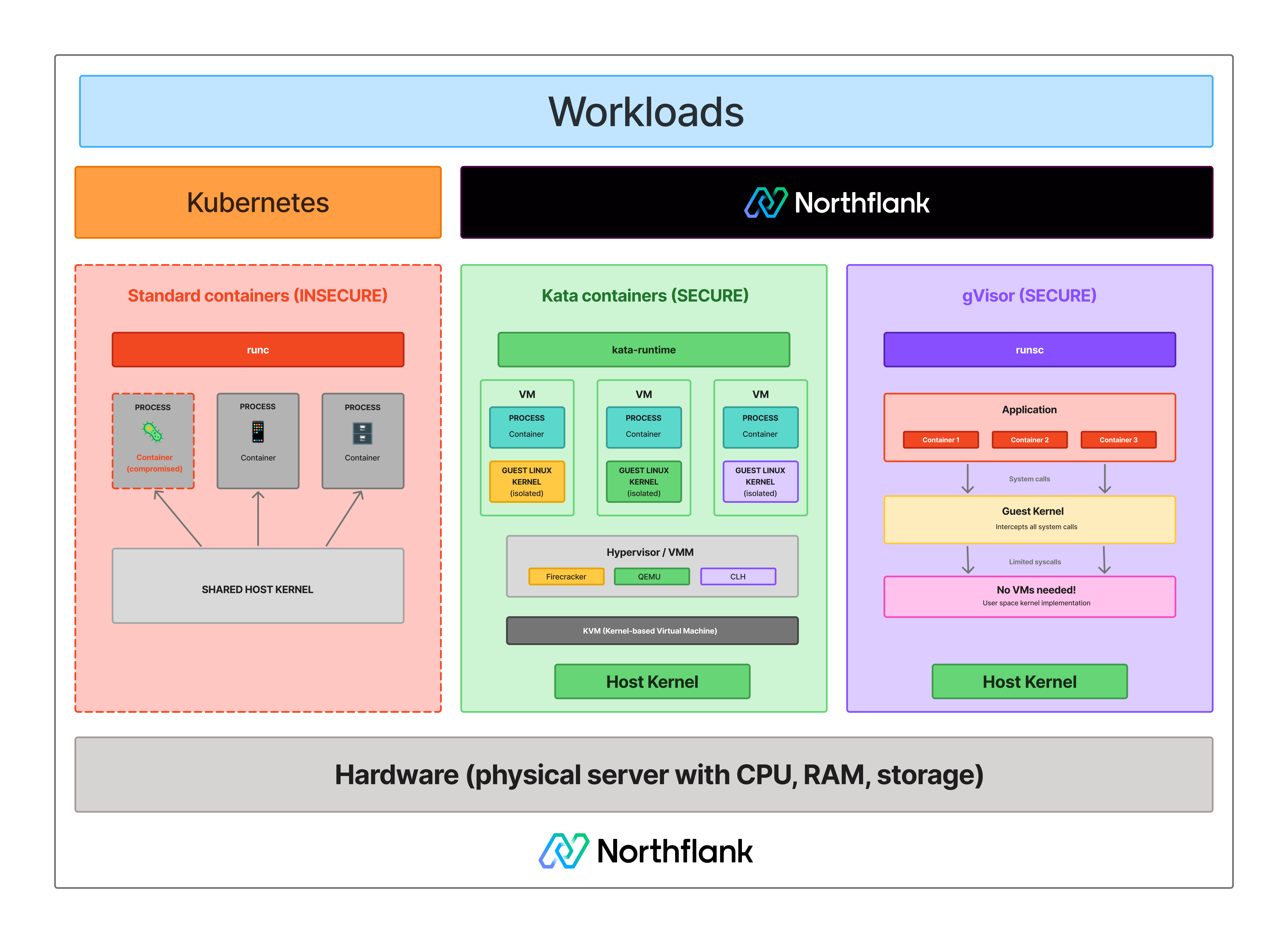
The core difference is the isolation boundary. Docker containers share the host kernel. Every container on the same host issues system calls directly to the same Linux kernel. A kernel vulnerability exploited by one container can affect the host and everything else running on it.
Kata Containers gives each workload its own dedicated Linux kernel inside a hardware-enforced boundary via KVM. To escape a Kata-backed workload, an attacker must first compromise the guest kernel, then escape the KVM hypervisor layer enforced by CPU hardware (Intel VT-x or AMD-V). That is a significantly harder attack path than a standard container escape.
For trusted workloads where you control what code runs, Docker's isolation is sufficient and the right default. For untrusted workloads, AI-generated code, customer-submitted scripts, or any multi-tenant environment, Docker's shared kernel model is the attack surface. See Containers vs virtual machines and What is KVM? for more context on why this boundary matters.
See how isolation models differ:
The decision comes down to your threat model. If you control what code runs and trust your workloads, Docker is sufficient. If you are running code from external users, AI agents, or any source you do not control, Docker's shared kernel model is a risk that Kata Containers is specifically designed to address.
| Use case | Docker | Kata Containers |
|---|---|---|
| Internal services and APIs | Yes | Overkill |
| CI/CD build environments | Yes | Yes, if builds run untrusted code |
| Microservices on Kubernetes | Yes | Overkill for trusted workloads |
| Multi-tenant untrusted code execution | No | Yes |
| AI agent and LLM-generated code | No | Yes |
| Serverless functions | No | Yes |
| Code interpreter platforms | No | Yes |
| Compliance requiring kernel isolation | No | Yes |
| Maximum workload density | Yes | No |
Yes. Kata Containers is not a replacement for Docker. It complements the container ecosystem. In a Kubernetes cluster, you can run standard Docker-compatible containers for trusted internal workloads and Kata-backed VMs for sandboxes and untrusted code, all managed through the same orchestration layer via RuntimeClass.
OCI-compliant container images work with Kata Containers without modification. The same image you run with Docker can run inside a Kata VM with a dedicated kernel boundary, without rebuilding or repackaging.
Running Docker containers for trusted workloads and Kata Containers microVMs for sandboxes and untrusted code in the same platform requires maintaining two different infrastructure stacks, two orchestration models, and two sets of networking and secrets configuration without the right tooling.
Northflank runs both in the same control plane. You connect a repo or bring a container image, and Northflank handles Kubernetes scheduling, autoscaling, TLS, secrets injection, real-time logs and metrics, and preview environments per pull request.
For workloads that need hardware-level isolation, Northflank's microVM-backed sandbox execution runs Kata Containers with Cloud Hypervisor as the primary VMM, with Firecracker and gVisor applied depending on workload requirements.
The platform has been in production since 2021 across startups, public companies, and government deployments. Sandboxes spin up in approximately 1 to 2 seconds, with compute pricing starting at $0.01667 per vCPU per hour and $0.00833 per GB of memory per hour. See the pricing page for full details.
BYOC (Bring Your Own Cloud) is self-serve into AWS, GCP, Azure, Oracle, CoreWeave, Civo, on-premises, or bare-metal, so workloads and data stay within your own infrastructure.
Get started with Northflank sandboxes
- Sandboxes on Northflank: overview and concepts: architecture overview and core sandbox concepts
- Deploy sandboxes on Northflank: step-by-step deployment guide: step-by-step deployment guide
- Deploy sandboxes in your cloud: BYOC deployment guide: run sandboxes inside your own VPC
- Create a sandbox with the SDK: programmatic sandbox creation: programmatic sandbox creation via the Northflank JS client
Get started (self-serve), or book a session with an engineer if you have specific infrastructure or compliance requirements.
No. Docker containers start in milliseconds with no OS boot required. Kata Containers workloads boot a guest kernel, adding 150 to 300ms depending on VMM and configuration. For most security-sensitive workloads, that overhead is acceptable. The tradeoff is isolation strength, not speed.
Yes. Kata Containers is OCI-compatible. Container images built for Docker run inside Kata VMs without modification. The runtime changes. The image format does not.
No. Docker remains the standard for cloud-native application deployment and trusted internal workloads. Kata Containers is purpose-built for workloads where Docker's shared kernel model is an unacceptable security tradeoff. Most production platforms that handle untrusted code run both.
Yes. Kata Containers implements the Container Runtime Interface and integrates with Kubernetes via RuntimeClass. Standard container pods and Kata-backed pods can run on the same cluster simultaneously.
Kata Containers runs each workload in a lightweight VM with a dedicated guest kernel, providing hardware-enforced isolation via KVM. gVisor intercepts syscalls in user space through its Sentry component without booting a VM. Kata provides stronger isolation for adversarial workloads. gVisor has lower overhead and works on hosts where nested virtualisation is unavailable. See What is gVisor? for a full explanation.
- What are Kata Containers?: a full technical breakdown of Kata Containers' architecture, VMM backends, and Kubernetes integration
- Kata Containers vs Firecracker vs gVisor: how the three leading isolation technologies compare on security, performance, and operational complexity
- Firecracker vs Docker: how Firecracker microVM isolation compares to standard container isolation
- What is a microVM?: how microVMs work and which technologies implement them
- What is gVisor?: how gVisor compares to Kata Containers and when to use each
- What is KVM?: the hardware virtualisation layer that Kata Containers builds on
- Containers vs virtual machines: the broader comparison covering containers, VMs, and microVMs in context
- How to sandbox AI agents: isolation architectures for AI agent execution environments