
What is a microVM?
A microVM is a lightweight virtual machine designed to run isolated workloads with minimal overhead. Unlike standard containers, each microVM runs its own Linux kernel enforced by hardware virtualisation, giving you a strong isolation boundary per workload without the resource cost of a full VM.
This article covers how microVMs work, how they compare to containers and traditional VMs, which technologies implement them, and when you need them.
- A microVM is a lightweight virtual machine that gives each workload its own dedicated kernel and hardware-level isolation, with a fraction of the memory overhead of a traditional VM
- They boot in milliseconds to low hundreds of milliseconds and are purpose-built for running untrusted, multi-tenant, or security-sensitive workloads
- Technologies that implement microVMs include Firecracker, Cloud Hypervisor, and QEMU microVM. Kata Containers is the orchestration layer that runs them on Kubernetes
- Platforms like Northflank use microVMs to run AI sandboxes, untrusted code execution, and multi-tenant workloads in production, anywhere standard containers are too weak a boundary. See how to spin up a secure code sandbox & microVM in seconds with Northflank.
A microVM is a lightweight virtual machine that provides hardware-enforced isolation per workload. Each microVM runs its own Linux kernel inside a KVM-enforced hardware boundary, completely separate from the host and from every other microVM on the same host.
Containers share the host kernel. MicroVMs do not. Each microVM gets its own kernel, its own memory space, and its own virtualised devices, with a stripped-down device model that keeps memory overhead in single-digit MiB and boot times in the low hundreds of milliseconds rather than the seconds or minutes a traditional VM requires.
MicroVMs sit between containers and traditional VMs on the isolation-vs-overhead tradeoff curve. For a broader comparison, see Containers vs virtual machines.
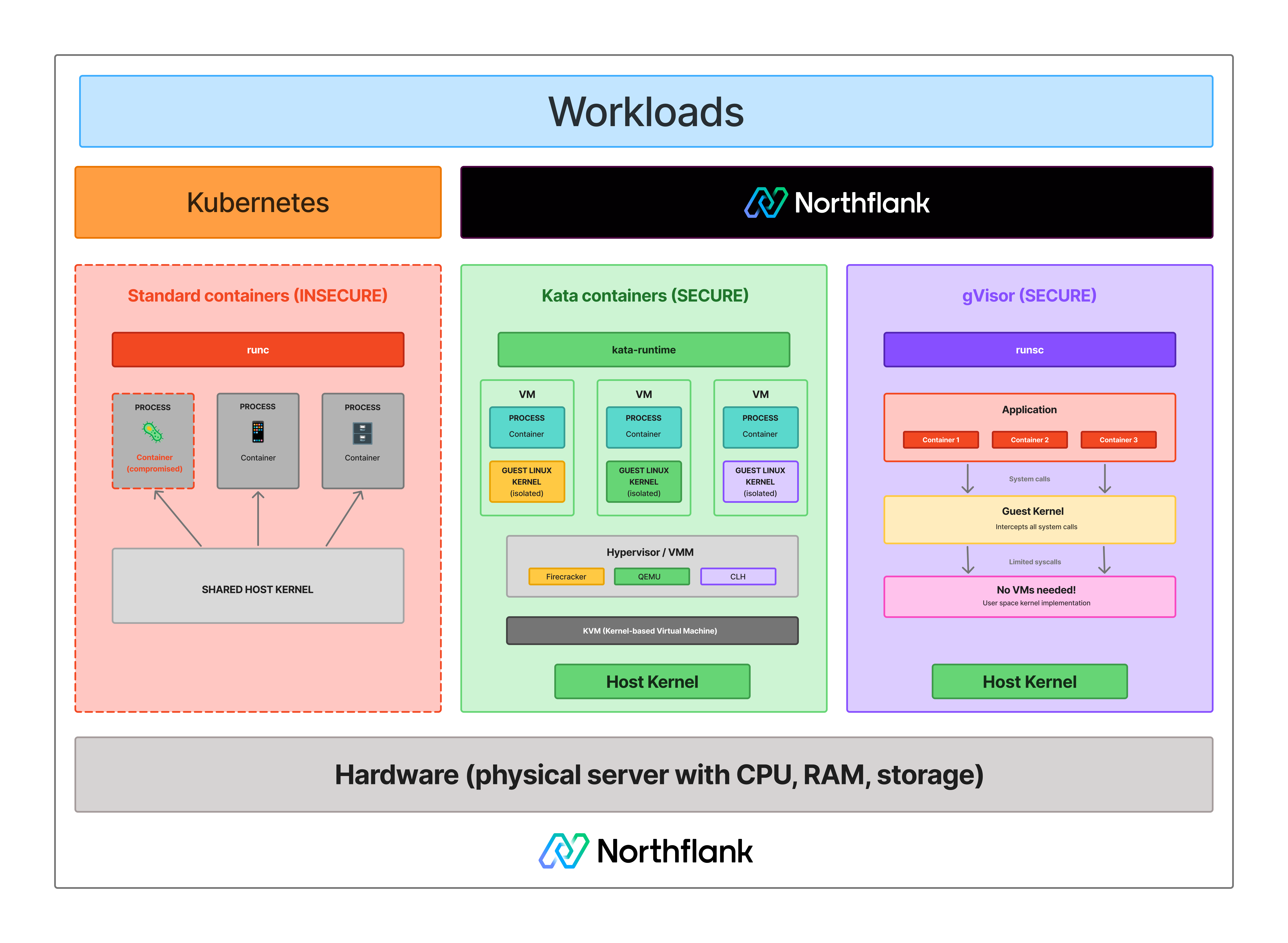
Standard containers share the host kernel. Every container on a host issues system calls directly to the same Linux kernel. If one container exploits a kernel vulnerability, it can affect the host and every other container running on it.
See how isolation models differ across standard containers, microVMs, and syscall interception:
For workloads you control and trust, internal APIs, CI/CD pipelines, your own application code, that tradeoff is acceptable.
The problem arises when you run code you do not control: AI-generated code, customer-submitted scripts, or any multi-tenant environment where different users execute workloads on shared infrastructure.
In those cases, the shared kernel is the attack surface, and containers do not give you a strong enough boundary. That is the problem microVMs solve.
MicroVMs use three components working together: KVM, a Virtual Machine Monitor (VMM), and a minimal guest kernel.
- KVM (Kernel-based Virtual Machine): A Linux kernel module that exposes hardware virtualisation capabilities (Intel VT-x, AMD-V) to user-space processes. It is the foundation every microVM technology builds on.
- The VMM (Virtual Machine Monitor): Sits in user space and uses KVM to create and manage individual microVMs. It defines which virtual devices each microVM gets, allocates vCPUs and memory, and controls the lifecycle. Minimalism is deliberate: fewer emulated devices means a smaller attack surface. Firecracker implements only five virtio devices. QEMU supports a significantly larger device model by comparison.
- The guest kernel: Boots inside the microVM as a standard Linux kernel, stripped down but complete. From the workload's perspective, it is running on real hardware. From the host's perspective, it is a KVM-enforced hardware boundary.
With Firecracker the full startup takes approximately 125ms. With Kata Containers adding orchestration on top, somewhere in the 150 to 300ms range depending on VMM and configuration.
See how the three models compare across isolation, performance, and resource overhead.
| Container | MicroVM | Traditional VM | |
|---|---|---|---|
| Isolation model | OS-level (namespaces, cgroups) | Hardware-level (KVM) | Hardware-level (hypervisor) |
| Kernel | Shared host kernel | Dedicated guest kernel | Dedicated guest kernel |
| Boot time | Milliseconds | ~125ms to ~300ms depending on VMM and configuration | Seconds to minutes |
| Memory overhead | Minimal | Less than 5 to 10 MiB | Hundreds of MiB |
| Attack surface | Medium (shared kernel) | Small (minimal device model) | Large (full hardware emulation) |
| Kubernetes integration | Native | Via Kata Containers / RuntimeClass | Not standard |
| Best for | Trusted internal workloads | Untrusted or multi-tenant workloads | Full OS isolation, legacy workloads |
Containers remain the right default for trusted workloads. MicroVMs are the right choice when the shared-kernel model is an unacceptable security tradeoff. Traditional VMs are rarely the right fit for high-density cloud workloads given their overhead.
Several open-source technologies implement the microVM model, sharing the same underlying principle of a minimal VMM using KVM for hardware isolation, but differing in design goals and operational complexity.
Firecracker is an open-source VMM built by AWS in Rust, with approximately 125ms to initiate user-space code and less than 5 MiB of memory overhead per instance. It supports up to 150 microVMs per second per host in benchmarks and powers AWS Lambda and Fargate. Firecracker does not include orchestration, so teams running it in Kubernetes typically do so through Kata Containers rather than directly. See What is AWS Firecracker? for a full technical breakdown.
Cloud Hypervisor is an open-source Rust-based VMM maintained by the Linux Foundation. It targets modern cloud workloads and supports GPU passthrough and live migration while keeping a small, auditable codebase. It is Northflank's primary VMM for microVM-backed workloads.
QEMU supports a microVM machine type with broader hardware compatibility than Firecracker or Cloud Hypervisor, but carries more overhead and a larger attack surface. It is the right choice when hardware compatibility matters more than minimum footprint.
Kata Containers is an orchestration framework that makes microVMs work natively with Kubernetes via the CRI. It is not itself a VMM; it sits on top of Firecracker, Cloud Hypervisor, or QEMU. From Kubernetes' perspective, a Kata-backed workload looks like a standard container. Under the hood, it runs in a microVM with a dedicated kernel. See Kata Containers vs Firecracker vs gVisor for a detailed comparison.
gVisor is not a microVM. It is a user-space kernel written in Go that intercepts system calls between a container and the host kernel, reducing the host kernel's attack surface without booting a VM. It has lower overhead than microVMs but weaker isolation; no hardware-enforced boundary. For environments where nested virtualisation is unavailable or syscall-interception isolation is sufficient, it is a practical alternative to microVMs.
MicroVMs are used wherever the shared-kernel model of containers is an unacceptable security tradeoff. The most common production use cases are:
- AI code sandboxes and agent execution: When an AI agent generates and runs code, that code is untrusted by definition. MicroVMs give each execution its own kernel boundary. See How to sandbox AI agents and Best code execution sandbox for AI agents.
- Multi-tenant SaaS platforms: When different customers run workloads on shared infrastructure, container-level isolation is not sufficient if any workload could be adversarial. See Kubernetes multi-tenancy and Multi-tenant cloud deployment.
- Serverless and function-as-a-service: Fast boot times, minimal overhead, and strong per-invocation isolation are the exact requirements of FaaS platforms. AWS Lambda is the most prominent example.
- CI/CD build isolation: Build jobs execute arbitrary code from repositories. MicroVMs give each job a clean, isolated kernel environment that cannot affect other jobs on the same host.
- Secure LLM inference and codegen tooling: Platforms running AI-generated code or model outputs need isolation beyond containers. See Secure runtime for codegen tools and Remote code execution sandbox.
Northflank runs microVM-backed workloads using Kata Containers with Cloud Hypervisor as the primary VMM, with Firecracker and gVisor applied depending on workload requirements. The platform has been in production since 2021 across startups, public companies, and government deployments. Sandboxes spin up in approximately 1 to 2 seconds, with compute pricing starting at $0.01667 per vCPU per hour and $0.00833 per GB of memory per hour. See the pricing page for full details.
Northflank supports both ephemeral and persistent sandbox environments on managed cloud or inside your own VPC, self-serve into AWS, GCP, Azure, Oracle, CoreWeave, Civo, on-premises, or bare-metal via bring your own cloud.
Get started with Northflank sandboxes
- Sandboxes on Northflank: overview and concepts: architecture overview and core sandbox concepts
- Deploy sandboxes on Northflank: step-by-step deployment guide: step-by-step deployment guide
- Deploy sandboxes in your cloud: BYOC deployment guide: run microVMs inside your own VPC
- Create a sandbox with the SDK: programmatic sandbox creation: programmatic sandbox creation via the Northflank JS client
- See how to spin up a secure code sandbox & microVM in seconds with Northflank.
Get started (self-serve), or book a session with an engineer if you have specific infrastructure or compliance requirements.
Containers share the host kernel and use Linux namespaces and cgroups for isolation. A microVM gives each workload its own dedicated Linux kernel enforced by hardware virtualisation. The microVM isolation boundary is the KVM hypervisor layer, which is significantly harder to escape than the container boundary.
Both run a dedicated guest kernel. Traditional VMs emulate full hardware stacks, including graphics, USB, and BIOS, taking seconds or minutes to boot with hundreds of MiB of memory overhead. MicroVMs strip the device model to the minimum needed for cloud workloads, booting in milliseconds to low hundreds of milliseconds with less than 5 to 10 MiB of overhead per instance.
Yes. Each microVM boots its own Linux kernel inside a KVM-enforced hardware boundary. This is the fundamental property that distinguishes a microVM from a container.
KVM (Kernel-based Virtual Machine) is a Linux kernel module that exposes CPU hardware virtualisation extensions (Intel VT-x, AMD-V) to user-space processes. Firecracker, Cloud Hypervisor, and QEMU all use KVM as the underlying virtualisation layer, meaning a host without KVM support cannot run microVMs.
Use Kata Containers with Cloud Hypervisor or Firecracker for production-ready microVM isolation on Kubernetes without building custom orchestration. Use Firecracker directly if you are building a custom serverless platform with the infrastructure expertise to manage it. Use gVisor if nested virtualisation is unavailable or syscall-interception isolation is sufficient. See Kata Containers vs Firecracker vs gVisor for a detailed comparison.
No. gVisor intercepts system calls between a container and the host kernel in user space. It does not use hardware virtualisation and does not boot a dedicated guest kernel. It reduces attack surface but does not provide the same hardware-enforced isolation boundary a microVM does.
- What is AWS Firecracker?: a full technical breakdown of Firecracker's architecture, device model, and jailer security model
- Kata Containers vs Firecracker vs gVisor: how the three leading isolation technologies compare on security, performance, and operational complexity
- Containers vs virtual machines: the broader comparison covering containers, VMs, and microVMs in context
- How to spin up a secure code sandbox and microVM in seconds with Northflank: a step-by-step guide to deploying microVM-backed workloads on Northflank
- How to sandbox AI agents: a practical guide to isolation architectures for AI agent execution environments
- Firecracker vs gVisor: a focused comparison of the two most common isolation approaches