
What is a cloud development environment (CDE)
- A cloud development environment (CDE), also called a cloud-based development environment, is a development workspace hosted on cloud infrastructure rather than a developer's machine. It includes the repository, tools, dependencies, configuration, and compute needed to build and test software, accessed through a browser, terminal, or local IDE over SSH.
- CDEs help teams standardise development setups, allocate compute resources to workloads, and access remote infrastructure without relying entirely on local hardware. They can run as managed services, on self-hosted infrastructure, or in your own cloud account via bring-your-own-cloud (BYOC). Trade-offs include cloud costs and dependence on network connectivity.
- Northflank Cloud Harnesses provide cloud development environments for developers and AI coding agents, with isolated microVMs, persistent workspaces, a web terminal, SSH, and VS Code and Cursor support. Start with an empty workspace or use Claude Code, Codex, Pi, or a compatible custom agent. Run Harnesses on Northflank's managed cloud or in your own AWS, GCP, Azure, Oracle, or CoreWeave infrastructure through BYOC.
Create a cloud development environment with Northflank Cloud Harnesses, or book a demo to discuss your setup.
Setting up a local development environment takes time. Developers need to install the right runtime versions, dependencies, databases, and tools, and every machine can end up configured differently. Large projects can also outgrow a laptop's CPU and memory, while accessing shared development services often requires additional configuration.
Cloud development environments address these challenges by moving development workspaces onto cloud infrastructure. But how do they work, how do they compare with local development, virtual desktop infrastructure (VDI), and sandboxes, and which deployment model should you choose? This guide covers the key concepts, benefits, trade-offs, and how Northflank provides cloud development environments for developers and AI coding agents.
A cloud development environment (CDE) is a development workspace hosted on cloud infrastructure where developers write, run, debug, and test code. It includes the project repository, language runtime, dependencies, development tools, configuration, and compute needed to work on an application. Developers connect to the workspace remotely through a browser, terminal, or local IDE, while the code executes in the cloud environment. CDEs can be created from predefined configurations or customised for specific projects and workflows.
A CDE is one part of cloud development more broadly, which also covers building, testing, and deploying applications using cloud infrastructure. For the wider topic, see What is cloud development?.
A cloud development environment platform provisions a remote workspace, configures it for a project, and manages its lifecycle. Although the exact workflow varies by provider, most CDEs follow these steps.
- Define the environment: A container image, dev container configuration, or platform template specifies the operating system, runtime, development tools, dependencies, and setup steps. Keeping this configuration in version control or on the platform helps teams create consistent workspaces.
- Provision the workspace: The platform allocates cloud compute and starts the environment using a container, virtual machine, or microVM. The underlying runtime and platform configuration determine the level of isolation between workspaces and the host.
- Configure the repository and access: The environment checks out the selected repository and branch, then loads the required configuration, environment variables, and credentials. Where supported, secrets are injected at runtime rather than stored in source code or container images.
- Connect to the workspace: Developers access the environment through a browser-based editor or terminal, a local IDE such as VS Code or Cursor, or a terminal connected over SSH. Depending on the platform, port forwarding or exposed ports let developers preview applications running inside the workspace.
- Retain work between sessions: Persistent storage can preserve source files, Git history, and other workspace data when an environment stops or restarts. What survives a pause, rebuild, or redeployment depends on the platform's storage configuration and lifecycle behaviour.
- Pause, resume, or delete the environment: Developers can stop or pause a workspace when it is idle, resume it when work continues, or delete it when it is no longer needed. Pausing may reduce compute costs while retaining persistent storage; deleting an environment can remove its associated data, depending on the platform's configuration. The workspace can then be recreated from its environment definition when needed.
Northflank Cloud Harnesses bring these lifecycle operations together, allowing developers to configure workspaces, connect repositories, access environments remotely, and pause or resume them as needed.
Cloud development environments overlap with local development, virtual desktop infrastructure (VDI), and sandboxes, but each serves a different primary purpose.
| Factor | Local development | Cloud development environment | Virtual desktop (VDI) | Sandbox |
|---|---|---|---|---|
| What it is | Development workspace on a developer's machine | Remote development workspace hosted on cloud infrastructure | Remote desktop environment delivered over a network | Isolated environment for executing code or workloads |
| Where code runs | Local machine | Cloud infrastructure | Remote desktop infrastructure | Depends on the sandbox implementation |
| Primary purpose | Local software development | Complete development workflows in a remote workspace | Managed access to a desktop and its applications | Isolated code execution and testing |
| Setup | Configured on each machine or from local tooling | Provisioned from a configuration, image, or template | Typically configured and managed centrally | Often provisioned programmatically |
| Isolation | Depends on local configuration | Depends on the platform and runtime | Typically separated through virtual desktop infrastructure | A core design goal |
| Persistence | Local disk | Depends on workspace storage and lifecycle | Depends on desktop configuration | Depends on implementation and lifecycle |
| Access | Directly on the machine | Browser, terminal, or local IDE connected remotely | Remote desktop client or supported access method | Often SDK, API, or direct workspace access |
| Best suited for | Local and offline workflows | Standardised team development, remote access, and resource-intensive workloads | Centrally managed desktop access | Running code in an isolated environment, including code generated by AI agents |
These approaches are not mutually exclusive. A cloud development environment can use a container or microVM for isolation, be accessed through a local IDE, and include a sandbox for executing untrusted code. The important distinction is the primary purpose: a CDE provides a development workspace, VDI provides a remote desktop, and a sandbox provides an isolated execution environment.
Cloud development environments make it easier to standardise development setups and access remote compute, but they also introduce trade-offs around connectivity, cost, and infrastructure management.
Benefits:
- Faster onboarding: New developers can start from a prepared workspace instead of manually installing and configuring every dependency.
- Consistent environments: Shared configurations help teams standardise runtimes, tools, and dependencies across development workspaces.
- Compute sized to the work: Large builds, test suites, and data-intensive workloads can run on cloud machines without relying entirely on a laptop's resources.
- Remote workspace storage: Source code and workspace files can remain on remote infrastructure, reducing reliance on local storage. This depends on the platform and how the workspace is configured.
- Access from different devices: Developers can connect to their workspaces through supported browsers, terminals, or IDEs without recreating the entire environment on each device.
- Parallel work: Separate environments for branches, tasks, or AI coding agents help teams work concurrently without sharing a single workspace. Northflank Cloud Harnesses support isolated workspaces for individual tasks, while team Harnesses let authorised teammates collaborate.
Drawbacks:
- Network dependency: Developers need a reliable connection to access their remote workspaces, which limits the ability to work directly in those environments offline.
- Latency: Remote editing, terminals, and debugging can feel slower than local workflows, particularly when network latency is high.
- Infrastructure costs: Compute, persistent storage, networking, and supporting services can all incur charges. Idle workspaces can increase costs if they are not paused or removed.
- Platform lock-in: Environment definitions and lifecycle workflows may rely on provider-specific formats or APIs. Portable configurations such as Dockerfiles and dev container specifications can make migration easier, but may not remove every dependency.
- Security and access management: Teams need to manage credentials, repository permissions, network access, and workspace isolation carefully, especially when environments can access internal systems.
Cloud development environments can be hosted by a provider, operated on infrastructure your organisation manages, or deployed into your own cloud account with a provider managing the platform. The right model depends on how much infrastructure control your team needs and how much operational work it wants to take on.
| Deployment model | Who manages the platform? | Where environments run | Operational responsibility | Best suited for |
|---|---|---|---|---|
| Managed SaaS | The provider | Provider-managed cloud infrastructure | Low: the provider operates the platform; your team manages workspace configuration and access | Teams that want to get started without operating the platform |
| Self-hosted | Your organisation | Infrastructure you control | High: your team operates, upgrades, secures, and scales the platform | Teams that need direct control over the platform and its infrastructure |
| Bring your own cloud (BYOC) | The provider manages the platform layer | Your cloud account | Shared: the provider manages the platform, while your team controls its cloud account, permissions, and infrastructure requirements | Teams that want a managed platform in their own cloud |
| Cloud-provider-managed service | The cloud provider | The provider's cloud infrastructure and project | Low to moderate: the provider operates the service, while your team manages configuration and cloud access | Teams already invested in a particular cloud ecosystem |
Northflank supports both managed cloud and bring your own cloud (BYOC) deployment models for cloud development environments. With managed cloud, you can create and manage Cloud Harnesses without operating the underlying infrastructure. With BYOC, Northflank provisions and manages the platform in your own cloud account, giving your team more control over where development workloads run while avoiding the need to operate the platform yourself. The right choice depends on your infrastructure requirements, security policies, and how much operational responsibility your team wants to retain.
Northflank provides cloud development environments through Cloud Harnesses. You can create an empty Harness and configure it for your own development workflow, or start with Claude Code, Codex, Cursor, OpenCode or Pi pre-installed. You can also bring your own agent.
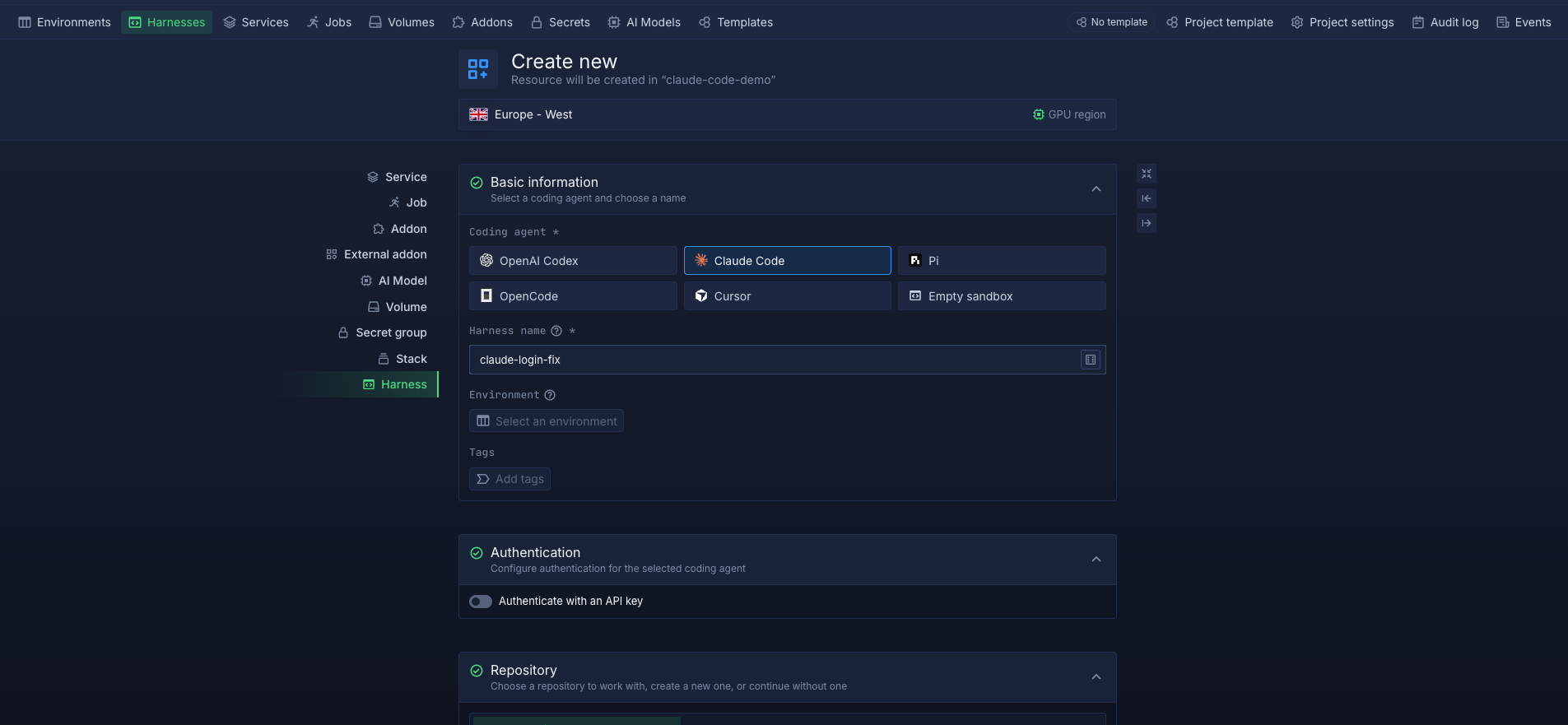
Each Harness can clone a connected repository and branch when it starts. You can customise its runtime image, compute resources, environment variables, and secret files to suit your project. Developers can access the workspace through the Northflank dashboard's web terminal, SSH, or VS Code and Cursor through an SSH proxy. You can also expose ports using custom domains to preview web applications, while team Harnesses allow multiple authorised teammates to work in the same environment. Private Harnesses restrict workspace access to their creator.
Every Cloud Harness runs in an isolated microVM using Kata Containers with Cloud Hypervisor by default, with gVisor available as an alternative. Files persist across pauses, restarts, and redeployments by default, so you can return to unfinished work without rebuilding the workspace. Harnesses continue running until you pause or delete them. Pausing scales compute to zero and stops compute billing, while the Northflank API lets you create, pause, resume, and delete Harnesses programmatically.
Cloud Harnesses also provide workspaces for AI coding agents. Agents can continue running after you close your laptop, work with the credentials injected into their environment, and run in separate Harnesses for independent tasks. Once the work is ready, you can use the wider Northflank platform for application deployments, managed databases, CI/CD, and preview environments to test changes before merging or deploying them.
Harnesses run on Northflank's managed cloud or in your own AWS, GCP, Azure, Oracle, or CoreWeave infrastructure through bring your own cloud (BYOC). With BYOC, Northflank provisions and manages the platform within your cloud infrastructure, giving your team control over where the development workloads run.
To get started, follow How to run coding agents in the cloud or create your first environment with Northflank Cloud Harnesses.
Yes. Cloud-based development environment, cloud development environment, and CDE all describe a development workspace that runs on cloud infrastructure and is accessed remotely. A remote development environment is a broader term that can also refer to a server a team manages itself.
A cloud IDE provides an integrated development interface backed by cloud infrastructure, often accessed through a browser. A CDE is the full remote workspace, including its runtime, dependencies, storage, and network access.
They can be, but security depends on workspace isolation, access controls, credentials, and network configuration. Containers share the host kernel, while microVMs provide each environment with its own kernel. Northflank runs every Cloud Harness in its own microVM and supports BYOC, allowing teams to run their development environments in their own cloud accounts.
Cost depends on environment size, running time, and whether idle environments are paused. On Northflank, a 4 vCPU, 16 GB Harness costs about $0.20 per hour of active compute, or approximately $35 per month for eight hours a day over 22 working days. Storage costs $0.15 per GB per month. Pausing a Harness scales compute to zero and stops compute billing, although persistent storage may still incur charges.
Yes. Coding agents such as Claude Code and Codex run as CLI tools, so they can work in a CDE with a terminal. Running agents in a cloud environment keeps them off your laptop, lets them continue working while you are disconnected, and allows each agent to use its own isolated workspace. Northflank Cloud Harnesses support Claude Code, Codex, Pi, and compatible custom agents. For more, see Best cloud environments for AI coding agents.



