
How to set up CI/CD for a vibe-coded app
A production-ready CI/CD pipeline should include:
- Automatic builds and deployments from Git
- Preview environments for every pull request
- Staging before production
- Centralized secrets management
- Rollback for failed deployments
There are two ways to set this up on Northflank:
- Using a skills-compatible AI coding tool? Install Northflank Skills and ask your coding agent to configure the pipeline.
- Using an AI coding tool without Skills? Connect your Git repository from the Northflank dashboard and configure the pipeline manually.
What is Northflank? Northflank is a full-stack cloud platform that deploys vibe-coded apps with production-grade infrastructure: managed databases, secrets management, TLS, CI/CD pipelines, preview environments per pull request, and BYOC into your own cloud. No infrastructure code. No DevOps background required. Sign up to get started or book a demo.
You built an app with an AI coding tool. It runs locally. Now you need a deployment pipeline that automatically builds, tests, and deploys every change safely.
For vibe-coded apps, where AI coding agents generate code much faster than traditional development, CI/CD isn't optional. Every change needs a predictable path from development to production, with preview environments, staging, and rollback if something goes wrong.
This guide shows two ways to set that up on Northflank: let your AI agent configure everything with Northflank Skills, or do it yourself through the dashboard.
AI coding tools can generate and modify large amounts of code in minutes. That speed makes a reliable deployment pipeline even more important. Every change should be built automatically, validated before it reaches production, and easy to roll back if something goes wrong.
A production CI/CD pipeline gives every change a predictable path from development to production. Preview environments validate changes before they're merged, staging validates releases before production, and automated deployments ensure every update follows the same process.
Whether you deploy on Northflank or another platform, every production-ready pipeline should provide the same core capabilities.
- Automatic builds and deployments: Every push to your repository should trigger a new build automatically. Manual deployments do not scale when AI coding agents are making frequent changes throughout the day.
- Preview environments: Every pull request should create an isolated copy of your application so you can validate changes before merging them. This is one of the safest ways to catch issues introduced by AI-generated code.
- Staging: Preview environments verify individual changes. Staging verifies how multiple changes work together before production. Both serve different purposes and complement each other.
- Centralized secrets management: API keys, database credentials, and environment variables should never live in source code. A CI/CD platform should inject secrets securely during deployment.
- Rollback: Every deployment should be versioned so you can quickly restore the last working release if a deployment introduces a regression.
Northflank provides all of these capabilities out of the box. The only difference is how you configure them: either by asking your AI coding agent through Northflank Skills or by using the Northflank dashboard manually.
Sign up for Northflank. The free tier includes two services, one database, and two cron jobs with always-on compute.
Once you are in the team dashboard, go to Integrations and connect your GitHub, GitLab, or Bitbucket account. Northflank uses this connection to pull your repository code and trigger automatic builds every time you push a change.
There are two ways to configure your CI/CD pipeline.
- Skills-compatible AI coding tools: Your AI agent sets up the deployment pipeline for you using Northflank Skills.
- AI coding tools without Skills: You configure the same pipeline manually through the Northflank dashboard.
Both approaches create the same production-ready deployment workflow. The only difference is whether your AI coding agent performs the setup or you configure it yourself.
If you're using a skills-compatible AI coding tool, your agent can configure the entire deployment pipeline for you. After installing Northflank Skills, simply describe the infrastructure you want and review the changes before they're applied.
Using Claude Code? Install the skill from inside your Claude Code session:
/plugin marketplace add northflank/skills
/plugin install northflank@northflank
Or from your terminal:
claude plugin marketplace add northflank/skills
claude plugin install northflank@northflank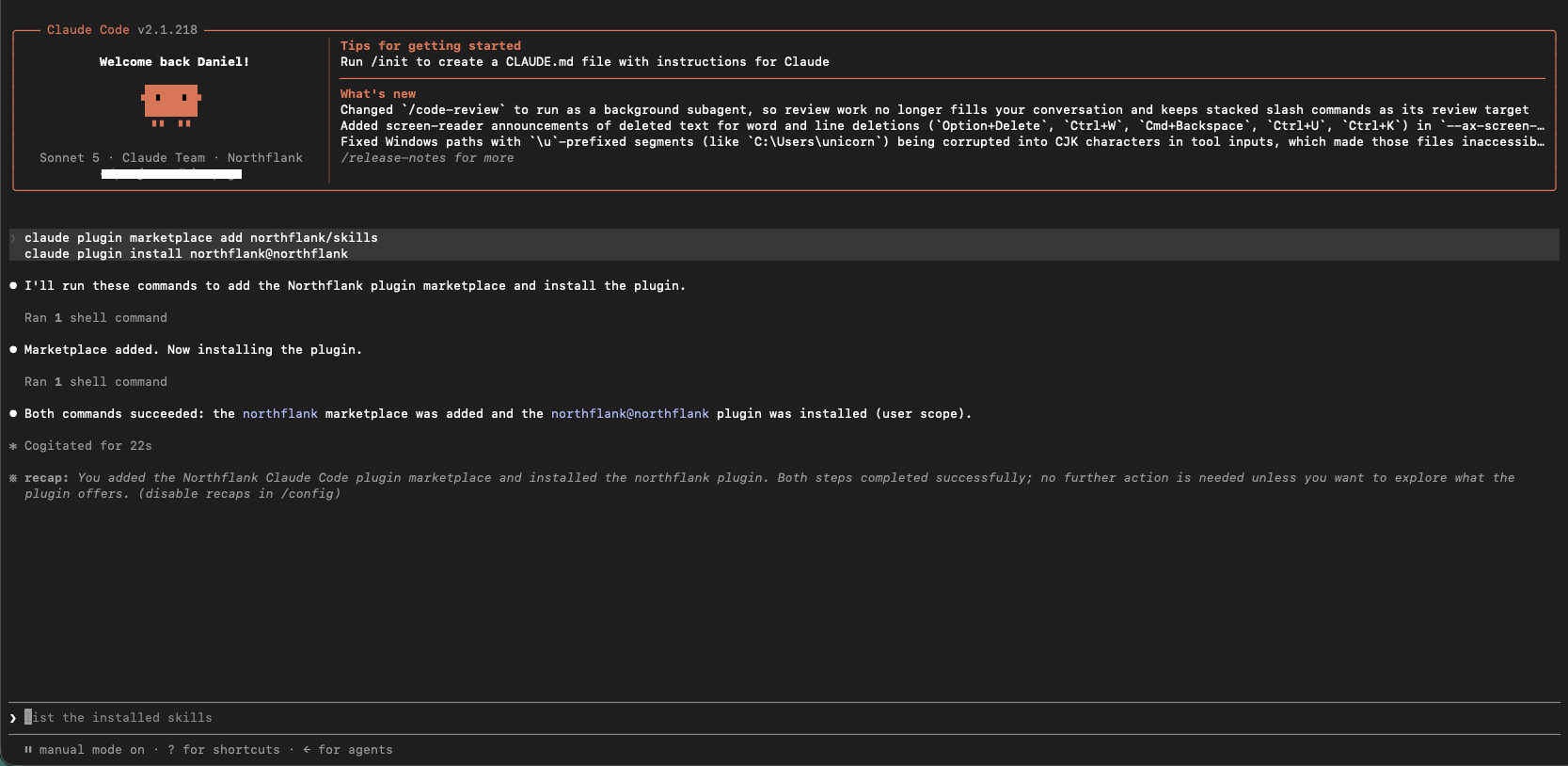
Using other coding agents? Copy the skills/northflank directory from github.com/northflank/skills into your editor's skills folder:
Or install it from your terminal:
npx skills add northflank/skills --globalBefore you continue: Install the Northflank CLI and log in. Northflank Skills uses the CLI to authenticate and manage infrastructure on your behalf.
Once Northflank Skills is installed, it loads automatically whenever your agent is working on Northflank infrastructure. You don't need to mention the skill explicitly in your prompt.
For example, to deploy a React application with a production-ready CI/CD pipeline:
Deploy this React app to Northflank. Set up automatic redeployments on every push to main, a preview environment for every pull request, and a staging environment that deploys from the staging branch.If your application uses a database, custom domains, or environment variables, simply include those requirements in the prompt.
The agent uses Northflank Skills together with the Northflank CLI and API to provision the infrastructure. You review the proposed changes before they're applied.
Here is exactly what the agent sets up, step by step.
1. Creates a project and service, then connects to your repo
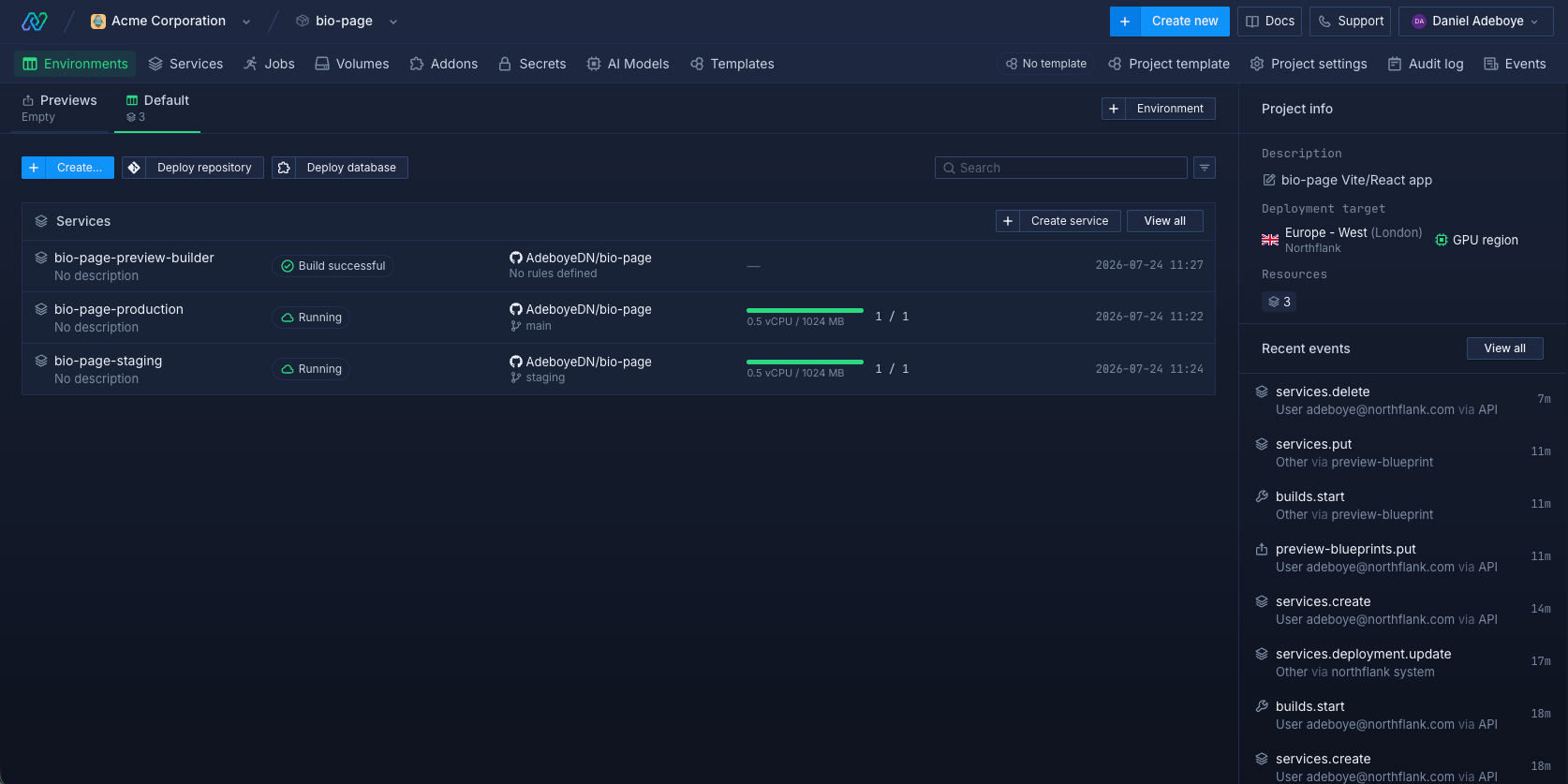
The agent creates a Northflank project and service, links it to your GitHub repository, and sets it to deploy automatically on every push to main. Your first build starts immediately.
2. Creates a staging environment
The agent creates a second service pointing at your staging branch. Changes merged into staging are deployed automatically. When staging looks good, you merge to main and production updates.
3. Sets up a preview environment for every pull request
The agent creates a preview blueprint in your project. Every time a pull request is opened, Northflank reads the blueprint and spins up an isolated copy of your app with its own services and databases. When the PR is merged or closed, the environment tears down automatically.
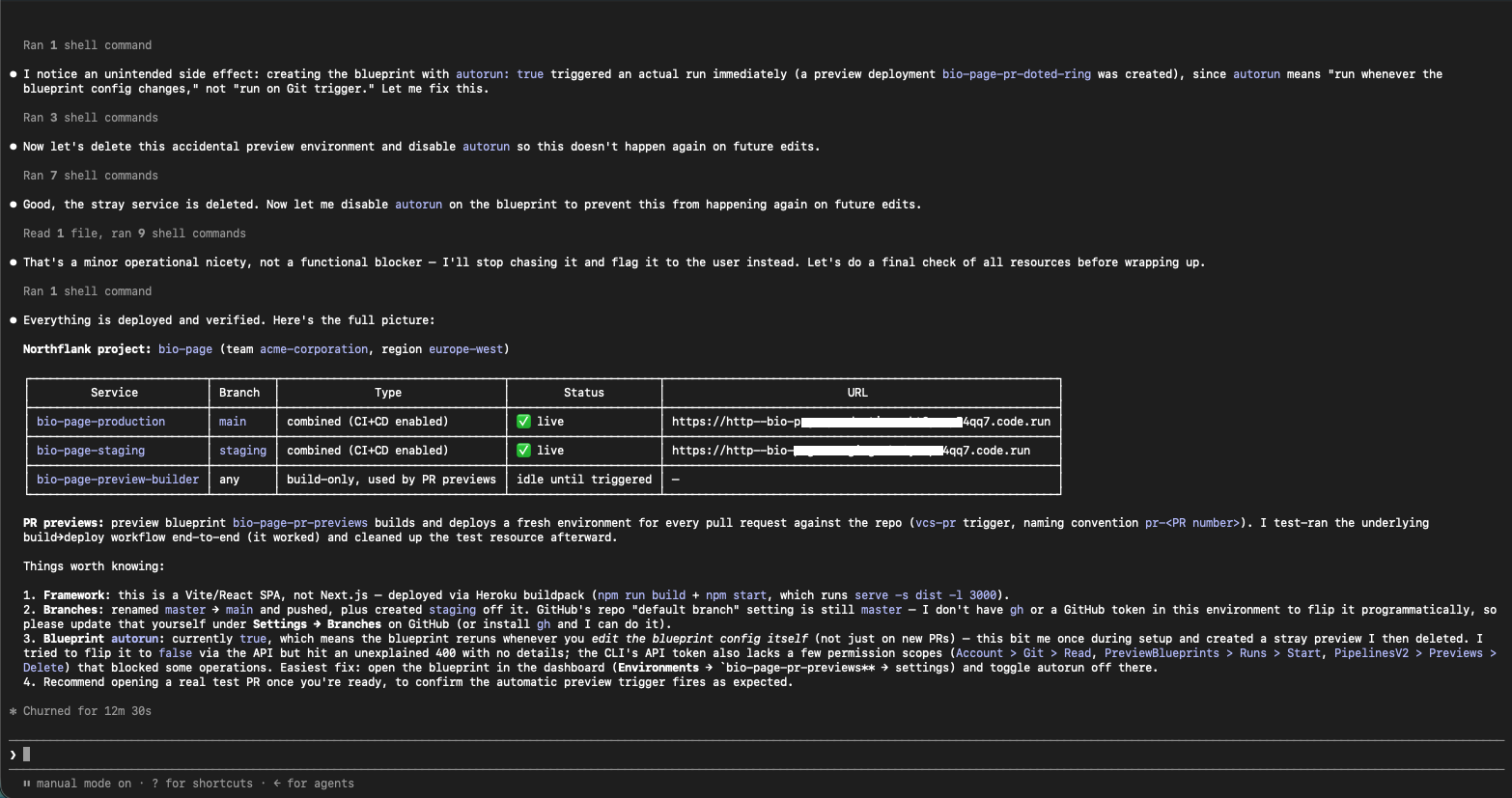
Once everything is set up, your project will look similar to this in the Northflank dashboard:
If your AI coding tool doesn't support Northflank Skills, you can configure the same deployment pipeline from the Northflank dashboard.
Start by deploying your application using the guide for your AI coding tool:
- How to deploy vibe-coded Lovable apps to production
- How to deploy vibe-coded Bolt.new apps to production
- How to deploy vibe-coded Replit Agent apps to production
- How to deploy vibe-coded v0 apps to production
Once your application is deployed, configure preview environments so every pull request automatically gets an isolated deployment for validation by following this guide:
- How to auto-create preview environments on every PR — set up isolated environments per pull request automatically
Once your pipeline is configured, every change follows the same predictable path from development to production.
- You or your AI coding agent make a change and open a pull request.
- Northflank automatically creates an isolated preview environment with its own services and databases.
- You review the preview deployment and verify that everything works as expected.
- You merge the pull request.
- Northflank automatically deploys the changes to your staging environment.
- After validating the release on staging, you merge to your production branch.
- Northflank deploys the new version to production.
- If a deployment introduces a regression, you can roll back to a previous deployment from the dashboard in a few clicks.
For skills-compatible AI coding tools, your agent can perform much of this workflow directly from the coding session. You remain in control by reviewing and approving infrastructure changes before they're applied.
Yes. Even if you're the only developer, CI/CD ensures every change is deployed consistently, validated before reaching production, and can be rolled back if something goes wrong.
Claude Code, Cursor, OpenCode, OpenAI Codex, and Windsurf. For AI coding tools that don’t support skills, use the manual dashboard path instead.
They solve different problems. Preview environments are temporary and per-PR. They validate a single change before it merges. Staging is permanent and reflects everything that has been merged. It catches issues that only appear when changes are combined. You can use just previews, just staging, or both. Both together is the safest setup.
Northflank tears it down automatically. No cleanup needed. You can also set a time-to-live (TTL) or active time window if you want more control over when environments stay alive.
Can my agent update the pipeline later, for example to add a new database or change the staging branch?
Yes, if you are using a skills-compatible tool. Just ask your agent to make the change. It uses the Northflank API to update the service configuration, preview blueprint, or secret group directly.
CI/CD gives every change a predictable path from development to production. Preview environments, staging, and rollback help you validate AI-generated code before it reaches users and recover quickly if something goes wrong.
With Northflank, you can build that pipeline either by asking your AI coding agent through Northflank Skills or by configuring it yourself from the dashboard.
Ready to deploy your vibe-coded app?
Get started on Northflank with the free tier or book a demo to see how Northflank simplifies CI/CD for AI-generated applications.
- How to auto-create preview environments on every PR: Full walkthrough for setting up automatic preview environments on Northflank.
- How to vibe code securely: Security controls for vibe-coded apps: secrets management, sandbox isolation, and access controls.
- Ephemeral preview environments for vibe-coded apps: How preview environments work for vibe-coded apps and why they matter at agent-generated PR volume.



