
Best tools to deploy backends in 2026
Here's a quick comparison of the top backend deployment platforms you should consider this year.
- Northflank - The most complete backend deployment platform, combining PaaS simplicity with Kubernetes flexibility. Supports any language, managed databases, BYOC (AWS/GCP/Azure/Oracle/Civo/Coreweave/Bare-metal), and GPU instances for AI workloads. Free tier available with per-second billing for paid plans.
- Railway - A platform that works for smaller projects where you need basic deployment capabilities.
- Render - Offers managed databases and automatic SSL certificates for standard backend deployments.
- Heroku - A platform that handles deployments through Git integration with add-on support for databases and services.
- AWS App Runner - Amazon's container deployment service for teams already using the AWS ecosystem.
In 2026, deploying your backend doesn't mean choosing between simplicity and control. Modern deployment platforms let you deploy backends with production-grade features without managing infrastructure, from APIs and SaaS applications to AI-powered services.
PaaS platforms handle infrastructure management for you, letting you focus on building your application instead of configuring servers. In 2026, the best PaaS options provide production-grade features without sacrificing flexibility.
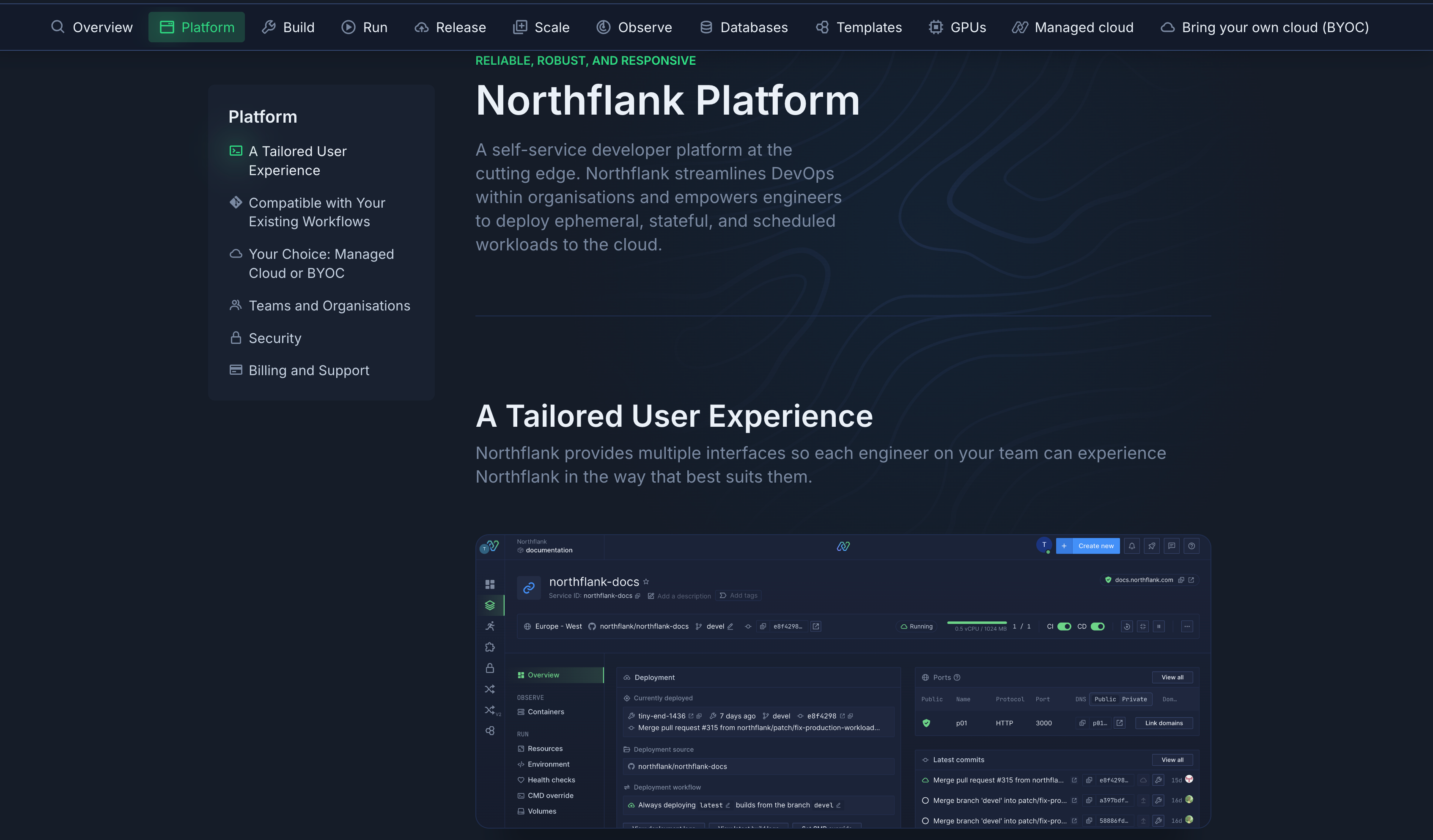
Northflank is a platform for deploying backend applications, APIs, databases, and AI workloads. You get the simplicity of traditional PaaS combined with the flexibility you need for production environments, without managing Kubernetes directly.
Key features:
- Deploy any backend stack (Node.js, Python, Go, Ruby, Java, or any containerized application)
- Managed databases: PostgreSQL, MySQL, MongoDB, Redis, and MinIO with automated backups
- Bring Your Own Cloud (BYOC): Deploy to Northflank's managed cloud or your own AWS, GCP, Azure, Civo, or Oracle Cloud accounts
- GPU support: NVIDIA A100, H100, B200, and more GPU types for AI inference and training workloads
- Multiple interfaces: Web dashboard, CLI, REST API, and infrastructure-as-code templates
- Git integration: GitHub, GitLab, and Bitbucket with automatic deployments and preview environments
- Production features: Horizontal/vertical autoscaling, health checks with automatic rollbacks, private networking, RBAC with SSO, secrets management
- One-click stack templates: Pre-configured stacks for FastAPI, Django, Flask, Express, Rails, Laravel, AI infrastructure (vLLM, Ollama, Langfuse), databases (Supabase, ClickHouse), and productivity tools (n8n, Temporal)
- Free Developer Sandbox plan with per-second billing for paid tiers (See full pricing details)
Best for: Production backend applications requiring databases, BYOC flexibility, GPU support for AI workloads, and teams that need enterprise features without Kubernetes complexity.
Northflank provides a free Developer Sandbox plan where you can deploy and test workloads. You can create an account, connect your Git repository, and deploy your first backend service in under a minute. The platform handles everything from build to production.
See some guides & one-click stack templates:
- Deploy Node Express on Northflank
- How to deploy Flask app on Northflank
- Deploy Ruby on Rails on Northflank
- Deploy FastAPI on Northflank
- Deploy Django on Northflank
- Deploy Laravel on Northflank
- Deploy vLLM OpenAI on GCP on Northflank
- Deploy Ollama on Northflank
- Deploy Langfuse on Northflank
- Deploy Supabase on Northflank
- Deploy ClickHouse on Northflank
- Deploy n8n on Northflank
- Deploy Temporal on Northflank
Railway provides a platform where you can deploy containerized applications and connect databases. It includes basic CI/CD from Git repositories and handles SSL provisioning.
Key features:
- Container deployment with database connections
- Git-based CI/CD
- SSL certificate management
- Dashboard for service monitoring
Best for: Smaller projects with basic deployment needs.
Render offers deployment for web services with managed PostgreSQL, Redis, and other databases. The platform includes automatic SSL certificate provisioning and background workers for handling asynchronous tasks.
Key features:
- Web service deployment from Git
- Managed databases (PostgreSQL, Redis)
- Automatic SSL certificates
- Background worker support
Best for: Standard backend deployments with common database requirements.
Heroku pioneered the git-push deployment model that many platforms now use. The platform provides add-ons for databases and other services, though it doesn't offer the infrastructure flexibility found in newer platforms.
Key features:
- Git-push deployments
- Add-on marketplace for databases and services
- Buildpack support for multiple languages
- Process management (web, worker, scheduler)
Best for: Teams familiar with the Heroku workflow who don't need BYOC or advanced infrastructure options.
Cloud providers give you access to their full ecosystem of services, which can be valuable if you need advanced networking, specific compliance requirements, or integration with other cloud-native tools. These options require more configuration than dedicated PaaS platforms.
App Runner is Amazon's service for deploying containerized applications or source code directly. It integrates with other AWS services like RDS for databases and CloudWatch for monitoring.
Key features:
- Container and source code deployment
- Integration with AWS ecosystem (RDS, CloudWatch, IAM)
- Automatic scaling
- VPC connectivity
Best for: Teams already using AWS who need tight integration with other AWS services.
Cloud Run lets you deploy containerized applications that scale automatically from zero to handle traffic spikes. It integrates with Google Cloud's ecosystem including Cloud SQL for databases and Cloud Build for CI/CD.
Key features:
- Serverless container deployment
- Scale-to-zero capability
- Integration with GCP services (Cloud SQL, Cloud Build, Cloud Logging)
- Request-based scaling
Best for: Teams using Google Cloud Platform who need serverless container deployment.
Microsoft's Container Apps service provides deployment for containerized backends with automatic scaling. It connects to Azure's broader ecosystem including Azure SQL, Cosmos DB, and Azure Monitor.
Key features:
- Containerized application deployment
- Integration with Azure services (Azure SQL, Cosmos DB, Azure Monitor)
- Automatic scaling based on HTTP traffic or events
- VNET integration
Best for: Teams working within the Microsoft Azure ecosystem.
Your choice depends on what you're building and where you are in your journey. Here's a comparison of common scenarios matched to the platforms that fit best.
| Use case | Recommended platform | Why |
|---|---|---|
| Production backend with databases, background workers, and observability | Northflank | Most complete solution with PaaS simplicity, BYOC flexibility, managed databases, and enterprise features |
| AI-powered backends requiring GPU instances | Northflank | Native GPU support (A100, H100, B200) alongside traditional compute on one platform |
| Data residency requirements or existing cloud credits | Northflank | BYOC deployment to your own AWS, GCP, or Azure accounts while maintaining unified developer experience |
| Microservices with private networking and complex pipelines | Northflank | Abstracts Kubernetes complexity while preserving flexibility for service discovery and orchestration |
| Side projects with predictable traffic | Railway or Render | Basic deployment capabilities for smaller workloads |
| Deep AWS ecosystem integration | AWS App Runner | Native integration with RDS, Lambda, CloudWatch, and other AWS services |
| Google Cloud Platform integration | Google Cloud Run | Serverless containers with GCP service integration |
| Microsoft Azure integration | Azure Container Apps | Container deployment within Azure ecosystem |
The key question isn't just "which platform can deploy my code?" but "which platform supports my application's requirements?" Consider your database needs, whether you need GPU support, if you have existing cloud commitments, and how much operational complexity you're willing to manage.
Most platforms offer free tiers or developer plans that let you test deployments before committing.
Northflank provides a free Developer Sandbox plan where you can deploy and test workloads. You can create an account, connect your Git repository, and deploy your first backend service in under a minute. The platform handles everything from build to production.
The fastest way to start is using stack templates. Northflank's one-click templates deploy complete application stacks with all required services, databases, secrets, and networking pre-configured. Select a template for your framework (FastAPI, Django, Express, Rails, Laravel), connect your repository, and your backend deploys with production-ready configuration.
1. What is the best tool to deploy backends in 2026?
The best tool depends on your specific requirements. For production backend applications requiring databases, BYOC flexibility, and GPU support for AI workloads, Northflank provides the most complete solution. For basic deployments on managed infrastructure, Railway and Render offer adequate functionality. For teams deeply integrated with AWS, App Runner provides native ecosystem integration.
2. How much does it cost to deploy a backend in 2026?
Backend deployment costs vary based on compute resources, storage, and traffic. Northflank offers a free Developer Sandbox plan for testing, with per-second billing for production workloads. A typical backend with a managed database costs approximately $15-50/month depending on your traffic and resource requirements. BYOC deployments use your existing cloud provider pricing with no markup.
3. What is the easiest way to deploy a backend?
The easiest approach is using a PaaS platform with one-click templates. Northflank provides stack templates for common frameworks including FastAPI, Django, Flask, Express, Rails, and Laravel. Select a template, connect your repository, and your backend deploys in under a minute with databases, secrets management, and networking pre-configured.
4. Can I deploy a backend without managing servers?
Yes. Modern deployment platforms abstract all server management. Northflank handles server provisioning, load balancing, auto-scaling, and failover automatically. You interact with your applications through a web dashboard, CLI, or API while the platform manages the underlying Kubernetes infrastructure.
5. How do I deploy a Python backend?
For Python backends (Django, Flask, FastAPI), add a requirements.txt to your repository along with either a Dockerfile or Procfile. Connect the repository to your deployment platform, and it builds and deploys your application. Northflank provides stack templates for Python frameworks that include web server configuration and optional PostgreSQL databases.
6. How do I deploy a Node.js backend?
Node.js backends need a package.json with a start script. Add a Dockerfile if you need custom configuration, then connect your repository to your deployment platform. The platform detects Node.js projects automatically, installs dependencies, builds the application, and deploys it with a public URL.
7. What's the difference between PaaS and cloud provider solutions for backend deployment?
PaaS platforms like Northflank, Railway, and Render abstract infrastructure management and provide streamlined developer experiences with built-in CI/CD and monitoring. Cloud provider solutions like AWS App Runner and Google Cloud Run give you access to broader cloud ecosystems but require more configuration. PaaS works best when you want to focus on building features. Cloud providers work when you need deep integration with specific cloud services.
8. Do I need Kubernetes to deploy a backend?
No. While Kubernetes powers many modern platforms, you don't need to learn or manage it directly. Platforms like Northflank abstract Kubernetes complexity while preserving its benefits. You get container orchestration, auto-scaling, and high availability without writing YAML configurations or managing clusters.