
Top AI tools for CI/CD pipeline automation in 2026
- AI coding tools like Cursor, GitHub Copilot, and Claude generate more code faster, which increases commit volume and puts more pressure on CI/CD pipelines.
- AI-powered CI/CD tools operate at different layers: some like Cursor and GitHub Copilot generate pipeline configuration, others like GitLab Duo and CircleCI include AI features for failure analysis and pipeline insights.
- As commit frequency increases, build triggers, multi-environment promotion, migration coordination, and rollback speed determine whether releases stay reliable.
- As AI-generated code increases commit volume, teams need CI/CD infrastructure that can handle it reliably. Northflank provides CI/CD and release automation with workflows, preview environments, and rollbacks in a single platform that has been running production workloads since 2021 across startups, public companies, and government deployments.
Set up environments on Northflank to automate your release process and preview changes in isolated environments.
AI coding assistants now generate a substantial share of the code that lands in production. That changes the CI/CD problem. The pipeline that once handled a few dozen commits per day may now need to handle several times that volume, with less certainty about what each commit contains. The CI/CD infrastructure you use becomes more critical, not less, when code generation is part of the workflow.
This article covers the main categories of AI-powered tools used around CI/CD pipelines, what they do, and how Northflank's automated release layer fits into this picture for teams that need a production-grade CI/CD platform.
AI coding tools increase the volume and velocity of code reaching CI/CD pipelines. Engineers using Cursor, GitHub Copilot, or Claude iterate faster, push more commits, and generate whole features, tests, and services in a fraction of the time it previously took.
That changes the pressure on CI/CD infrastructure in a few specific ways:
- Commit frequency increases: More iterations mean more builds triggered, more deployments to staging, and more releases to manage.
- Per-commit review depth decreases: AI-generated code moves faster through review. Staging environments and test pipelines carry more of the validation weight that code review used to carry.
- Schema and migration changes come more frequently: AI coding tools generate application logic and database schema changes together in the same iteration. Without coordinated migration handling in the release process, these changes become a deployment risk.
- Rollback capability becomes a more active control: When a bad commit reaches production, the speed at which you can roll back is a meaningful risk variable. This is amplified when commit volume is high.
A pipeline that handled 20 commits a day may now handle several times that, with less manual oversight per commit.
If you are looking to automate your release process, manage multi-stage deployments, or provision full-stack preview environments per pull request, Northflank provides CI/CD and release automation with workflows, Git triggers, and preview blueprints, built for teams shipping at high velocity. Get started (self-serve) or book a demo if you have specific infrastructure or compliance requirements.
- Set up environments: automate your release process and preview changes in isolated environments
- Continuous integration and delivery on Northflank: overview of how CI/CD works on Northflank
- Run AI-generated code safely: how to run AI-generated code with the right isolation and delivery infrastructure
- Enterprise vibe coding: how to deploy AI-generated apps safely: deploying AI-generated applications safely at enterprise scale
AI-powered tooling in the CI/CD space spans code generation and platform features, and each category plays a different role. See the breakdown of categories below:
These tools generate configuration and scripts. They do not execute or manage pipelines.
- Cursor: An AI-first code editor widely used for generating full-stack CI/CD configuration. Engineers use it to scaffold GitHub Actions workflows, write Dockerfiles, and debug build errors interactively.
- GitHub Copilot: An inline assistant for pipeline configuration, test scripts, Jenkins job definitions, and deployment manifests. It works within the editor and surfaces suggestions based on repository context.
- Claude (Anthropic): Commonly used to analyse deployment scripts, interpret build failures, and construct pipeline definitions through natural language interaction.
All three generate text. They produce YAML files, shell scripts, and configuration that then needs to be validated and executed by an actual CI/CD platform. The quality of the underlying delivery infrastructure determines whether that configuration executes reliably.
These are existing CI/CD platforms that have added AI features on top of their core delivery infrastructure.
- GitLab Duo: Adds AI-powered root cause analysis, code review summaries, and vulnerability explanations inside the GitLab platform. The core CI/CD runtime is GitLab's existing pipeline engine.
- CircleCI: Includes pipeline insights that analyse test data, detect flaky tests, and provide failure analysis. For a broader comparison, see top CircleCI alternatives.
- Harness: Offers AI-assisted pipeline configuration and deployment analysis on top of its delivery platform. For a comparison with alternatives, see top Harness alternatives.
GitHub Actions is the most widely used CI automation layer. GitHub has added native AI features including Copilot-powered log analysis and failure root cause analysis directly inside Actions, and GitHub Models allows AI model calls within workflows. It also integrates with Northflank via webhooks, allowing it to trigger workflows or pass build artifacts directly. Northflank supports GitHub Actions integration natively.
Northflank provides a release layer that covers CI/CD configuration, environment management, multi-stage promotion, and release automation. It has been running production workloads since 2021 across startups, public companies, and government deployments. The sections below cover how each part of that layer works.
Environments on Northflank organise your project by deployment stage. Each environment, such as development, staging, or production, appears as a column in a board view and contains the workflows that deploy to that stage. This gives teams visibility across all deployment stages from a single view.
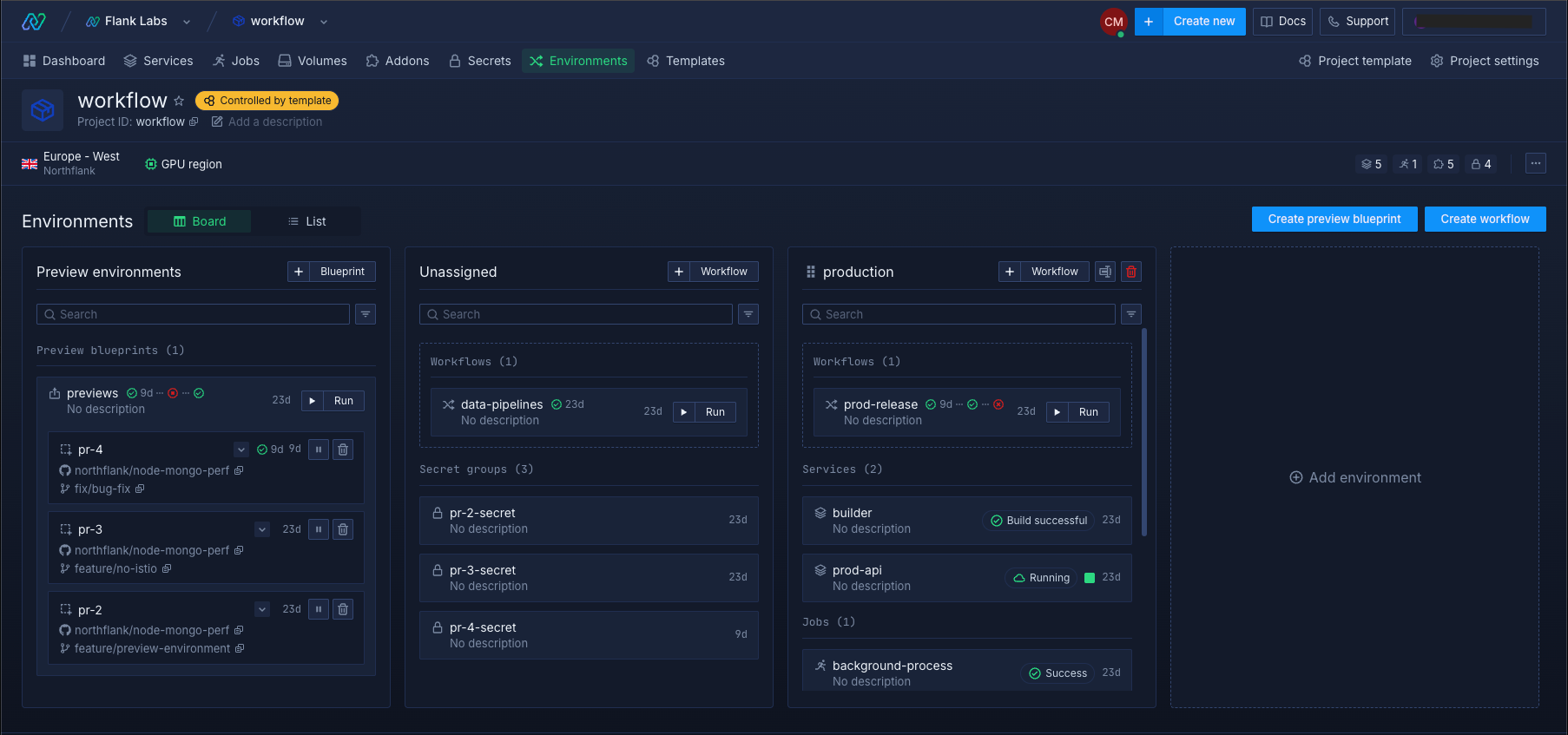
Workflows are automated release processes that execute when triggered manually or by Git events. Each workflow contains a series of nodes that build your code, deploy it to services, run database migrations, and perform other release tasks.
Workflow nodes include:
- Start build: Triggers a build from a specified branch and commit, or the latest available.
- Deploy build: Deploys a built image to a target service or job.
- Deploy image: Deploys an image from an external container registry.
- Promote deployment: Copies the currently deployed image from one environment to the next.
- Run job: Executes a job and can be configured to wait for completion before the next node runs.
Workflows can be configured to run sequentially, so each node only proceeds if the previous one succeeds. This is the appropriate structure for releases that include database migrations or multi-service coordination. See set up environments for configuration details.
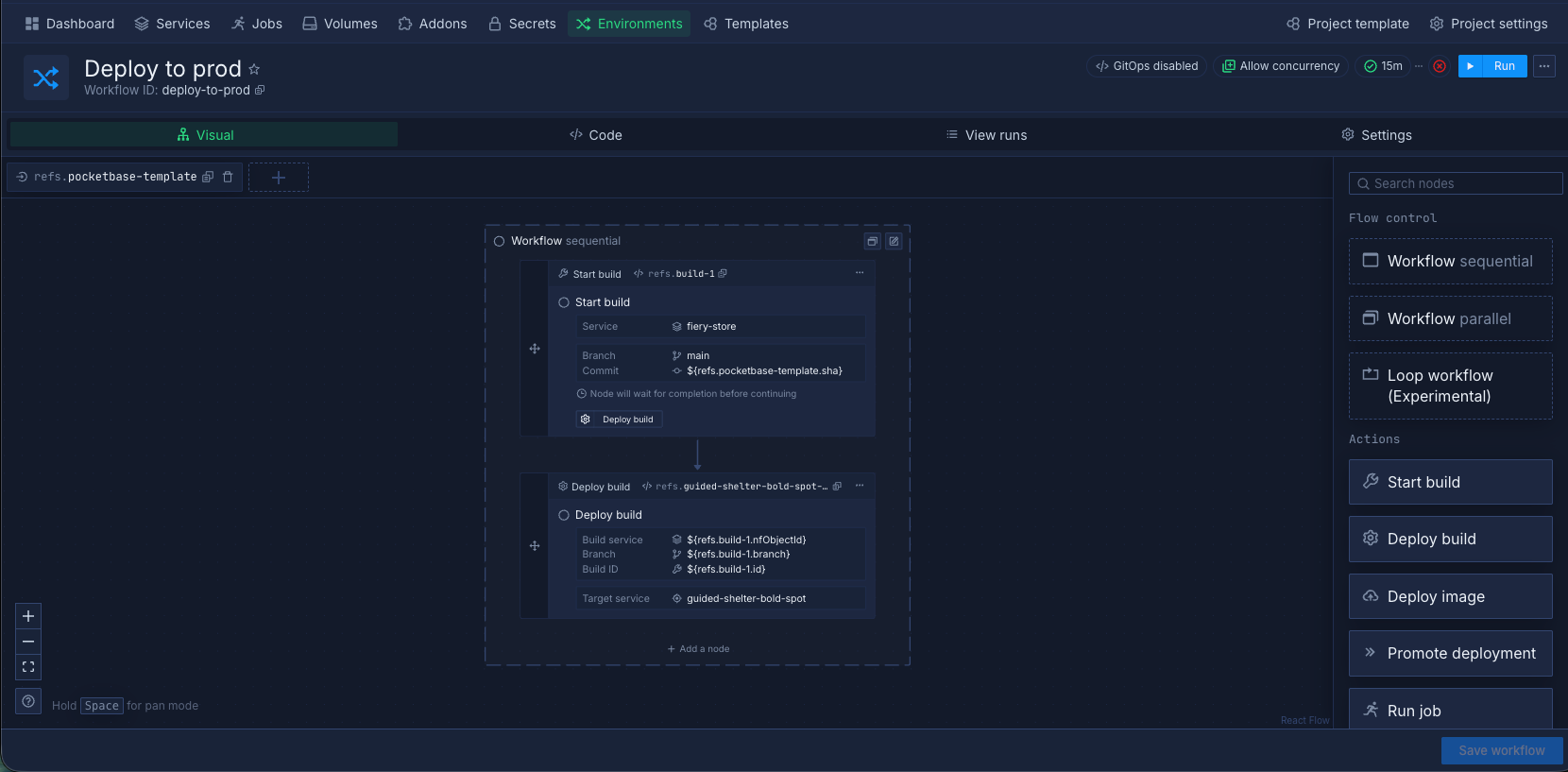
Workflows support Git push triggers, so a commit to a configured branch runs the workflow. This is how CI/CD is configured on Northflank: a push to a development branch triggers the development workflow, a push to main triggers the production workflow.
Workflows and preview blueprints also support cron schedules for recurring tasks such as nightly builds, database backups, and cache warming.
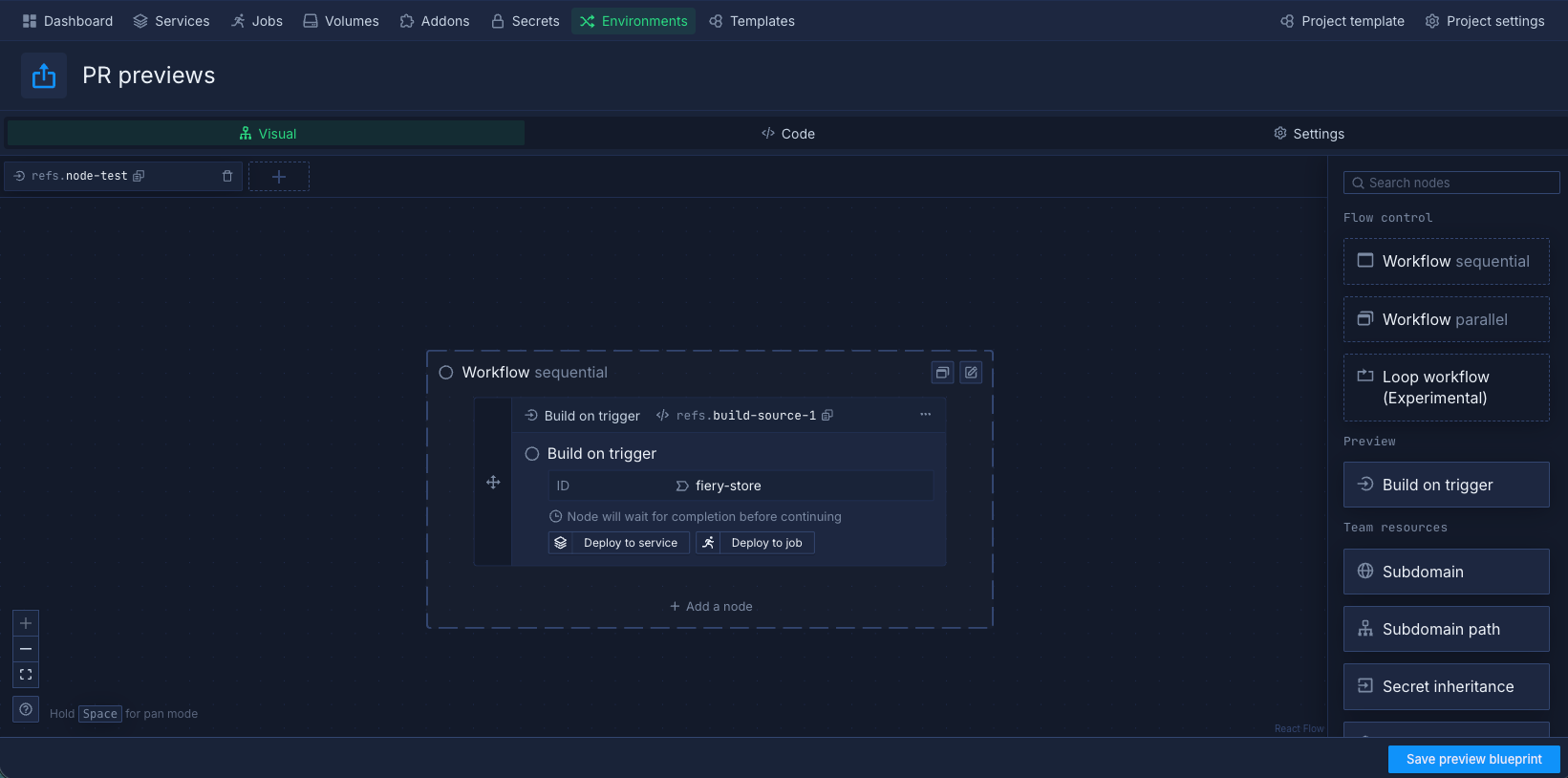
Preview blueprints define ephemeral environments that are created when a pull request is opened or a commit is pushed. Each preview environment gets its own services, databases, and unique URLs, so changes can be validated in isolation before merging.
For teams reviewing AI-generated code, a full-stack preview environment per pull request provides a consistent validation layer before changes reach staging.
Automate your CI/CD pipeline on Northflank
- Set up environments: organise your project by deployment stage and automate releases with workflows
- Configure a release flow: build sequential or parallel workflows with build, deploy, migrate, and promote nodes
- Set up a preview environment: provision full-stack ephemeral environments per pull request
- GitOps on Northflank: store and version your release configuration in Git with bidirectional sync
- GitHub Actions integration: trigger Northflank workflows from GitHub Actions via webhook
- Bring your own cloud (BYOC): run Northflank inside your own AWS, GCP, Azure, Oracle, CoreWeave, Civo, or on-premises infrastructure
Get started (self-serve), or book a session with an engineer if you have specific infrastructure or compliance requirements.
The table below shows how each category of tooling maps to the capabilities that teams shipping AI-generated code need the most.
| Capability | AI authoring tools | AI-augmented CI platforms | Northflank |
|---|---|---|---|
| Generates pipeline config | Yes | Partial | No (you define it) |
| Executes builds | No | Yes | Yes (via build services) |
| Multi-environment management | No | Varies (platform dependent) | Yes (dev, staging, production stages) |
| Workflow orchestration | No | Varies (basic in most) | Yes (visual workflow editor) |
| Preview environments | No | Varies (some platforms only) | Yes (per pull request or branch) |
| Git-triggered workflows | No | Yes | Yes (per branch or PR) |
| Migration coordination in release | No | No | Yes (coordinated with deployments) |
| Cron-scheduled workflows | No | Varies (platform dependent) | Yes (per workflow or preview environment) |
CI/CD pipeline automation refers to the use of tools and platforms to trigger builds, run tests, and deploy code without manual intervention at each step. Continuous integration handles building and testing code on each commit. Continuous delivery manages the deployment of that code across environments, from development through to production.
AI-powered tools in this space fall into two main categories. The first is AI coding assistants like Cursor, GitHub Copilot, and Claude, which generate pipeline configuration files, Dockerfiles, and deployment scripts. The second is CI/CD platforms like GitLab and CircleCI that have added AI features for failure analysis, pipeline insights, and configuration suggestions.
AI tools are primarily used for two tasks in CI/CD: writing and debugging pipeline configuration, and analysing build and test failures to surface root causes. They assist with authoring configuration that runs on top of a delivery platform but do not replace the delivery infrastructure itself.
Northflank provides CI/CD and release automation through environments, workflows, preview environments, Git triggers, and cron schedules. Environments organise deployment stages, workflows define the automated release process for each stage, and preview blueprints provision ephemeral environments for pull request validation. It runs on Kubernetes infrastructure and supports bring-your-own-cloud deployments across AWS, GCP, Azure, and other providers.
AI coding tools increase commit frequency and reduce per-commit review depth. This combination means defects that would previously be caught in review may now reach the CI pipeline or staging environment. A delivery platform with defined promotion gates, preview environments, and fast rollback paths provides a structural check on this.
- Best CI/CD tools: a comparison of the leading CI/CD platforms and what each one is best suited for
- Continuous deployment: how continuous deployment works and how to implement it in production
- Continuous delivery: the difference between continuous delivery and continuous deployment, and when to use each
- Jenkins alternatives: modern CI/CD platforms that replace or complement Jenkins
- Top CircleCI alternatives: platforms to consider if you are evaluating alternatives to CircleCI
- Top Harness alternatives: a look at delivery platforms that compete with or complement Harness
- How to run AI-generated code safely: isolation models and infrastructure requirements for executing LLM-generated code
- Enterprise vibe coding: how to deploy AI-generated apps safely: how enterprise teams can ship AI-generated applications without compromising security or reliability